
TurboPLM
TurboPLM: A low-cost PLM and BOM workspace with open-source self-hosting. Ranked #15 of 43 in Bill of Materials Software by our editors (7.7/10); pricing: Free plan; best for budget-conscious PLM and BOM users.
At a glance
- Editor score7.7 / 10
- PricingFree plan
- Best forBudget-conscious PLM and BOM users
- Free planYes
- Paid from$10/mo
- DeploymentHybrid
- Facts checked21 Sep 2026
Where it wins
- Multi-level BOMs include comparison, baselines, cycle prevention, and where-used.
- Covers revisions, changes, approvals, traceability, suppliers, and process planning.
- Free hosted and open-source self-hosted options keep entry costs low.
Where it doesn't
- Support is limited to email and community channels.
- The broad PLM scope may exceed the needs of teams wanting only BOM management.
- Self-hosting requires running the software on your own hardware.
Our verdict on TurboPLM
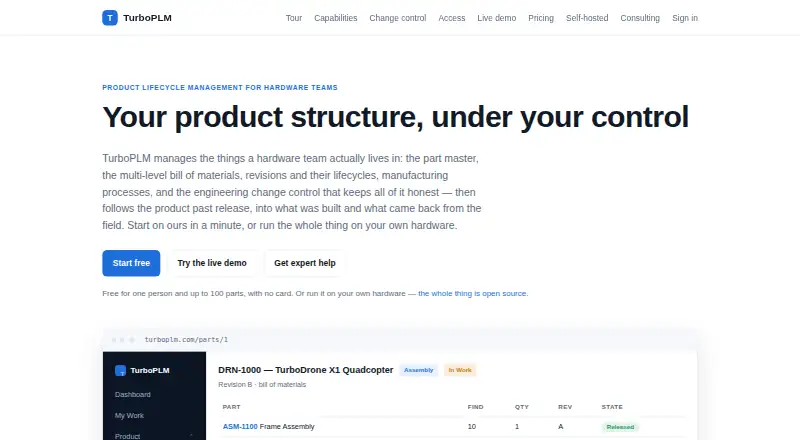
TurboPLM is product lifecycle management software for hardware teams that need to manage parts, revisions, multi-level bills of materials, documents, CAD data, manufacturing processes, sourcing, traceability, and engineering changes. It fits solo users and small to mid-market organizations that want a hosted workspace or the option to run open-source software on their own infrastructure. Its BOM capabilities include cycle prevention, where-used views, comparisons, and named baselines, while lifecycle controls cover change requests, change notices, approvals, electronic signatures, and item-level access control.
Pricing is unusually accessible for a PLM product. The Free plan costs $0 and includes every module and a private workspace. The Pro plan costs $10 per month and adds unlimited members and unlimited parts while retaining every module. The Self-hosted plan costs $0 as software, uses the GNU AGPL v3 license, has no license or seat-count fee, and runs on the customer’s own hardware. Hosted deployment is available through the web, with an API platform option, while self-hosting provides a separate deployment path. This structure makes TurboPLM a practical fit for budget-conscious teams comparing hosted and self-managed ownership models.
The product’s wider workflow coverage is a key reason to consider it over a narrowly focused BOM tool. Browser-based 3D CAD viewing, versioned documents, manufacturing process plans, material planning, serial and lot traceability, supplier RFQs, approved manufacturer lists, and cost roll-ups connect engineering work with downstream operations. Integrations include ERP, CAD, Digi-Key, Mouser, Farnell/Newark, and RS Components. Teams that need a broader lifecycle system should find this scope relevant; teams seeking only simple BOM creation may prefer a more focused tool. Support is provided through email and community channels.
Your product? Our editors can test TurboPLM in depth and publish a review, labelled as paid · from $149/mo →
TurboPLM pricing
All 3 TurboPLM plans and prices →
TurboPLM fact sheet
| Free plan | Yes |
|---|---|
| Paid from | $10/mo |
| Revision control | Yes |
| Multi-level BOMs | Yes |
| BOM comparison | Yes |
| Change workflows | Yes |
| Inventory integration | Yes |
| Deployment | Hybrid |
| Max BOM levels | Not verified |
| Deployment | Cloud, Self-hosted |
| Platforms | Web |
| Support | Email, Community |
| Built for | Solo, Small business, Mid-market (editorial estimate) |
| Integrations | 6 integrations: ERP, CAD, Digi-Key, Mouser, Farnell/Newark, RS Components |
| Pricing | Free plan (source) |
| Website | turboplm.com |
| Facts checked | 21 Sep 2026 |
TurboPLM integrations
TurboPLM lists 6 integrations on its own site.
- ERP
- CAD
- Digi-Key
- Mouser
- Farnell/Newark
- RS Components
Alternatives to TurboPLM
- PTC WindchillA broad PLM suite for engineering, manufacturing, and service BOM control.9.4
- Siemens TeamcenterA broad PLM system for complex, multi-domain engineering and manufacturing organizations.9.3
- Dassault Systèmes ENOVIAA broad PLM suite for complex BOM, change and configuration control.9.2



See all TurboPLM alternatives →
Used TurboPLM? Be the first to review it
The editor score above is our own research. What this page doesn't have yet is a reader's view — what you used TurboPLM for, what worked and what didn't. No stars are seeded and no review is paid for; an editor reads every one before it appears.
Write a reviewTwo minutes · verified accounts only · read by an editor before it appears
Featured on iTechGuides

TurboPLM is listed in our Bill of Materials Software directory. Add the badge to your site — it links back to this page.
<a href="https://www.itechguides.com/products/turboplm/"><img src="https://www.itechguides.com/best/badge/turboplm.svg" alt="Featured on iTechGuides" width="230" height="46"></a>
Reviewed by iTechGuides Editors · Editorial team · Updated Oct 2026
Advertiser disclosure: iTechGuides is reader-supported. Vendors can pay for top positions in our rankings and for a place on other products' pages, and we may earn a commission when you click some links. Bought places stand at the number bought; this page and our disclosure say so. Paying vendors may get a fuller, more detailed review from our editors, and that review can change their score. How we rank.
Last updated · How we research and update