
Tripo AI
Tripo AI: A broad 3D creation suite for teams that need generation, processing, and animation. Ranked #2 of 24 in AI 3D Model Generators by our editors (9.1/10); pricing: Free plan; best for creators needing generation plus animation.
At a glance
- Editor score9.1 / 10
- PricingFree plan
- Best forCreators needing generation plus animation
- Free planYes
- Text-to-3DYes
- Founded2023 · Sai Ying Pun, Hong Kong
- Facts checked20 Sep 2026
Where it wins
- Generates models from text, images, multiview inputs, and sketches
- Combines texturing, retopology, format conversion, rigging, and animation
- Supports REST API access and integrations with major 3D tools and engines
Where it doesn't
- The Free plan limits use to public models and non-commercial work
- The Free plan includes one concurrent task and limited exports
- Studio subscriptions and API credit pricing use separate billing systems
Our verdict on Tripo AI
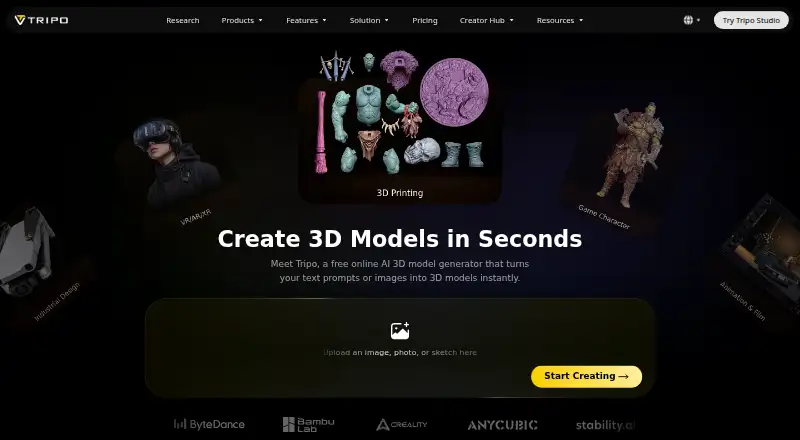
Tripo AI is a web-based AI 3D creation platform for artists, designers, game developers, studios, and developers. It generates models from text, images, multiview inputs, and sketches, then supports AI texturing with PBR materials, mesh segmentation, completion, retopology, format conversion, automatic rigging, and animation retargeting. Assets can be exported in GLB, GLTF, FBX, OBJ, USDZ, STL, and 3MF formats for game engines, DCC applications, animation, visualization, and 3D printing workflows.
The plan structure covers individual and collaborative use. Free provides 200 monthly credits, public models, non-commercial use, one concurrent task, and limited exports. Pro raises the allowance to 3,000 monthly credits, adds private models and commercial use, supports 10 concurrent tasks, and includes unlimited storage and exports. Max provides 25,000 monthly credits, 100 concurrent tasks, commercial use, private models, unlimited storage and exports, plus 8K textures. Team is designed for shared work with 90,000 monthly credits, shared workspaces and assets, centralized billing and administration, 200 concurrent tasks, and commercial use.
Its strongest fit is for creators who want generation and downstream asset preparation in one workflow rather than a narrowly focused model generator. Integrations include Blender, 3ds Max, Unity, Unreal Engine, Maya, Cocos, Godot, ZBrush, MetaTailor, and Roblox, while the REST API uses token authentication for software integrations. The main boundaries are the Free plan's public, non-commercial terms and limited export capacity, along with separate billing systems for Studio subscriptions and API credits. Choose Tripo AI when animation, processing, and ecosystem connections matter alongside generation; choose an alternative when those capabilities are unnecessary or when the Free plan's restrictions do not fit.
Your product? Our editors can test Tripo AI in depth and publish a review, labelled as paid · from $149/mo →
Tripo AI pricing
All 4 Tripo AI plans and prices →
Tripo AI fact sheet
| Free plan | Yes |
|---|---|
| Paid from | Not verified |
| Text-to-3D | Yes |
| Image-to-3D | Yes |
| Sketch-to-3D | Yes |
| AI texturing | Yes |
| Export formats | GLB, GLTF, FBX, OBJ, USDZ, STL, 3MF |
| API access | Yes |
| Rigging or animation | Yes |
| Deployment | Cloud |
| Platforms | Web |
| Compliance & security | ISO 27001 |
| Support | Email, Docs |
| Built for | Solo, Small business, Mid-market, Enterprise (editorial estimate) |
| Integrations | 10 integrations: Blender, 3ds Max, Unity, Unreal Engine, Maya, Cocos … |
| Pricing | Free plan (source) |
| Website | tripo3d.ai |
| Facts checked | 20 Sep 2026 |
Tripo AI integrations
Tripo AI lists 10 integrations on its own site.
- Blender
- 3ds Max
- Unity
- Unreal Engine
- Maya
- Cocos
- Godot
- ZBrush
- MetaTailor
- Roblox
Alternatives to Tripo AI
- MeshyA broad AI 3D workspace spanning asset creation, editing, export, and printing.9.3
- Hyper3D RodinA broad 3D generation platform with strong integrations, exports, and API workflows.8.9
- SloydA broad 3D generation toolkit for creators, game developers, and production pipelines.8.8



See all Tripo AI alternatives →
Tripo AI vs the competition
- Tripo AI vs Meshy
- Tripo AI vs Hyper3D Rodin
- Tripo AI vs Sloyd
- Tripo AI vs 3D AI Studio
- Tripo AI vs Alpha3D
- Tripo AI vs Kaedim



Compare Tripo AI with any tool side by side →
Also Ranked In
Tripo AI is ranked in 5 of our directories.
Used Tripo AI? Be the first to review it
The editor score above is our own research. What this page doesn't have yet is a reader's view — what you used Tripo AI for, what worked and what didn't. No stars are seeded and no review is paid for; an editor reads every one before it appears.
Write a reviewTwo minutes · verified accounts only · read by an editor before it appears
Featured on iTechGuides

Tripo AI is listed in our AI 3D Model Generators directory. Add the badge to your site — it links back to this page.
<a href="https://www.itechguides.com/products/tripo-ai/"><img src="https://www.itechguides.com/best/badge/tripo-ai.svg" alt="Featured on iTechGuides" width="230" height="46"></a>
Reviewed by iTechGuides Editors · Editorial team · Updated Oct 2026
Advertiser disclosure: iTechGuides is reader-supported. Vendors can pay for top positions in our rankings and for a place on other products' pages, and we may earn a commission when you click some links. Bought places stand at the number bought; this page and our disclosure say so. Paying vendors may get a fuller, more detailed review from our editors, and that review can change their score. How we rank.
Last updated · How we research and update