Trinka
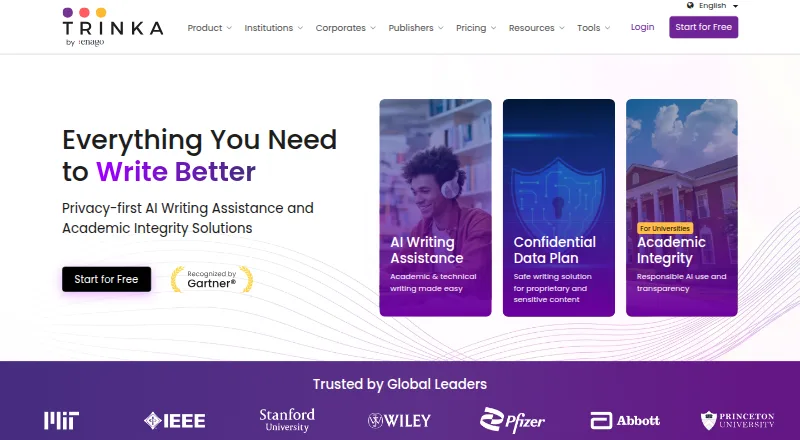
Trinka: A focused writing assistant for academic, technical, and citation-heavy workflows. Ranked #8 of 88 in Grammar Checkers by our editors (8.1/10); pricing: Free plan; best for academic and technical writing workflows.
At a glance
- Editor score8.1 / 10
- PricingFree plan
- Best forAcademic and technical writing workflows
- Free planYes
- Tone detectionYes
- Facts checked22 Sep 2026
Where it wins
- Style-guide, consistency, citation, and technical writing checks
- Word, LaTeX, browser, API, and self-hosted support
- Free Basic plan with 5,000 words per month
Where it doesn't
- No native iOS or Android app
- Basic limits usage to 5,000 words per month
- Advanced features require a paid tier
Our verdict on Trinka
Trinka is an AI-powered grammar checker and writing assistant for students, researchers, academics, and professionals working on academic or technical content. It checks grammar, spelling, punctuation, sentence structure, word choice, and style, while also supporting paraphrasing, citation checking, consistency checks, and AI-assisted writing. English and Spanish grammar checking are supported, with US and UK English variants for English content. Its web editor, browser extension, Microsoft Word add-in, Windows application, and file proofreading tools suit document-heavy workflows.
The published plans show a useful free entry point. Basic costs $0 per month and includes 5,000 words per month, lite grammar checking, browser extensions, and limited AI writing requests. Premium adds unlimited writing assistance, advanced editing modes, style-guide corrections, and a Windows desktop application. Premium Plus adds premium features, 240 pages per year of standard plagiarism checking, file translation from 30+ languages, and up to 240 proofread files per year. Confidential Data costs $300 per year and adds an offline grammar checker app, instant data deletion, no AI training, and 1,000 plagiarism or AI-detection pages per year.
Trinka stands out when the workflow extends beyond basic proofreading. It supports Microsoft Word, Microsoft Outlook, Google Docs, Authorea, Evernote, Medium, and LaTeX, while its API and self-hosted options can fit more structured or controlled environments. Style-guide corrections and consistency checks cover spelling, hyphenation, numbers, and symbols, which is useful for formal documents that need more than sentence-level fixes. Choose Trinka for academic, research, technical, or citation-focused writing. A different grammar checker may suit users who need a native mobile app or a simpler general-purpose writing tool.
Your product? Our editors can test Trinka in depth and publish a review, labelled as paid · from $149/mo →
Trinka pricing
All 4 Trinka plans and prices →
Trinka fact sheet
| Free plan | Yes |
|---|---|
| Paid from | Not verified |
| Browser extension | Yes |
| Desktop app | Yes |
| Mobile app | Not verified |
| Style suggestions | Yes |
| Tone detection | Yes |
| Languages supported | 2 |
| Deployment | Cloud, Self-hosted, Desktop, Browser extension |
| Platforms | Web, Windows, Chrome extension |
| Compliance & security | SOC 2, ISO 27001, GDPR, HIPAA |
| Support | Email, Docs |
| Built for | Solo, Small business, Mid-market, Enterprise (editorial estimate) |
| Integrations | 9 integrations: Microsoft Word, Google Chrome, Mozilla Firefox, Microsoft Edge, Microsoft Outlook, LaTeX … |
| Pricing | Free plan (source) |
| Website | trinka.ai |
| Facts checked | 22 Sep 2026 |
Trinka integrations
Trinka lists 9 integrations on its own site.
- Microsoft Word
- Google Chrome
- Mozilla Firefox
- Microsoft Edge
- Microsoft Outlook
- LaTeX
- API
- SDK
- On-premise
Alternatives to Trinka
- GrammarlyA broad writing assistant with strong grammar, tone, rewriting, and AI coverage.9.4
- LanguageToolA broad multilingual checker with open-source and self-hosting options.9.2
- Microsoft EditorA strong Microsoft 365 writing assistant with focused platform coverage.9.0


Trinka vs the competition
- Trinka vs Grammarly
- Trinka vs LanguageTool
- Trinka vs Microsoft Editor
- Trinka vs Ginger
- Trinka vs ProWritingAid
- Trinka vs Scribbr Grammar Checker



Compare Trinka with any tool side by side →
Also Ranked In
Trinka is ranked in 8 of our directories; the 6 strongest besides Grammar Checkers.
Used Trinka? Be the first to review it
The editor score above is our own research. What this page doesn't have yet is a reader's view — what you used Trinka for, what worked and what didn't. No stars are seeded and no review is paid for; an editor reads every one before it appears.
Write a reviewTwo minutes · verified accounts only · read by an editor before it appears
Featured on iTechGuides

Trinka is listed in our Grammar Checkers directory. Add the badge to your site — it links back to this page.
<a href="https://www.itechguides.com/products/trinka/"><img src="https://www.itechguides.com/best/badge/trinka.svg" alt="Featured on iTechGuides" width="230" height="46"></a>
Reviewed by iTechGuides Editors · Editorial team · Updated Oct 2026
Advertiser disclosure: iTechGuides is reader-supported. Vendors can pay for top positions in our rankings and for a place on other products' pages, and we may earn a commission when you click some links. Bought places stand at the number bought; this page and our disclosure say so. Paying vendors may get a fuller, more detailed review from our editors, and that review can change their score. How we rank.
Last updated · How we research and update