
TonalBrain
TonalBrain: Affordable AI-assisted mixing with broad DAW support and credit-based pricing. Ranked #7 of 41 in AI Audio Mixing Software by our editors (7.5/10); pricing: Paid; best for affordable plugin mixing across many DAWs.
At a glance
- Editor score7.5 / 10
- PricingPaid
- Best forAffordable plugin mixing across many DAWs
- Free planNo
- Paid from$9 one-time
- Facts checked22 Sep 2026
Where it wins
- Analyzes up to 24 tracks in a multitrack session
- Combines EQ, compression, de-essing, sidechain, and stereo processing
- Works with Ableton Live, Logic Pro, Pro Tools, and four other DAWs
Where it doesn't
- No free plan is available
- Analysis runs consume credits
- Sessions are limited to 24 tracks per run
Our verdict on TonalBrain
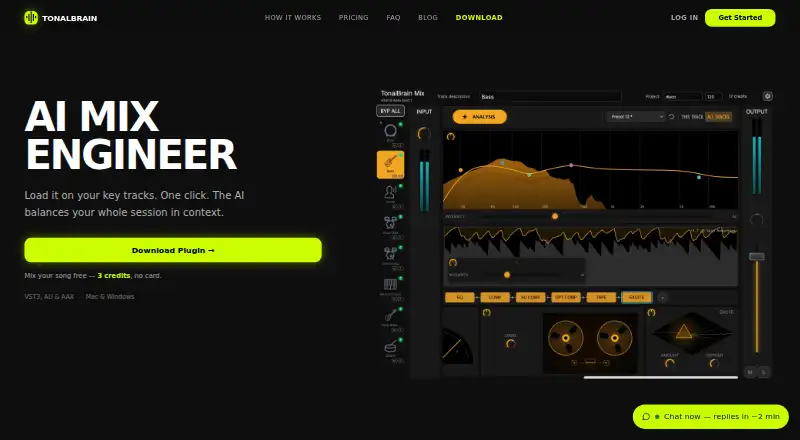
TonalBrain is an AI-powered audio mixing plugin for music producers working in major digital audio workstations. It analyzes multiple tracks together to identify frequency masking and dynamic conflicts, then can apply EQ, compression, de-essing, sidechain compression, stereo width, tape saturation, and harmonic excitation. The plugin supports macOS and Windows through VST3, AU, and AAX formats, with integrations for Ableton Live, Logic Pro, Pro Tools, FL Studio, Cubase, Reaper, and Studio One.
Pricing uses one-time credit packs rather than a recurring subscription. Starter costs $9 for 50 credits, Creator costs $25 for 200 credits, and Studio costs $59 for 600 credits. Each analysis run uses 1 credit, each plan supports up to 24 tracks per run, and credits never expire. The plans provide the same listed analysis allowance and platform coverage, so the main difference is the number of included credits. This structure suits producers who prefer credits that remain available over time, while ongoing users may need to purchase additional packs as their projects require more analyses.
The standout workflow combines section-aware analysis with snapshots, saved presets, and one-click A/B testing. Generated processing modules are editable, removable, and reorderable, giving producers control over the resulting chain rather than locking them into a fixed result. TonalBrain also states that raw audio remains on the user's machine while analysis data is sent to its servers for processing. It is a good fit for producers seeking AI-assisted multitrack processing across several DAWs, but less suitable for workflows that require a free tier or more than 24 tracks in a single run.
Your product? Our editors can test TonalBrain in depth and publish a review, labelled as paid · from $149/mo →
TonalBrain pricing
All 3 TonalBrain plans and prices →
TonalBrain fact sheet
| Free plan | No |
|---|---|
| Paid from | $9 one-time |
| DAW plugin | Yes |
| Stem separation | Not verified |
| Automatic EQ | Yes |
| Automatic dynamics | Yes |
| Spatial processing | Stereo |
| Maximum track count | 24 tracks |
| Plugin formats | Vst |
| Deployment | Desktop |
| Platforms | Windows, macOS |
| Compliance & security | GDPR |
| Support | |
| Built for | Solo, Small business (editorial estimate) |
| Integrations | 7 integrations: Ableton Live, Logic Pro, Pro Tools, FL Studio, Cubase, Reaper … |
| Pricing | Paid (source) |
| Website | tonalbrain.com |
| Facts checked | 22 Sep 2026 |
TonalBrain integrations
TonalBrain lists 7 integrations on its own site.
- Ableton Live
- Logic Pro
- Pro Tools
- FL Studio
- Cubase
- Reaper
- Studio One
Alternatives to TonalBrain
- iZotope Neutron 5A deep AI-assisted mixing suite for producers who want detailed control inside a DAW.9.2
- iZotope Nectar 4A focused vocal suite with AI assistance, harmonies, effects, and unmasking.7.9
- EZmix 3A flexible preset-led mixing tool, but not a complete automatic full-mix solution.7.9



See all TonalBrain alternatives →
TonalBrain vs the competition
- TonalBrain vs iZotope Neutron 5
- TonalBrain vs iZotope Nectar 4
- TonalBrain vs EZmix 3
- TonalBrain vs StemMaster
- TonalBrain vs StemDesk
- TonalBrain vs NeuroMix AI


Compare TonalBrain with any tool side by side →
Used TonalBrain? Be the first to review it
The editor score above is our own research. What this page doesn't have yet is a reader's view — what you used TonalBrain for, what worked and what didn't. No stars are seeded and no review is paid for; an editor reads every one before it appears.
Write a reviewTwo minutes · verified accounts only · read by an editor before it appears
Featured on iTechGuides

TonalBrain is listed in our AI Audio Mixing Software directory. Add the badge to your site — it links back to this page.
<a href="https://www.itechguides.com/products/tonalbrain/"><img src="https://www.itechguides.com/best/badge/tonalbrain.svg" alt="Featured on iTechGuides" width="230" height="46"></a>
Reviewed by iTechGuides Editors · Editorial team · Updated Oct 2026
Advertiser disclosure: iTechGuides is reader-supported. Vendors can pay for top positions in our rankings and for a place on other products' pages, and we may earn a commission when you click some links. Bought places stand at the number bought; this page and our disclosure say so. Paying vendors may get a fuller, more detailed review from our editors, and that review can change their score. How we rank.
Last updated · How we research and update