
Toki
Toki: A focused Mac tracker for understanding work habits across applications and websites. Ranked #33 of 36 in Screen Time Management Apps by our editors (6.0/10); pricing: 5-day trial; best for mac productivity analytics with iCloud sync.
At a glance
- Editor score6.0 / 10
- Pricing5-day trial
- Best forMac productivity analytics with iCloud sync
- Free planNo
- Facts checked20 Sep 2026
Where it wins
- Automatically tracks applications, websites, sessions, and window titles
- Combines timelines, productivity analytics, rankings, and daily goals
- Stores data locally and syncs activity across Macs with iCloud
Where it doesn't
- Available only on macOS
- Paid product with no free plan
- Focuses on tracking rather than blocking apps or setting limits
Our verdict on Toki
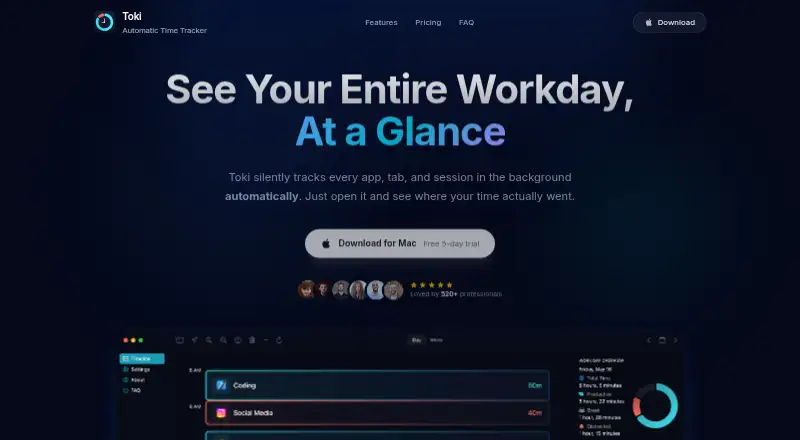
Toki is a native macOS time-tracking app for professionals, freelancers, students, entrepreneurs, and individuals who want clearer visibility into their work habits. It automatically records active applications, websites, sessions, and window titles, then organizes that activity into a color-coded daily timeline. Productivity analytics break workdays into productive, break, and distracted time, while rankings show frequently used apps and distractions. Daily goals add a simple way to monitor progress over time.
The product’s strongest fit is its combination of automatic tracking and focused analytics. Users can review how their time was distributed without manually starting and stopping timers, inspect activity by timeline, and identify recurring distractions through app rankings. The Full Access plan includes automatic time tracking, timeline views, productivity analytics, and iCloud Sync. The One-time Purchase plan includes all features, future updates, iCloud Sync, and native Mac performance. A 5-day free trial is available, and there is no free plan.
Toki also emphasizes local data handling and Mac ecosystem fit. Activity is stored on the device in an encrypted SQLite database, while iCloud synchronization supports access across Macs. That makes it a practical choice for people who want analytics tied closely to their Mac workflow. It is less suitable for anyone seeking app blocking, website blocking, or usage limits, since its emphasis is measurement and reflection rather than intervention. Choose Toki for private, Mac-focused productivity visibility; consider another category tool if behavior controls or broader platform support are central requirements.
Your product? Our editors can test Toki in depth and publish a review, labelled as paid · from $149/mo →
Toki pricing
Toki fact sheet
| Free plan | No |
|---|---|
| Paid from | Not verified |
| Devices included | Not verified |
| Supported platforms | macOS |
| Usage reports | Yes |
| Application limits | Not verified |
| Scheduled limits | Not verified |
| Focus sessions | Not verified |
| Usage history retention | Not verified |
| Free trial | 5 days · no card needed |
| Deployment | Desktop |
| Platforms | macOS |
| Support | |
| Built for | Solo, Small business (editorial estimate) |
| Integrations | 1 integrations: iCloud |
| Pricing | 5-day trial (source) |
| Website | tokitracker.com |
| Facts checked | 20 Sep 2026 |
Toki integrations
Toki lists 1 integrations on its own site.
- iCloud
Alternatives to Toki
- FreedomA flexible cross-device blocker with strong scheduling and session controls.9.4
- ScreenZenA free, broad screen-time toolkit for blocking apps and websites across four platforms.9.3
- AppBlockA flexible blocker for scheduled focus, stricter limits, and mobile-first screen-time control.9.2



Used Toki? Be the first to review it
The editor score above is our own research. What this page doesn't have yet is a reader's view — what you used Toki for, what worked and what didn't. No stars are seeded and no review is paid for; an editor reads every one before it appears.
Write a reviewTwo minutes · verified accounts only · read by an editor before it appears
Featured on iTechGuides

Toki is listed in our Screen Time Management Apps directory. Add the badge to your site — it links back to this page.
<a href="https://www.itechguides.com/products/toki-screen-time-management-app/"><img src="https://www.itechguides.com/best/badge/toki-screen-time-management-app.svg" alt="Featured on iTechGuides" width="230" height="46"></a>
Reviewed by iTechGuides Editors · Editorial team · Updated Oct 2026
Advertiser disclosure: iTechGuides is reader-supported. Vendors can pay for top positions in our rankings and for a place on other products' pages, and we may earn a commission when you click some links. Bought places stand at the number bought; this page and our disclosure say so. Paying vendors may get a fuller, more detailed review from our editors, and that review can change their score. How we rank.
Last updated · How we research and update