
TimeBolt
TimeBolt: A focused desktop cleanup tool for faster speech editing and NLE handoff. Ranked #42 of 78 in AI Video Editors by our editors (5.3/10); pricing: Free plan; best for editors focused on speech cleanup and fast cuts.
At a glance
- Editor score5.3 / 10
- PricingFree plan
- Best forEditors focused on speech cleanup and fast cuts
- Free planYes
- Paid from$97/yr
- Text-based editingYes
- Facts checked21 Sep 2026
Where it wins
- Detailed silence, filler-word, retake, and repeated-phrase detection
- XML and plugin exports for Premiere Pro and DaVinci Resolve
- Multi-camera editing, 4K capture, captions, and direct MP4 rendering
Where it doesn't
- Free exports are watermarked and cannot be saved as projects
- The Free plan supports video only and has no XML or NLE export
- It is a cleanup utility rather than a complete video editor
Our verdict on TimeBolt
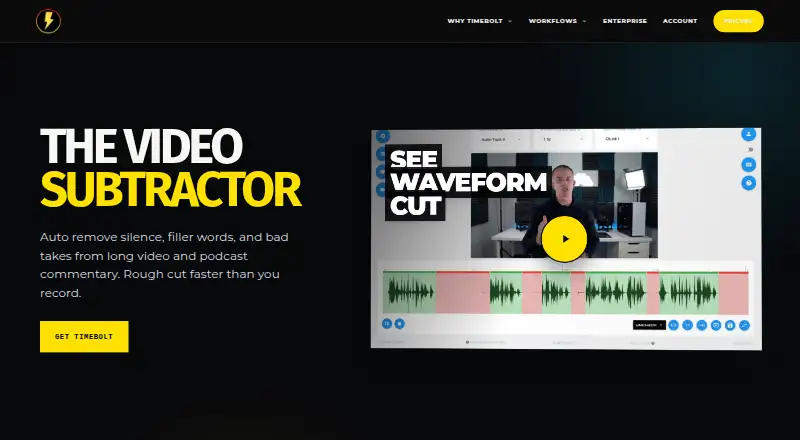
TimeBolt is a desktop video and audio editor for creators, podcasters, educators, and editors who need to remove dead air and tighten spoken content. Its core workflow combines automatic silence detection with timeline editing, scene- and word-level cuts, speed adjustment, captions, and direct MP4 rendering. UMCHECK adds detection for filler words, false starts, retakes, and repeated phrases. The application supports Windows and macOS, processes core video files locally, and includes 4K screen and webcam capture.
Pricing is structured around a free plan and several Pro options. Free includes video-only support, silence detection and removal, watermarked exports, and no project saving or XML/NLE export. Pro costs $17 per month, $97 per year, or $347 one time, and adds video and audio file support, files of any duration, XML and plugin export, and Banger video sharing up to 12 minutes. The one-time Pro option limits Banger video sharing to 4 minutes. Teams costs $97 per seat per year and adds a centralized license dashboard, seat management, key reassignment, and priority support. Vault provides fully on-premise deployment, customer-infrastructure processing, enterprise deployment and support, and optional on-premise UMCHECK AI.
Its strongest fit is an editor who wants targeted speech cleanup before finishing work in another application. Exports and workflows connect with Adobe Premiere Pro, DaVinci Resolve, Final Cut Pro, Camtasia, CapCut, iMovie, and YouTube, while Turbo Mode can change speech rate or target duration. Multi-track and multi-camera workflows broaden its utility beyond basic silence removal. However, users seeking a complete editor with broader production features should look elsewhere. TimeBolt makes more sense as a focused editing utility, especially when fast cuts and NLE handoff matter more than an all-in-one workspace.
Your product? Our editors can test TimeBolt in depth and publish a review, labelled as paid · from $149/mo →
TimeBolt pricing
All 4 TimeBolt plans and prices →
TimeBolt fact sheet
| Free plan | Yes |
|---|---|
| Paid from | $97/yr |
| Text-based editing | Yes |
| Automatic captions | Yes |
| Silence removal | Yes |
| AI audio cleanup | Not verified |
| Maximum export resolution | 4k |
| Supported platforms | Windows, macOS |
| Money-back guarantee | 30 days |
| Deployment | Cloud, Self-hosted, Desktop |
| Platforms | Windows, macOS |
| Compliance & security | HIPAA |
| Support | Email, Docs |
| Built for | Solo, Small business, Mid-market, Enterprise (editorial estimate) |
| Integrations | 7 integrations: Adobe Premiere Pro, DaVinci Resolve, Final Cut Pro, Camtasia, CapCut, iMovie … |
| Pricing | Free plan (source) |
| Website | timebolt.io |
| Facts checked | 21 Sep 2026 |
TimeBolt integrations
TimeBolt lists 7 integrations on its own site.
- Adobe Premiere Pro
- DaVinci Resolve
- Final Cut Pro
- Camtasia
- CapCut
- iMovie
- YouTube
Alternatives to TimeBolt
- DaVinci ResolveA full post-production suite with an unusually capable free version.9.4
- Adobe PremiereA deep Adobe-centered editor for professional video work and collaborative production.9.3
- Avid Media ComposerA deep editor for teams needing transcript tools, high-resolution media, and shared projects.9.1


See all TimeBolt alternatives →
Used TimeBolt? Be the first to review it
The editor score above is our own research. What this page doesn't have yet is a reader's view — what you used TimeBolt for, what worked and what didn't. No stars are seeded and no review is paid for; an editor reads every one before it appears.
Write a reviewTwo minutes · verified accounts only · read by an editor before it appears
Featured on iTechGuides

TimeBolt is listed in our AI Video Editors directory. Add the badge to your site — it links back to this page.
<a href="https://www.itechguides.com/products/timebolt/"><img src="https://www.itechguides.com/best/badge/timebolt.svg" alt="Featured on iTechGuides" width="230" height="46"></a>
Reviewed by iTechGuides Editors · Editorial team · Updated Oct 2026
Advertiser disclosure: iTechGuides is reader-supported. Vendors can pay for top positions in our rankings and for a place on other products' pages, and we may earn a commission when you click some links. Bought places stand at the number bought; this page and our disclosure say so. Paying vendors may get a fuller, more detailed review from our editors, and that review can change their score. How we rank.
Last updated · How we research and update