Thusfar
Thusfar: A focused Windows tracker for Steam sessions, with manual logging beyond Steam. Ranked #6 of 20 in Game Playtime Trackers by our editors (8.1/10); pricing: Open source; best for steam users who want session recaps.
At a glance
- Editor score8.1 / 10
- PricingOpen source
- Best forSteam users who want session recaps
- Paid fromFree
- Tracking modeHybrid
- Facts checked20 Sep 2026
Where it wins
- Automatically detects Steam game starts and stops
- Structured recap prompts capture notes at session end
- Local storage and crash recovery keep session history available
Where it doesn't
- Automatic tracking is centered on Steam
- Console, emulator, and non-Steam sessions require manual logging
- Windows desktop only, with no mobile app
Our verdict on Thusfar
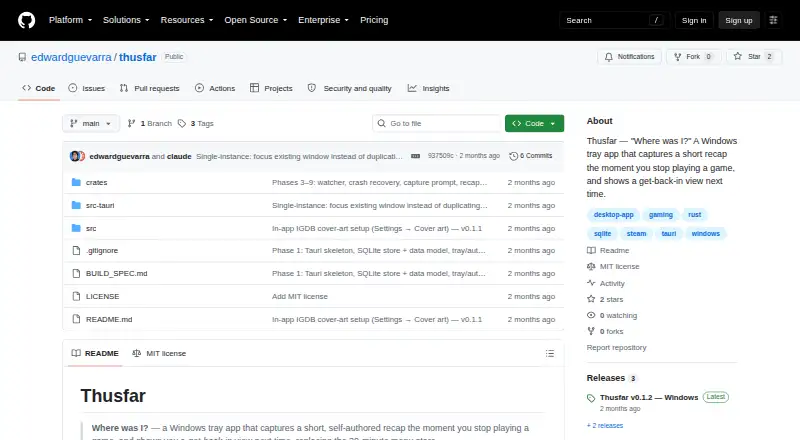
Thusfar is an open-source Windows desktop app for players who want more context than a total-playtime number. It automatically detects Steam game starts and stops, records playtime and last-played context, and organizes history through per-game library and recap views. At the end of a qualifying session, it prompts for a short recap, either as a one-line note or through structured fields covering where the player was, what came next, and what not to forget. Players can also log sessions manually for console games, emulators, and non-Steam titles.
Its strongest fit is Steam-centered tracking with a lightweight desktop workflow. System tray operation and Windows login autostart keep the app available without making it the main focus of the desktop. Crash recovery supports in-progress sessions, while local SQLite storage keeps the recorded information on the computer. Optional IGDB enrichment adds cover art to the library, giving the per-game views more visual context. The integration scope is deliberately narrow: Steam provides automatic tracking, and IGDB supplies optional artwork.
Thusfar is a good choice for Windows Steam users who want to remember what happened during a session, not just when a game was played. Its hybrid tracking mode also accommodates broader libraries, but manual entry becomes necessary for consoles, emulators, and non-Steam games. Players seeking automatic coverage across multiple platforms or a mobile companion should look elsewhere. For its focused use case, the combination of automatic Steam detection, recap prompts, local storage, and open-source availability makes it a practical fit for maintaining a personal play history.
Your product? Our editors can test Thusfar in depth and publish a review, labelled as paid · from $149/mo →
Thusfar pricing
Thusfar fact sheet
| Free plan | Not verified |
|---|---|
| Paid from | Free |
| Tracking mode | Hybrid |
| Supported platforms | Windows PC with automatic Steam tracking; consoles, emulators, and non-Steam games via manual logging |
| Mobile app | No |
| Desktop app | Yes |
| History retention | Not verified |
| Data export | Not verified |
| Deployment | Desktop |
| Platforms | Windows |
| Built for | Solo, Small business (editorial estimate) |
| Integrations | 2 integrations: Steam, IGDB |
| Pricing | Open source |
| Website | github.com |
| Facts checked | 20 Sep 2026 |
Thusfar integrations
Thusfar lists 2 integrations on its own site.
- Steam
- IGDB
Alternatives to Thusfar
- PlayCounterA free, open-source Windows tracker with broad launcher coverage and local history.9.4
- PlayTrackerA broad tracker for gamers who want one view across supported gaming accounts.9.0
- PyroblastA free web tracker that unifies playtime, achievements, and profiles across major platforms.8.8



See all Thusfar alternatives →
Thusfar vs the competition
- Thusfar vs PlayCounter
- Thusfar vs PlayTracker
- Thusfar vs Pyroblast
- Thusfar vs GamingGaiden
- Thusfar vs Steins;Tracker
- Thusfar vs Steam Wrapped

Compare Thusfar with any tool side by side →
Used Thusfar? Be the first to review it
The editor score above is our own research. What this page doesn't have yet is a reader's view — what you used Thusfar for, what worked and what didn't. No stars are seeded and no review is paid for; an editor reads every one before it appears.
Write a reviewTwo minutes · verified accounts only · read by an editor before it appears
Featured on iTechGuides

Thusfar is listed in our Game Playtime Trackers directory. Add the badge to your site — it links back to this page.
<a href="https://www.itechguides.com/products/thusfar/"><img src="https://www.itechguides.com/best/badge/thusfar.svg" alt="Featured on iTechGuides" width="230" height="46"></a>
Reviewed by iTechGuides Editors · Editorial team · Updated Oct 2026
Advertiser disclosure: iTechGuides is reader-supported. Vendors can pay for top positions in our rankings and for a place on other products' pages, and we may earn a commission when you click some links. Bought places stand at the number bought; this page and our disclosure say so. Paying vendors may get a fuller, more detailed review from our editors, and that review can change their score. How we rank.
Last updated · How we research and update