ThunderSoft Free Slideshow Maker
ThunderSoft Free Slideshow Maker: A free Windows slideshow maker with extensive formats and album support. Ranked #14 of 23 in Photo Slideshow Makers by our editors (7.0/10); pricing: Free plan; best for free Windows users making large photo albums.
At a glance
- Editor score7.0 / 10
- PricingFree plan
- Best forFree Windows users making large photo albums
- Free planYes
- Paid fromFree
- Maximum photos500 photos
- Founded2009
- Facts checked20 Sep 2026
Where it wins
- Supports albums with more than 500 images and thumbnail index pages
- Includes more than 70 transitions and more than 70 animated templates
- Publishes to video, HTML5, EXE, screensaver, Flash, and HTML formats
Where it doesn't
- Windows desktop software is not designed for cross-platform editing
- No AI-assisted slideshow features are included
- Its focus is slideshow creation rather than broader photo editing
Our verdict on ThunderSoft Free Slideshow Maker
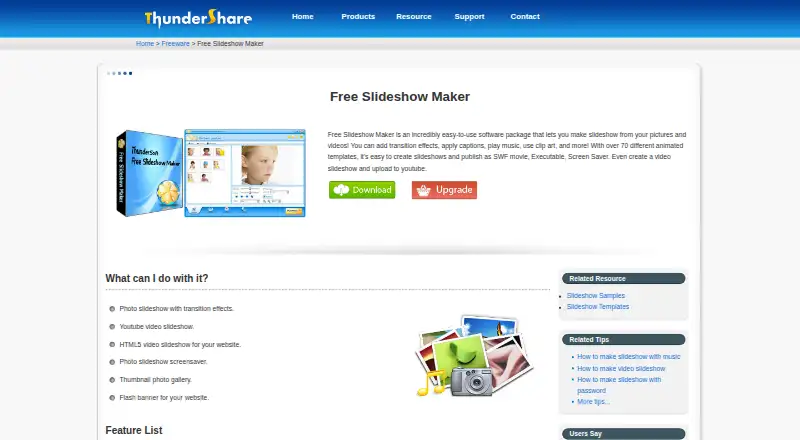
ThunderSoft Free Slideshow Maker is Windows desktop software for building slideshows from photos and video clips. It suits individuals and small teams that want an offline workflow for turning large photo collections into presentations, videos, screensavers, browser content, or executable files. The tool combines transitions, animated templates, captions, clip art, music, thumbnail galleries, and HD video support, making it appropriate for photo albums and straightforward slideshow publishing rather than general-purpose image editing.
The free pricing model is a major reason to consider it. There are no paid tiers to compare, while the published feature set includes more than 70 transition effects, more than 70 animated templates, text captions, clip art, and background music from WAV, MP3, and WMA files. Albums can contain more than 500 images and can include thumbnail index pages. For output, the software supports SWF, HTML, EXE, screensaver, video, and HTML5 video, with playback options covering browsers, iPad, iPhone, and YouTube upload. That range gives free Windows users several ways to share or distribute a finished slideshow.
Platform fit is the main boundary. The supported operating systems are Windows 11, 10, 8.1, 8, 7, Vista, and XP, so this is a Windows-focused desktop choice rather than a cross-platform editor. Its scope is also narrow: the listed capabilities center on arranging photos and clips, styling transitions and templates, adding captions and music, and exporting the result. There are no AI-assisted features. Choose it if free offline slideshow creation, large albums, and varied publishing formats matter most; choose another category tool if you need a broader photo editor, AI features, or a workflow spanning multiple operating systems.
Your product? Our editors can test ThunderSoft Free Slideshow Maker in depth and publish a review, labelled as paid · from $149/mo →
ThunderSoft Free Slideshow Maker pricing
ThunderSoft Free Slideshow Maker fact sheet
| Free plan | Yes |
|---|---|
| Paid from | Free |
| Maximum photos | 500 photos |
| Caption tools | Yes |
| Audio upload | Yes |
| Export formats | SWF, HTML, EXE, screensaver, video, HTML5 video |
| Playback options | browser playback, iPad playback, iPhone playback, YouTube upload |
| Supported platforms | Windows 11, 10, 8.1, 8, 7, Vista, XP |
| Deployment | Desktop |
| Platforms | Windows |
| Support | Email, Docs |
| Built for | Solo, Small business (editorial estimate) |
| Pricing | Free plan |
| Website | thundershare.net |
| Facts checked | 20 Sep 2026 |
Alternatives to ThunderSoft Free Slideshow Maker
- MAGIX Photostory deluxeA feature-rich Windows slideshow editor for personal photo and video projects.8.9
- PhotoStageA versatile slideshow maker with broad export options and a non-commercial free version.8.7
- Icecream Slideshow MakerA capable free Windows slideshow maker with paid 4K, DVD, and cloud-upload features.8.4



See all ThunderSoft Free Slideshow Maker alternatives →
Used ThunderSoft Free Slideshow Maker? Be the first to review it
The editor score above is our own research. What this page doesn't have yet is a reader's view — what you used ThunderSoft Free Slideshow Maker for, what worked and what didn't. No stars are seeded and no review is paid for; an editor reads every one before it appears.
Write a reviewTwo minutes · verified accounts only · read by an editor before it appears
Featured on iTechGuides

ThunderSoft Free Slideshow Maker is listed in our Photo Slideshow Makers directory. Add the badge to your site — it links back to this page.
<a href="https://www.itechguides.com/products/thundersoft-free-slideshow-maker/"><img src="https://www.itechguides.com/best/badge/thundersoft-free-slideshow-maker.svg" alt="Featured on iTechGuides" width="230" height="46"></a>
Reviewed by iTechGuides Editors · Editorial team · Updated Oct 2026
Advertiser disclosure: iTechGuides is reader-supported. Vendors can pay for top positions in our rankings and for a place on other products' pages, and we may earn a commission when you click some links. Bought places stand at the number bought; this page and our disclosure say so. Paying vendors may get a fuller, more detailed review from our editors, and that review can change their score. How we rank.
Last updated · How we research and update