
PhotoStage
PhotoStage: A versatile slideshow maker with broad export options and a non-commercial free version. Ranked #2 of 23 in Photo Slideshow Makers by our editors (8.7/10); pricing: Free plan; best for free users needing broad device and export support.
At a glance
- Editor score8.7 / 10
- PricingFree plan
- Best forFree users needing broad device and export support
- Free planYes
- Facts checked20 Sep 2026
Where it wins
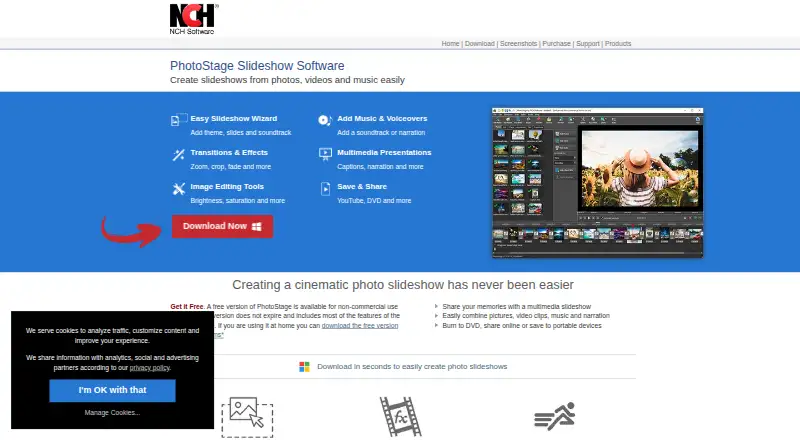
- Guided creation with themes, soundtracks, captions, and narration
- Exports to video, discs, HTML5, cloud storage, and social platforms
- Available across Windows, macOS, iOS, and Android
Where it doesn't
- The free version is limited to non-commercial use
- Home Edition does not support video clip insertion
- Paid pricing varies by regional store page and currency handling
Our verdict on PhotoStage
PhotoStage is slideshow software for turning photos, video clips, music, and narration into video presentations. It suits individuals, families, educators, and other non-commercial users who want guided creation alongside manual control. Media can be arranged with drag-and-drop tools, while the slideshow wizard supplies themes and soundtracks. Editing includes filters, adjustments, cropping, rotation, flipping, transitions, effects, captions, and title animations. Audio tools cover music tracks, audio effects, and narration recording.
The free version is available for non-commercial use and covers a wide range of creation and delivery needs. Paid options include the Pro Edition Annual Plan, with video clip insertion and professional features; the Home Edition Annual Plan, with Professional Edition features but without video clip insertion support; and the Pro Edition Quarterly Plan, which provides unlimited ongoing use of professional version features and includes all upgrades. Published pricing includes a starting price of 11.64, while regional store pages and currency handling affect the final transaction.
PhotoStage stands out for its breadth of export and playback choices. Projects can be delivered as video files, DVD or CD slideshows, HTML5 websites, or formats including 3GP, AVI, GIF, MKV, MOV, MP4, and WEBM. It also supports uploads and storage connections involving YouTube, Vimeo, Flickr, Dropbox, Google Drive, and OneDrive, plus playback on portable devices. Choose it if broad device coverage, physical media, web output, and flexible sharing matter. Consider another tool if commercial use in the free tier or video insertion in the Home Edition is essential.
Your product? Our editors can test PhotoStage in depth and publish a review, labelled as paid · from $149/mo →
PhotoStage pricing
All 3 PhotoStage plans and prices →
PhotoStage fact sheet
| Free plan | Yes |
|---|---|
| Paid from | Not verified |
| Maximum photos | Not verified |
| Caption tools | Yes |
| Audio upload | Yes |
| Export formats | 3GP, ASF, AVI, DV, FLV, GIF, MKV, MOV, MP4, MPG, OGG, RM, SWF, WEBM, WMV, DVD, CD, HTML5 |
| Playback options | DVD/CD, video files, YouTube, Flickr, Vimeo, Dropbox, Google Drive, OneDrive, portable devices, HTML5 website embed |
| Supported platforms | Windows, macOS, iPad/iOS, Android |
| Deployment | Desktop, Mobile |
| Platforms | Windows, macOS, iOS, Android |
| Support | Tickets, Community, Docs |
| Built for | Solo, Small business (editorial estimate) |
| Integrations | 6 integrations: YouTube, Vimeo, Flickr, Dropbox, Google Drive, OneDrive |
| Pricing | Free plan (source) |
| Website | nchsoftware.com |
| Facts checked | 20 Sep 2026 |
PhotoStage integrations
PhotoStage lists 6 integrations on its own site.
- YouTube
- Vimeo
- Flickr
- Dropbox
- Google Drive
- OneDrive
Alternatives to PhotoStage
- MAGIX Photostory deluxeA feature-rich Windows slideshow editor for personal photo and video projects.8.9
- Icecream Slideshow MakerA capable free Windows slideshow maker with paid 4K, DVD, and cloud-upload features.8.4
- Ashampoo Slideshow Studio HD 4A one-time Windows editor for 4K slideshows, discs, narration, and broad export options.8.2



See all PhotoStage alternatives →
PhotoStage vs the competition
- PhotoStage vs MAGIX Photostory deluxe
- PhotoStage vs Icecream Slideshow Maker
- PhotoStage vs Ashampoo Slideshow Studio HD 4
- PhotoStage vs Smilebox
- PhotoStage vs 4K Slideshow Maker
- PhotoStage vs Photopia



Compare PhotoStage with any tool side by side →
Used PhotoStage? Be the first to review it
The editor score above is our own research. What this page doesn't have yet is a reader's view — what you used PhotoStage for, what worked and what didn't. No stars are seeded and no review is paid for; an editor reads every one before it appears.
Write a reviewTwo minutes · verified accounts only · read by an editor before it appears
Featured on iTechGuides

PhotoStage is listed in our Photo Slideshow Makers directory. Add the badge to your site — it links back to this page.
<a href="https://www.itechguides.com/products/photostage/"><img src="https://www.itechguides.com/best/badge/photostage.svg" alt="Featured on iTechGuides" width="230" height="46"></a>
Reviewed by iTechGuides Editors · Editorial team · Updated Oct 2026
Advertiser disclosure: iTechGuides is reader-supported. Vendors can pay for top positions in our rankings and for a place on other products' pages, and we may earn a commission when you click some links. Bought places stand at the number bought; this page and our disclosure say so. Paying vendors may get a fuller, more detailed review from our editors, and that review can change their score. How we rank.
Last updated · How we research and update