
TestMap.ai
TestMap.ai: A broad AI testing workspace with a useful free tier and paid collaboration features. Ranked #4 of 21 in AI Test Case Generators by our editors (9.1/10); pricing: Free plan; best for AI-assisted exploratory and browser testing.
At a glance
- Editor score9.1 / 10
- PricingFree plan
- Best forAI-assisted exploratory and browser testing
- Free planYes
- Paid from$15/user/mo
- Acceptance criteriaYes
- Facts checked22 Sep 2026
Where it wins
- Generates traditional, BDD, exploratory, edge, negative, security, and performance cases
- Connects requirements, test runs, defects, and GitHub synchronization
- Combines browser recording, API monitoring, MCP, and conversational AI refinement
Where it doesn't
- Starter is limited to basic test management and community support
- Reports, analytics, integrations, and AI-agent features require Pro
- SSO/SAML, SLA guarantees, and custom AI models require Enterprise
Our verdict on TestMap.ai
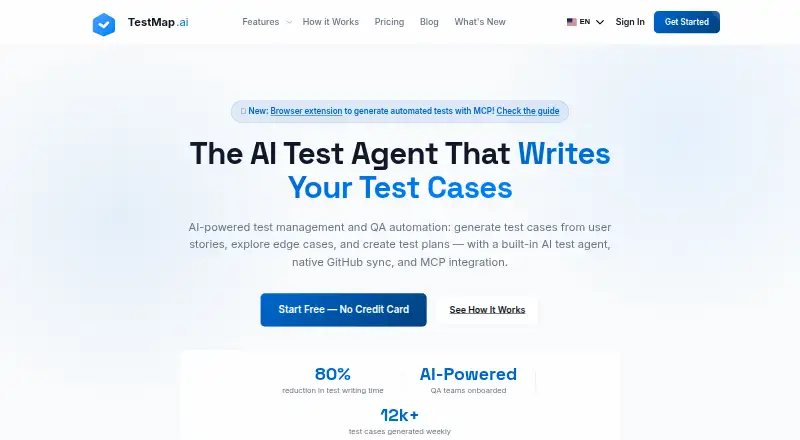
TestMap.ai is an AI-native quality management platform for software engineering and QA teams. It generates structured test cases from requirements, user stories, acceptance criteria, documentation, and plain-language descriptions. Its coverage includes traditional, BDD, and exploratory testing, along with happy-path, edge-case, negative, security, and performance scenarios. The platform also supports test runs, results, bug reports, collaboration, requirement-to-defect traceability, and browser-based recording through a Chrome extension.
Pricing follows a freemium structure. The Starter plan is free and includes the Chrome extension, basic test management, and community support. Pro costs $15 per user per month when billed monthly and adds all integrations, reports and analytics, AI Agent, MCP, the browser extension, and priority support. Enterprise adds SSO/SAML, an SLA guarantee, a dedicated success manager, and custom AI model configuration. This makes Starter a practical entry point for basic test management, while teams needing broader connectivity, analytics, or advanced AI workflows move to Pro or Enterprise.
TestMap.ai’s strongest distinction is breadth across exploratory and browser-oriented workflows. GitHub can provide synchronized requirements and context; Jira, Claude Desktop, Cursor, Chrome, and MCP-compatible AI assistants extend the surrounding workflow. Browser interactions can become structured test cases, while API calls and responses are monitored during recording. Teams seeking one workspace for AI-assisted generation, management, browser capture, and defect traceability should consider it. Teams needing advanced controls such as SSO/SAML or custom AI model configuration should choose Enterprise rather than Starter or Pro.
Your product? Our editors can test TestMap.ai in depth and publish a review, labelled as paid · from $149/mo →
TestMap.ai pricing
All 3 TestMap.ai plans and prices →
TestMap.ai fact sheet
| Free plan | Yes |
|---|---|
| Paid from | $15/user/mo |
| Requirements input | Yes |
| Existing app input | Yes |
| Acceptance criteria | Yes |
| Browser test generation | Yes |
| API test generation | Yes |
| Mobile test generation | Not verified |
| Deployment | Cloud, Browser extension |
| Platforms | Web, Chrome extension |
| Support | Community |
| Built for | Solo, Small business, Mid-market, Enterprise (editorial estimate) |
| Integrations | 6 integrations: GitHub, Jira, Claude Desktop, Cursor, MCP-compatible AI assistants, Chrome |
| Pricing | Free plan (source) |
| Website | testmap.ai |
| Facts checked | 22 Sep 2026 |
TestMap.ai integrations
TestMap.ai lists 6 integrations on its own site.
- GitHub
- Jira
- Claude Desktop
- Cursor
- MCP-compatible AI assistants
- Chrome
Alternatives to TestMap.ai
- QAEverestBroad AI test generation with traceability, automation, and extensive tool integrations.9.4
- WalnutAITurns requirements, designs, code, and workflows into traceable test coverage.9.3
- TrulitStructured AI test generation with web automation, API access and Jira synchronization.9.2



See all TestMap.ai alternatives →
TestMap.ai vs the competition
- TestMap.ai vs QAEverest
- TestMap.ai vs WalnutAI
- TestMap.ai vs Trulit
- TestMap.ai vs Casely
- TestMap.ai vs Panaya
- TestMap.ai vs TestStory AI



Compare TestMap.ai with any tool side by side →
Used TestMap.ai? Be the first to review it
The editor score above is our own research. What this page doesn't have yet is a reader's view — what you used TestMap.ai for, what worked and what didn't. No stars are seeded and no review is paid for; an editor reads every one before it appears.
Write a reviewTwo minutes · verified accounts only · read by an editor before it appears
Featured on iTechGuides

TestMap.ai is listed in our AI Test Case Generators directory. Add the badge to your site — it links back to this page.
<a href="https://www.itechguides.com/products/testmap-ai/"><img src="https://www.itechguides.com/best/badge/testmap-ai.svg" alt="Featured on iTechGuides" width="230" height="46"></a>
Reviewed by iTechGuides Editors · Editorial team · Updated Oct 2026
Advertiser disclosure: iTechGuides is reader-supported. Vendors can pay for top positions in our rankings and for a place on other products' pages, and we may earn a commission when you click some links. Bought places stand at the number bought; this page and our disclosure say so. Paying vendors may get a fuller, more detailed review from our editors, and that review can change their score. How we rank.
Last updated · How we research and update