
tela
tela: An open-source knowledge base combining collaborative Markdown, cited AI search, and flexible publishing. Ranked #32 of 136 in Knowledge Base Software by our editors (6.1/10); pricing: Free plan · 30-day trial; best for AI-assisted open-source documentation.
At a glance
- Editor score6.1 / 10
- PricingFree plan · 30-day trial
- Best forAI-assisted open-source documentation
- Free planYes
- Publishing audienceBoth
- Facts checked20 Sep 2026
Where it wins
- Cited semantic search and AI answers for documentation discovery
- Git and Jira documentation generation with scheduled Atlas refresh
- Self-hosting, public spaces, roles, revisions, and agent connectors
Where it doesn't
- Free includes 50 built-in AI answers per month
- Advanced governance and identity features require Enterprise
- Atlas sources and AI generation are centered on Git and Jira projects
Our verdict on tela
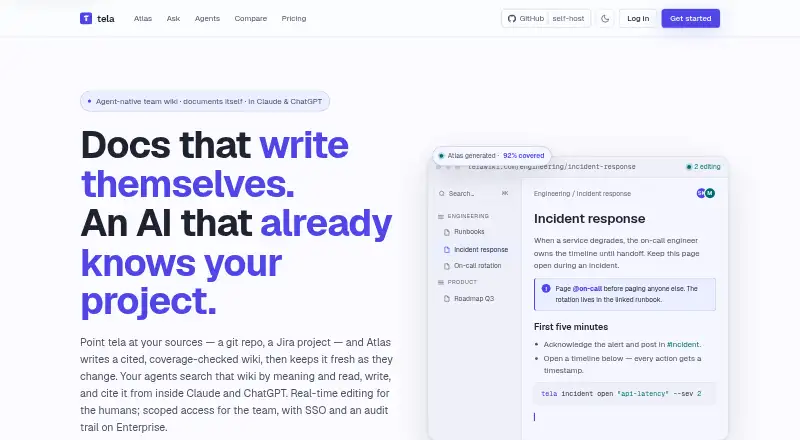
tela is a Markdown-native knowledge base and team wiki for personal users, teams, and organizations. It combines collaborative page editing, comments, full-text and semantic search, public spaces, access controls, revision history, synchronization, and AI-assisted documentation. Teams can publish no-login documentation sites, while organizations can manage owner, editor, and viewer roles across spaces. tela is available as a hosted service or open-source software for self-hosting, making it suitable for groups that want documentation flexibility without leaving Markdown.
Its strongest feature is Atlas, which can generate cited documentation from Git repositories or Jira projects and refresh it over time. The Free plan includes 50 built-in AI answers monthly and one Atlas source, with manual refresh and unlimited pages and spaces. Personal adds 3,000 built-in AI answers monthly, five Atlas sources, scheduled refresh, custom domains, and public spaces. Team increases the pooled allowance to 5,000 answers and 20 Atlas sources, while adding roles and member management. Enterprise includes unlimited Atlas and AI, SSO, SCIM, audit logs, advanced governance, priority support, and an SLA. Pricing starts at $6 per month when billed annually, and a 30-day Personal trial is available without a card.
Beyond AI generation, tela fits teams that need control over how documentation is edited, shared, synchronized, and connected to other tools. Revision comparison and restore workflows support ongoing maintenance, while WebDAV, rclone, a REST API, and an MCP connector extend access to folders and AI agents. Public links can use optional passwords and expiry dates. The product is a strong choice for Markdown-oriented teams that value open-source deployment and cited knowledge retrieval. Teams needing broad integrations beyond Git and Jira, or advanced identity and governance on lower tiers, should evaluate whether the available plan structure fits their workflow.
Your product? Our editors can test tela in depth and publish a review, labelled as paid · from $149/mo →
tela pricing
tela fact sheet
| Free plan | Yes |
|---|---|
| Paid from | Not verified |
| Publishing audience | Both |
| Article limit | Not verified |
| Custom domain | Yes |
| SSO support | Yes |
| Version history | Yes |
| Content analytics | Not verified |
| Free trial | 30 days · no card needed |
| Money-back guarantee | 30 days |
| Deployment | Cloud, Self-hosted |
| Platforms | Web |
| Support | Email, Docs, Community |
| Built for | Solo, Small business, Mid-market, Enterprise (editorial estimate) |
| Integrations | 6 integrations: Git, Jira, Claude, ChatGPT, WebDAV, MCP |
| Pricing | Free plan · 30-day trial (source) |
| Website | telawiki.com |
| Facts checked | 20 Sep 2026 |
tela integrations
tela lists 6 integrations on its own site.
- Git
- Jira
- Claude
- ChatGPT
- WebDAV
- MCP
Alternatives to tela
- ConfluenceA mature knowledge workspace with structured content, permissions, search, and Atlassian integrations.9.4
- BlueSpiceA broad, open-source knowledge base with workflows, permissions, analytics, and self-hosting.9.2
- GuruA governed internal knowledge hub with cited AI answers and verification workflows.9.0



Used tela? Be the first to review it
The editor score above is our own research. What this page doesn't have yet is a reader's view — what you used tela for, what worked and what didn't. No stars are seeded and no review is paid for; an editor reads every one before it appears.
Write a reviewTwo minutes · verified accounts only · read by an editor before it appears
Featured on iTechGuides

tela is listed in our Knowledge Base Software directory. Add the badge to your site — it links back to this page.
<a href="https://www.itechguides.com/products/tela/"><img src="https://www.itechguides.com/best/badge/tela.svg" alt="Featured on iTechGuides" width="230" height="46"></a>
Reviewed by iTechGuides Editors · Editorial team · Updated Oct 2026
Advertiser disclosure: iTechGuides is reader-supported. Vendors can pay for top positions in our rankings and for a place on other products' pages, and we may earn a commission when you click some links. Bought places stand at the number bought; this page and our disclosure say so. Paying vendors may get a fuller, more detailed review from our editors, and that review can change their score. How we rank.
Last updated · How we research and update