
Teampay by Paystand
Teampay by Paystand: A broad spend-management system for teams requesting purchases through Slack or Teams. Ranked #18 of 30 in Spend Management Software by our editors (7.0/10); pricing: Pricing on request; best for teams using Slack or Teams for spend requests.
At a glance
- Editor score7.0 / 10
- PricingPricing on request
- Best forTeams using Slack or Teams for spend requests
- Approval workflowsYes
- Facts checked20 Sep 2026
Where it wins
- Combines cards, approvals, budgets, reimbursements, and bill payment
- Supports Slack and Microsoft Teams spend requests and approvals
- Synchronizes transactions with QuickBooks Online, NetSuite, and other ERPs
Where it doesn't
- Pricing uses a contact-sales model
- The listed platform is web
- Its chat workflows center on Slack and Microsoft Teams
Our verdict on Teampay by Paystand
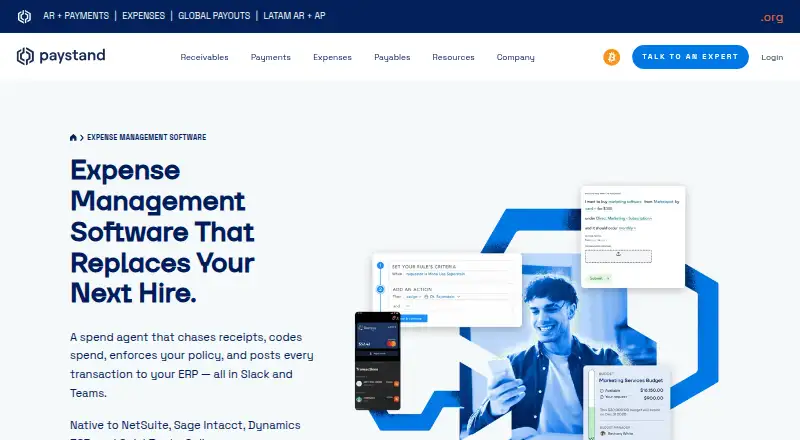
Teampay by Paystand is spend management software for finance teams that need to control employee purchasing across cards, approvals, budgets, reimbursements, and accounts-payable payments. It supports virtual and physical corporate cards with spending limits and merchant restrictions, plus configurable approval workflows. Employees can submit purchase requests through Slack or Microsoft Teams, while finance teams manage policies, budgets, receipts, and transaction coding. It is particularly suited to organizations whose employees already work in Slack or Teams and whose finance processes span multiple spending types.
According to the vendor’s pricing information, Teampay uses a contact-sales model rather than published plan-by-plan pricing. Paystand describes subscription pricing and directs prospects toward a customized analysis. That approach is relevant for finance teams evaluating a broader system that combines cards, expense reimbursements, budget controls, receipt capture, approval workflows, and bill payment automation. The product’s scope is wider than a card-only tool or a standalone reimbursement system, so buyers should evaluate which parts of the spend process they need to bring together.
Teampay’s ecosystem fit is a central strength. It integrates with Slack and Microsoft Teams for spend requests and approvals, and supports native ERP posting and synchronization with QuickBooks Online, NetSuite, Sage Intacct, and Microsoft Dynamics 365. Budget controls can be assigned by person, department, project, or vendor, while automated receipt collection and transaction coding support finance administration. Teams seeking one system for purchasing controls, employee expenses, corporate cards, and AP automation should consider Teampay. Organizations that do not use the listed chat or accounting platforms may find its most distinctive workflows less relevant.
Your product? Our editors can test Teampay by Paystand in depth and publish a review, labelled as paid · from $149/mo →
Teampay by Paystand pricing
Teampay by Paystand fact sheet
| Free plan | Not verified |
|---|---|
| Paid from | Not verified |
| Budget controls | Yes |
| Approval workflows | Yes |
| Corporate cards | Yes |
| Bill pay | Yes |
| Expense reimbursements | Yes |
| Multi-currency support | Yes |
| Card issuance | Both |
| Deployment | Cloud |
| Platforms | Web |
| Integrations | 6 integrations: Slack, Microsoft Teams, QuickBooks Online, NetSuite, Sage Intacct, Microsoft Dynamics 365 |
| Pricing | Pricing on request (source) |
| Website | paystand.com |
| Facts checked | 20 Sep 2026 |
Teampay by Paystand integrations
Teampay by Paystand lists 6 integrations on its own site.
- Slack
- Microsoft Teams
- QuickBooks Online
- NetSuite
- Sage Intacct
- Microsoft Dynamics 365
Alternatives to Teampay by Paystand
- RhoRho brings cards, expense workflows, reimbursements, and bill pay into one free platform.9.4
- BILL Spend & ExpenseA free card and expense platform with accounting sync, subject to card and payment fees.9.2
- Zoho SpendA broad spend suite spanning expenses, cards, procurement, invoices, and budgets.9.0



See all Teampay by Paystand alternatives →
Also Ranked In
Teampay by Paystand is ranked in 2 of our directories.
Used Teampay by Paystand? Be the first to review it
The editor score above is our own research. What this page doesn't have yet is a reader's view — what you used Teampay by Paystand for, what worked and what didn't. No stars are seeded and no review is paid for; an editor reads every one before it appears.
Write a reviewTwo minutes · verified accounts only · read by an editor before it appears
Featured on iTechGuides

Teampay by Paystand is listed in our Spend Management Software directory. Add the badge to your site — it links back to this page.
<a href="https://www.itechguides.com/products/teampay-by-paystand/"><img src="https://www.itechguides.com/best/badge/teampay-by-paystand.svg" alt="Featured on iTechGuides" width="230" height="46"></a>
Reviewed by iTechGuides Editors · Editorial team · Updated Oct 2026
Advertiser disclosure: iTechGuides is reader-supported. Vendors can pay for top positions in our rankings and for a place on other products' pages, and we may earn a commission when you click some links. Bought places stand at the number bought; this page and our disclosure say so. Paying vendors may get a fuller, more detailed review from our editors, and that review can change their score. How we rank.
Last updated · How we research and update