
TaskJuggler
TaskJuggler: A free, text-driven planner for complex schedules, resources, costs, and scenarios. Ranked #92 of 188 in Project Management Software by our editors (3.0/10); pricing: Free plan; best for technical planners needing advanced scheduling control.
At a glance
- Editor score3.0 / 10
- PricingFree plan
- Best forTechnical planners needing advanced scheduling control
- Free planYes
- Paid fromFree
- Task viewsGantt
- Facts checked23 Sep 2026
Where it wins
- Automatic resource leveling resolves task conflicts
- Scenarios, baselines, calendars, and cost planning support detailed analysis
- Free open-source tool with broad report and data-exchange options
Where it doesn't
- Command-line and text-file workflow has a steep learning curve
- Niche fit for teams seeking a visual project workspace
- Built-in web reports do not replace a fully collaborative interface
Our verdict on TaskJuggler
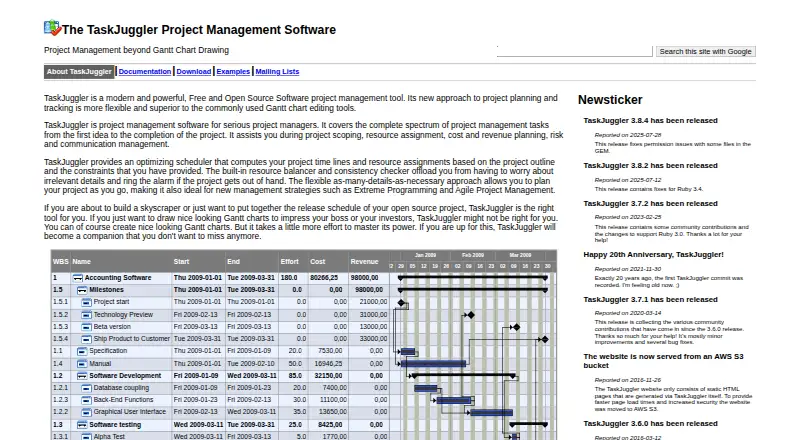
TaskJuggler is free, open-source project management software for technical planners handling complex schedules, resource assignments, costs, risks, and status tracking. Its optimizing scheduler calculates timelines and resource assignments from project constraints, while support for Gantt views, time sheets, calendars, and detailed reports covers the core needs of structured project planning. It runs on Linux, Windows, and macOS, and is operated primarily through the command line and text files using RubyGems.
The pricing model is straightforward: TaskJuggler is available at no cost as open-source software, with no paid tiers described. Its feature set includes automatic resource leveling, task conflict resolution, scenarios, baselines, working-hours and leave management, shifts, time zones, and task, resource, and account cost planning. Reports can be generated for interactive viewing, HTML publishing, calendars, status, accounting, and resource allocation. A built-in web server supports dynamic interactive reports, while CSV, iCalendar, Microsoft Project, and Clarity data exchange broaden its fit with established planning workflows.
TaskJuggler’s main trade-off is its operating model. Text files and command-line control offer precise, repeatable planning, but teams expecting a visual, browser-first workspace may find the workflow demanding. Integrations include Vim, Emacs mode, Emacs Org mode, FreeMind, Redmine, Bugzilla, Microsoft Project, and Computer Associates Clarity. Choose TaskJuggler when scheduling logic, resource balancing, what-if analysis, and cost visibility matter more than approachable collaboration features. Choose another project management tool if the priority is a conventional graphical interface for broad team participation.
Your product? Our editors can test TaskJuggler in depth and publish a review, labelled as paid · from $149/mo →
TaskJuggler pricing
TaskJuggler fact sheet
| Free plan | Yes |
|---|---|
| Paid from | Free |
| Task views | Gantt |
| Automation rules | Not verified |
| Time tracking | Yes |
| Guest access | Not verified |
| Free-plan user limit | Not verified |
| Native integrations | Not verified |
| Deployment | Self-hosted |
| Platforms | Linux, Windows, macOS |
| Support | Docs |
| Built for | Solo, Small business, Mid-market, Enterprise (editorial estimate) |
| Integrations | 1 integrations: Vim |
| Pricing | Free plan |
| Website | taskjuggler.org |
| Facts checked | 23 Sep 2026 |
TaskJuggler integrations
TaskJuggler lists 1 integrations on its own site.
- Vim
Alternatives to TaskJuggler
- ClickUpBroad project control with tasks, Docs, automations, reporting, time tracking, and AI.9.4
- JiraA mature choice for agile delivery teams needing boards, backlogs, workflows, and automation.9.3
- AsanaA mature project hub with flexible views, automation, reporting, and AI features.9.2


See all TaskJuggler alternatives →
Also Ranked In
TaskJuggler is ranked in 2 of our directories.
Used TaskJuggler? Be the first to review it
The editor score above is our own research. What this page doesn't have yet is a reader's view — what you used TaskJuggler for, what worked and what didn't. No stars are seeded and no review is paid for; an editor reads every one before it appears.
Write a reviewTwo minutes · verified accounts only · read by an editor before it appears
Featured on iTechGuides

TaskJuggler is listed in our Project Management Software directory. Add the badge to your site — it links back to this page.
<a href="https://www.itechguides.com/products/taskjuggler/"><img src="https://www.itechguides.com/best/badge/taskjuggler.svg" alt="Featured on iTechGuides" width="230" height="46"></a>
Reviewed by iTechGuides Editors · Editorial team · Updated Oct 2026
Advertiser disclosure: iTechGuides is reader-supported. Vendors can pay for top positions in our rankings and for a place on other products' pages, and we may earn a commission when you click some links. Bought places stand at the number bought; this page and our disclosure say so. Paying vendors may get a fuller, more detailed review from our editors, and that review can change their score. How we rank.
Last updated · How we research and update