TaskDial
TaskDial: A focused time-blocking planner for clock-based scheduling and Pomodoro sessions. Ranked #117 of 137 in Daily Planner Apps by our editors (3.0/10); pricing: Open source; best for minimal self-hosted clock-based planning.
At a glance
- Editor score3.0 / 10
- PricingOpen source
- Best forMinimal self-hosted clock-based planning
- Paid fromFree
- Planning methodTime blocking
- Facts checked20 Sep 2026
Where it wins
- 12-hour clock face makes task durations easy to visualize
- Built-in 25-minute Pomodoro sessions with timed breaks
- Self-hostable open-source software under the AGPL-3.0 license
Where it doesn't
- Currently invite-only for the hosted browser application
- No recurring tasks, integrations, or calendar synchronization
- Available on the web and self-hosted rather than broad native platforms
Our verdict on TaskDial
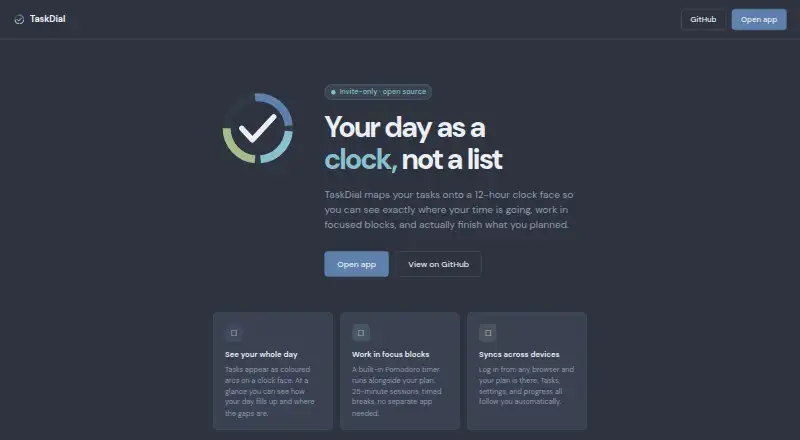
TaskDial is a browser-based daily planner for people who organize work through time blocking. Its central view places tasks on a 12-hour clock face, letting users enter estimated durations, assign time slots, and add fixed-time meeting slots. The approach suits individuals who prefer seeing the shape of a day rather than managing a conventional list. It is currently invite-only as a hosted application, while self-hosting is available through its open-source AGPL-3.0 software.
The clock-face scheduling is TaskDial’s clearest point of distinction. Real-time clock hand progression shows how the planned day advances, while task duration controls and fixed meeting slots help combine flexible work with immovable commitments. The built-in Pomodoro timer adds 25-minute focus sessions and timed breaks without requiring a separate tool. Plans, settings, and progress can synchronize across browsers, supporting users who move between browser environments. This feature set makes TaskDial a good fit for visual planning and focused work sessions, especially when self-hosting is a priority.
TaskDial stays narrow in scope. The published product details do not include recurring tasks, integrations, or calendar synchronization, so people managing connected workflows or repeat-heavy schedules may need a broader daily planner. Platform coverage is also limited to the web and self-hosted deployments. Choose TaskDial if a clock-based view, duration planning, fixed meetings, and Pomodoro timing match your routine. Choose another planner if you need a wider ecosystem, recurring task management, calendar connections, or a generally available hosted application.
Your product? Our editors can test TaskDial in depth and publish a review, labelled as paid · from $149/mo →
TaskDial pricing
TaskDial fact sheet
| Free plan | Not verified |
|---|---|
| Paid from | Free |
| Planning method | Time blocking |
| Calendar sync | Not verified |
| Recurring tasks | Not verified |
| Mobile platforms | Not verified |
| Daily task limit | Not verified |
| Focus sessions | Yes |
| Deployment | Cloud, Self-hosted, Browser extension |
| Platforms | Web |
| Support | Docs |
| Built for | Solo, Small business (editorial estimate) |
| Pricing | Open source |
| Website | dynamicskillset.github.io |
| Facts checked | 20 Sep 2026 |
Alternatives to TaskDial
- SunsamaA guided daily planner for turning tasks, calendars, and workload limits into a focused workday.8.9
- Amazing MarvinA flexible planner for people who want structured days without a fixed workflow.8.8
- MotionA broad AI planner for scheduling, booking, calendars, and project work.8.7


See all TaskDial alternatives →
Used TaskDial? Be the first to review it
The editor score above is our own research. What this page doesn't have yet is a reader's view — what you used TaskDial for, what worked and what didn't. No stars are seeded and no review is paid for; an editor reads every one before it appears.
Write a reviewTwo minutes · verified accounts only · read by an editor before it appears
Featured on iTechGuides

TaskDial is listed in our Daily Planner Apps directory. Add the badge to your site — it links back to this page.
<a href="https://www.itechguides.com/products/taskdial/"><img src="https://www.itechguides.com/best/badge/taskdial.svg" alt="Featured on iTechGuides" width="230" height="46"></a>
Reviewed by iTechGuides Editors · Editorial team · Updated Oct 2026
Advertiser disclosure: iTechGuides is reader-supported. Vendors can pay for top positions in our rankings and for a place on other products' pages, and we may earn a commission when you click some links. Bought places stand at the number bought; this page and our disclosure say so. Paying vendors may get a fuller, more detailed review from our editors, and that review can change their score. How we rank.
Last updated · How we research and update