
Tandem
Tandem: A shared-resource calendar with conflict checking, approvals, permissions, and external distribution. Ranked #96 of 193 in Calendar Apps by our editors (3.0/10); pricing: Free plan; best for organizations scheduling shared resources.
At a glance
- Editor score3.0 / 10
- PricingFree plan
- Best forOrganizations scheduling shared resources
- Free planYes
- Paid from$20/mo
- Facts checked22 Sep 2026
Where it wins
- Centralizes rooms, facilities, equipment, teams, groups, and events
- Supports conflict checking, permissions, approvals, and calendar embedding
- Connects with Outlook, Google, Apple, and Samsung calendars
Where it doesn't
- External calendar distribution and updates are one-way
- The Free plan provides one master calendar for admins
- Facility rental and equipment modules require Enterprise
Our verdict on Tandem
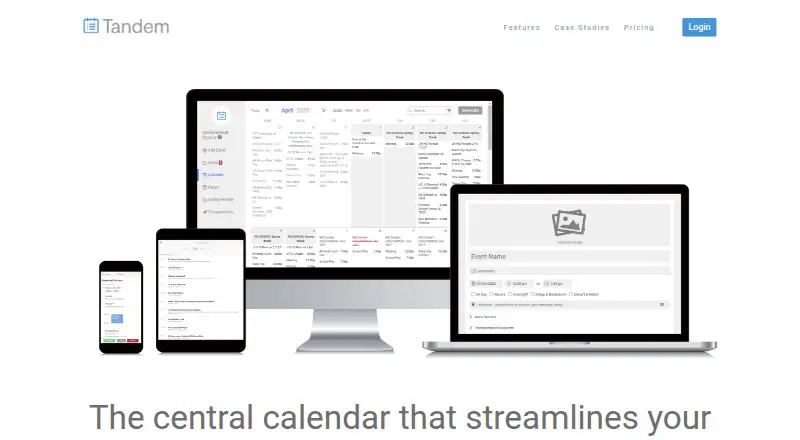
Tandem is an online scheduling platform for schools, universities, and other calendar-driven organizations. It brings rooms, teams, groups, facilities, equipment, and events into a central calendar, with tools for conflict checking, role-based permissions, public and private events, website embedding, and subscriber updates. It is suited to organizations that coordinate shared resources across multiple departments or groups rather than individuals seeking a personal calendar.
The plan structure moves from basic calendar publishing to broader scheduling controls. The Free plan includes a single master calendar for admins, email updates, website integration, and connections to Outlook, Google, Apple, and Samsung Calendar. Pro costs $20 per month with monthly billing for up to five users and adds full conflict checking, fine-grained permissions, public and private events, unlimited calendar pages, integrations, and SMS updates. Annual billing is also available with a stated 5% saving. Enterprise costs $40 per month with monthly billing for up to five users and adds step-by-step approval workflows, facility rental, account customization, equipment inventory, transportation and work orders, and internal calendar reports. Annual billing is available for this tier as well.
Tandem’s strongest fit is shared-resource coordination where approvals and scheduling conflicts need formal handling. Its API can extend event data to other services, while integrations include Microsoft Accounts, Active Directory, RSS, XML, and CSV alongside the listed calendar services. Email, SMS, and in-app notifications support updates to participants and subscribers. External calendar distribution is one-way, so organizations needing two-way synchronization may prefer another calendar system. Choose Tandem for centralized institutional scheduling with permissions, approvals, and resource modules; choose an alternative if personal calendar workflows or bidirectional synchronization are the priority.
Your product? Our editors can test Tandem in depth and publish a review, labelled as paid · from $149/mo →
Tandem pricing
All 3 Tandem plans and prices →
Tandem fact sheet
| Free plan | Yes |
|---|---|
| Paid from | $20/mo |
| Shared calendars | Yes |
| Time blocking | Yes |
| Scheduling links | Not verified |
| Calendar sync | One_way |
| Mobile apps | Ios and android |
| Video meeting support | Not verified |
| Deployment | Cloud |
| Platforms | Web |
| Support | Email, Live chat, Phone |
| Built for | Small business, Mid-market, Enterprise (editorial estimate) |
| Integrations | 9 integrations: Microsoft Outlook, Google Calendar, Apple Calendar, Samsung Calendar, Microsoft Accounts, Active Directory … |
| Pricing | Free plan (source) |
| Website | tandem.co |
| Facts checked | 22 Sep 2026 |
Tandem integrations
Tandem lists 9 integrations on its own site.
- Microsoft Outlook
- Google Calendar
- Apple Calendar
- Samsung Calendar
- Microsoft Accounts
- Active Directory
- RSS
- XML
- CSV
Alternatives to Tandem
- Google CalendarA versatile calendar for personal schedules and Google Workspace collaboration.9.4
- Microsoft OutlookA flexible calendar choice for people and teams already working in Microsoft’s ecosystem.9.2
- Zoho CalendarA low-cost calendar with booking, sync, room reservations, and broad integrations.9.1


Used Tandem? Be the first to review it
The editor score above is our own research. What this page doesn't have yet is a reader's view — what you used Tandem for, what worked and what didn't. No stars are seeded and no review is paid for; an editor reads every one before it appears.
Write a reviewTwo minutes · verified accounts only · read by an editor before it appears
Featured on iTechGuides

Tandem is listed in our Calendar Apps directory. Add the badge to your site — it links back to this page.
<a href="https://www.itechguides.com/products/tandem-calendar-app/"><img src="https://www.itechguides.com/best/badge/tandem-calendar-app.svg" alt="Featured on iTechGuides" width="230" height="46"></a>
Reviewed by iTechGuides Editors · Editorial team · Updated Oct 2026
Advertiser disclosure: iTechGuides is reader-supported. Vendors can pay for top positions in our rankings and for a place on other products' pages, and we may earn a commission when you click some links. Bought places stand at the number bought; this page and our disclosure say so. Paying vendors may get a fuller, more detailed review from our editors, and that review can change their score. How we rank.
Last updated · How we research and update