
Talcura
Talcura: A broad recruiting-to-onboarding suite for growing teams with complex hiring workflows. Ranked #71 of 231 in Applicant Tracking Systems by our editors (3.1/10); pricing: Paid; best for growing teams needing recruiting through onboarding.
At a glance
- Editor score3.1 / 10
- PricingPaid
- Best forGrowing teams needing recruiting through onboarding
- Free planNo
- Paid from$299/mo
- Career siteYes
- Founded2009 · Markham, Ontario, Canada
- Facts checked20 Sep 2026
Where it wins
- Résumé parsing, candidate scoring, CRM, and automated scheduling
- Career sites, job distribution, workflows, offers, and e-signatures
- Onboarding, compliance reporting, and HRIS integrations
Where it doesn't
- No free plan is available
- Essentials allows ten active jobs
- Scale pricing is custom-priced
Our verdict on Talcura
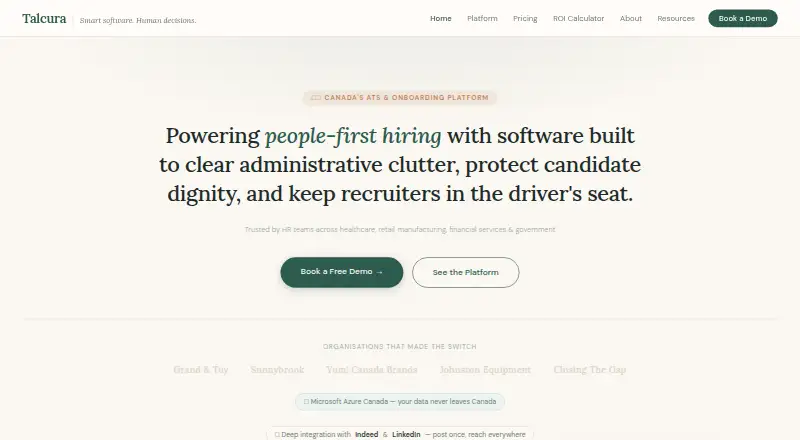
Talcura is a cloud-based applicant tracking and employee onboarding platform for mid-market and enterprise organizations. It is designed for teams managing sourcing, screening, candidate matching, interviews, job distribution, career sites, offers, reporting, and onboarding in one system. Its positioning fits growing teams and organizations with complex or high-volume hiring needs, including healthcare, retail, manufacturing, financial services, and government. The platform is web-based and emphasizes Canadian data residency, configurable hiring processes, and mobile application experiences.
Pricing separates a focused entry tier from a broader recruiting suite. Essentials costs $299 per month when billed annually or $349 per month when billed monthly, with a branded career site, mobile apply portal, screening questionnaires, knock-out questions, templates, standard Indeed and LinkedIn integrations, basic reporting, and Microsoft Azure Canada cloud hosting. Execute costs $699 per month annually or $799 per month monthly and adds the full recruiting and onboarding suite, résumé parsing, candidate scoring, a candidate CRM, talent pipeline, automated interview scheduling, blind recruiting tools, and DEI and compliance reporting. Scale adds HRIS integrations, enterprise security controls, custom reporting, a dedicated account manager, and an SLA-backed uptime guarantee at custom pricing.
Talcura’s breadth is its main distinction. Integrations include Indeed, LinkedIn, Zoom, Microsoft Teams, Google Meet, GoToMeeting, Workday, UKG, and SAP HCM, while the core feature set covers requisitions, approvals, workflow automation, documents, e-signatures, analytics, compliance, and employee onboarding. That scope suits teams that want recruiting and onboarding connected rather than a narrow applicant tracker. Essentials may fit organizations starting with career sites and screening, but teams needing parsing, CRM, scheduling, or onboarding will need Execute. Companies seeking a free plan, a non-web platform, or straightforward public pricing for every tier should look elsewhere.
Your product? Our editors can test Talcura in depth and publish a review, labelled as paid · from $149/mo →
Talcura pricing
All 3 Talcura plans and prices →
Talcura fact sheet
| Free plan | No |
|---|---|
| Paid from | $299/mo |
| Career site | Yes |
| Resume parsing | Yes |
| Interview scheduling | Yes |
| Workflow automation | Yes |
| Job board distribution | Yes |
| Active jobs | 10 jobs |
| Users included | Not verified |
| Deployment | Cloud |
| Platforms | Web |
| Compliance & security | GDPR, SSO/SAML, 2FA |
| Support | Email, Live chat, Phone · 24/7 |
| Built for | Mid-market, Enterprise (editorial estimate) |
| Integrations | 9 integrations: Indeed, LinkedIn, Zoom, Microsoft Teams, Google Meet, GoToMeeting … |
| Pricing | Paid (source) |
| Website | talcura.com |
| Facts checked | 20 Sep 2026 |
Talcura integrations
Talcura lists 9 integrations on its own site.
- Indeed
- Zoom
- Microsoft Teams
- Google Meet
- GoToMeeting
- Workday
- UKG
- SAP HCM
Alternatives to Talcura
- LeverA broad ATS and recruiting CRM for teams that want one hiring platform.9.3
- WorkableA broad ATS with AI, 200+ job boards and extensive hiring workflows.9.2
- Zoho RecruitA broad ATS with a free tier, mobile apps, API access, and scalable paid plans.9.1



See all Talcura alternatives →
Used Talcura? Be the first to review it
The editor score above is our own research. What this page doesn't have yet is a reader's view — what you used Talcura for, what worked and what didn't. No stars are seeded and no review is paid for; an editor reads every one before it appears.
Write a reviewTwo minutes · verified accounts only · read by an editor before it appears
Featured on iTechGuides

Talcura is listed in our Applicant Tracking Systems directory. Add the badge to your site — it links back to this page.
<a href="https://www.itechguides.com/products/talcura/"><img src="https://www.itechguides.com/best/badge/talcura.svg" alt="Featured on iTechGuides" width="230" height="46"></a>
Reviewed by iTechGuides Editors · Editorial team · Updated Oct 2026
Advertiser disclosure: iTechGuides is reader-supported. Vendors can pay for top positions in our rankings and for a place on other products' pages, and we may earn a commission when you click some links. Bought places stand at the number bought; this page and our disclosure say so. Paying vendors may get a fuller, more detailed review from our editors, and that review can change their score. How we rank.
Last updated · How we research and update