
Sweet Home 3D
Sweet Home 3D: A capable open-source choice for detailed residential floor plans and 3D visualization. Ranked #8 of 52 in 3D Visualization Software by our editors (8.4/10); pricing: Free plan; best for free, open-source floor-plan visualization.
At a glance
- Editor score8.4 / 10
- PricingFree plan
- Best forFree, open-source floor-plan visualization
- Free planYes
- Paid fromFree
- Primary platformHybrid
- Facts checked23 Sep 2026
Where it wins
- Dimensioned plans support straight, round and sloping walls.
- Photorealistic images and video include lighting and sunlight controls.
- Works across web, Windows, macOS, Linux, iOS and Android.
Where it doesn't
- The feature set focuses on residential planning rather than broad visualization workflows.
- Panorama and VR workflows are not included.
- Premium mobile features require a subscription plan.
Our verdict on Sweet Home 3D
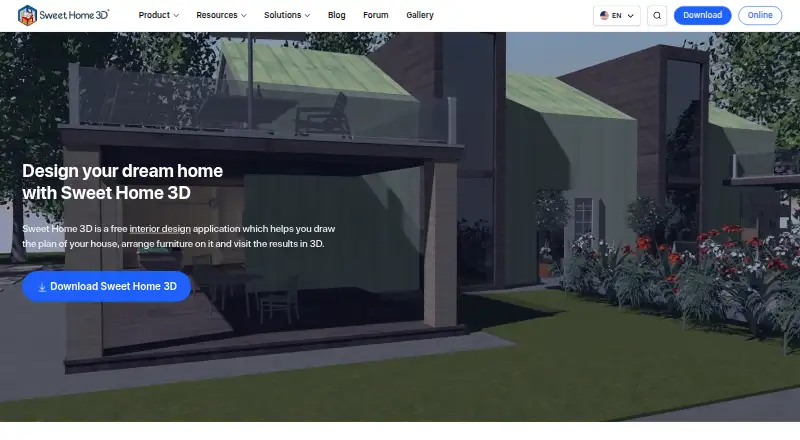
Sweet Home 3D is interior design software for homeowners, students, professionals and others planning residential spaces. Its core workflow combines dimensioned floor-plan creation with interactive aerial and virtual-visitor 3D views. Users can add walls, rooms, doors, windows, furniture, floors and ceilings, then customize dimensions, colors, textures, locations and orientations. The product is available as an offline desktop or mobile app, as well as a browser-based WebGL experience, making it suitable for users who want a free, open-source starting point for home design across major platforms.
The strongest part of the product is the connection between precise planning and visual output. Straight, round and sloping walls support varied layouts, while room annotations, dimension lines, text, arrows and a compass rose add planning detail. The searchable furniture catalog supports substantial customization, and doors and windows create automatic wall openings. For presentation, Sweet Home 3D can render photorealistic images and video with lighting and sunlight controls. It also imports blueprints, 3D models and textures, and exports to PDF, bitmap and vector images, video and standard 3D formats.
The published plans divide access into a Free desktop edition with a browser-based online version and floor-plan and 3D design features, plus Premium weekly and Premium annual options that add premium mobile app features and subscription access. Its open-source edition and Java plug-in extensibility will appeal to users who value adaptability and platform coverage. However, the product is centered on residential floor planning and home visualization rather than panorama or VR workflows. Choose Sweet Home 3D for detailed, accessible home layouts and multi-platform 3D output; choose another tool if immersive panorama or VR support is central to the project.
Your product? Our editors can test Sweet Home 3D in depth and publish a review, labelled as paid · from $149/mo →
Sweet Home 3D pricing
Sweet Home 3D fact sheet
| Free plan | Yes |
|---|---|
| Paid from | Free |
| Real-time scenes | Yes |
| 360° tours | Not verified |
| VR/AR support | Not verified |
| AI visualization tools | No |
| Video export | Yes |
| Primary platform | Hybrid |
| Mobile viewing | Yes |
| Deployment | Cloud, Desktop, Mobile |
| Platforms | Web, Windows, macOS, Linux, iOS, Android |
| Support | Docs, Community |
| Built for | Solo, Small business (editorial estimate) |
| Pricing | Free plan |
| Website | sweethome3d.com |
| Facts checked | 23 Sep 2026 |
Alternatives to Sweet Home 3D
- Autodesk VREDA deep visualization suite for automotive and industrial virtual prototyping.9.4
- EnscapeLive CAD/BIM visualization with walkthroughs, VR, panoramas and video exports.9.3
- KeyShotA deep product-rendering toolkit for CAD workflows, interactive experiences, and automation.8.9

See all Sweet Home 3D alternatives →
Sweet Home 3D vs the competition
- Sweet Home 3D vs Autodesk VRED
- Sweet Home 3D vs Enscape
- Sweet Home 3D vs KeyShot
- Sweet Home 3D vs Bentley LumenRT
- Sweet Home 3D vs Lumion
- Sweet Home 3D vs Matterport



Compare Sweet Home 3D with any tool side by side →
Also Ranked In
Sweet Home 3D is ranked in 4 of our directories.
Used Sweet Home 3D? Be the first to review it
The editor score above is our own research. What this page doesn't have yet is a reader's view — what you used Sweet Home 3D for, what worked and what didn't. No stars are seeded and no review is paid for; an editor reads every one before it appears.
Write a reviewTwo minutes · verified accounts only · read by an editor before it appears
Featured on iTechGuides

Sweet Home 3D is listed in our 3D Visualization Software directory. Add the badge to your site — it links back to this page.
<a href="https://www.itechguides.com/products/sweet-home-3d/"><img src="https://www.itechguides.com/best/badge/sweet-home-3d.svg" alt="Featured on iTechGuides" width="230" height="46"></a>
Reviewed by iTechGuides Editors · Editorial team · Updated Oct 2026
Advertiser disclosure: iTechGuides is reader-supported. Vendors can pay for top positions in our rankings and for a place on other products' pages, and we may earn a commission when you click some links. Bought places stand at the number bought; this page and our disclosure say so. Paying vendors may get a fuller, more detailed review from our editors, and that review can change their score. How we rank.
Last updated · How we research and update