
SVG Maker AI
SVG Maker AI: A vector-focused icon generator with editable SVG workflows and developer integrations. Ranked #6 of 25 in AI Icon Generators by our editors (8.7/10); pricing: Free plan; best for vector-focused teams needing editable SVG workflows.
At a glance
- Editor score8.7 / 10
- PricingFree plan
- Best forVector-focused teams needing editable SVG workflows
- Free planYes
- Paid from$15/mo
- Style referencesYes
- Facts checked21 Sep 2026
Where it wins
- Grid guidance supports consistent icon geometry and stroke styling
- Manual editing covers anchors, strokes, colors, layers, and named groups
- SVG export, React copying, REST API, Figma, Illustrator, React, and Vue support
Where it doesn't
- The Free Trial includes only 1 generation credit
- Creator Pro limits generation to 70 per month
- Team folders, batch generation, and REST API access require Business
Our verdict on SVG Maker AI
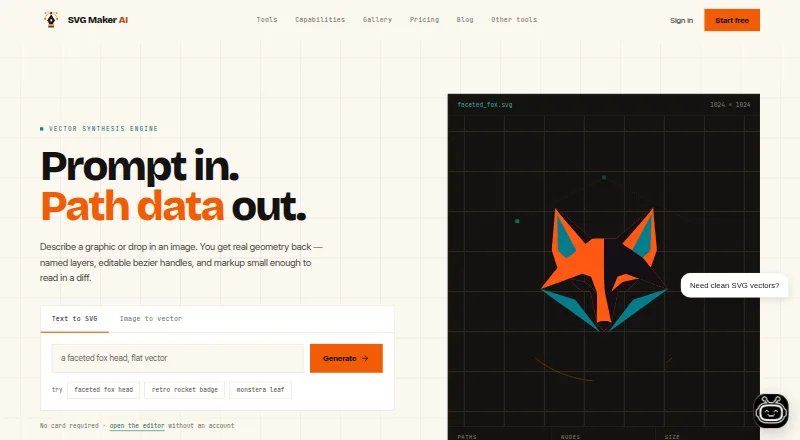
SVG Maker AI is a browser-based AI vector graphics tool for generating editable SVG icons and icon sets from prompts. It is designed for designers, developers, and teams creating client work, product interfaces, logos, and commercial icon packs. Grid-based generation lets users configure grid sizes and stroke guidance, while manual editing covers anchor points, strokes, colors, and layers. Raster images can also be converted into layered vector paths, with SVG export and React component copying for design and development workflows.
Its pricing separates ongoing plans from one-time credit packs. The Free Trial costs $0 per month and includes 1 generation credit, a manual SVG editor workspace, standard .svg export, and a community prompt library. Creator Pro costs $15 per month and adds 70 generations monthly, AI-assisted anchor point edits, a priority generation queue, and Figma and Illustrator import. Business costs $45 per month and adds 250 generations monthly, shared team folders, collaborative editor sessions, batch generation from prompt lists, REST API access, and a dedicated support contact. One-time options include 30 credits for $10, 100 credits for $25, and 250 credits for $50; these credits never expire.
The product fits workflows that need editable vector output rather than finished raster artwork. Readable SVG markup, named layer groups, and integrations with Figma, Adobe Illustrator, React, and Vue support handoff between design and development. The web and API platforms also cover both direct creation and programmatic vector management. Teams needing shared workspaces, collaborative editing, batch generation, or API access should choose Business. Individual creators can start with the Free Trial or Creator Pro, while users seeking a broader image-generation tool or higher included generation limits should consider an alternative.
Your product? Our editors can test SVG Maker AI in depth and publish a review, labelled as paid · from $149/mo →
SVG Maker AI pricing
All 6 SVG Maker AI plans and prices →
SVG Maker AI fact sheet
| Free plan | Yes |
|---|---|
| Paid from | $15/mo |
| Style references | Yes |
| Vector export | Yes |
| Batch generation | Yes |
| Export formats | SVG, PNG |
| Monthly generations | 70 /mo |
| Commercial use | Yes |
| Money-back guarantee | 7 days |
| Deployment | Cloud, Browser extension |
| Platforms | Web |
| Support | Email, Docs |
| Built for | Small business, Mid-market (editorial estimate) |
| Integrations | 4 integrations: Figma, Adobe Illustrator, React, Vue |
| Pricing | Free plan (source) |
| Website | svgmakerai.com |
| Facts checked | 21 Sep 2026 |
SVG Maker AI integrations
SVG Maker AI lists 4 integrations on its own site.
- Figma
- Adobe Illustrator
- React
- Vue
Alternatives to SVG Maker AI
- CleanVectorA flexible AI icon generator for editable, consistent vector sets.9.4
- ImagconA practical icon generator for developers who need platform-ready app assets.9.2
- AppilotA focused web tool for generating and exporting mobile app icon packages.9.1



See all SVG Maker AI alternatives →
SVG Maker AI vs the competition
- SVG Maker AI vs CleanVector
- SVG Maker AI vs Imagcon
- SVG Maker AI vs Appilot
- SVG Maker AI vs Icovela
- SVG Maker AI vs IconsMint
- SVG Maker AI vs Pixelle



Compare SVG Maker AI with any tool side by side →
Also Ranked In
SVG Maker AI is ranked in 3 of our directories.
Used SVG Maker AI? Be the first to review it
The editor score above is our own research. What this page doesn't have yet is a reader's view — what you used SVG Maker AI for, what worked and what didn't. No stars are seeded and no review is paid for; an editor reads every one before it appears.
Write a reviewTwo minutes · verified accounts only · read by an editor before it appears
Featured on iTechGuides

SVG Maker AI is listed in our AI Icon Generators directory. Add the badge to your site — it links back to this page.
<a href="https://www.itechguides.com/products/svg-maker-ai/"><img src="https://www.itechguides.com/best/badge/svg-maker-ai.svg" alt="Featured on iTechGuides" width="230" height="46"></a>
Reviewed by iTechGuides Editors · Editorial team · Updated Oct 2026
Advertiser disclosure: iTechGuides is reader-supported. Vendors can pay for top positions in our rankings and for a place on other products' pages, and we may earn a commission when you click some links. Bought places stand at the number bought; this page and our disclosure say so. Paying vendors may get a fuller, more detailed review from our editors, and that review can change their score. How we rank.
Last updated · How we research and update