Supertone Clear
Supertone Clear: A real-time voice-cleanup plug-in for preparing dialogue before a mix. Ranked #35 of 41 in AI Audio Mixing Software by our editors (4.4/10); pricing: Paid; best for editors cleaning voice audio before mixing.
At a glance
- Editor score4.4 / 10
- PricingPaid
- Best forEditors cleaning voice audio before mixing
- Free planNo
- Facts checked24 Sep 2026
Where it wins
- Reduces noise and reverb in voice audio
- Separates voice from noise and reverb, with dialogue removal for ambience
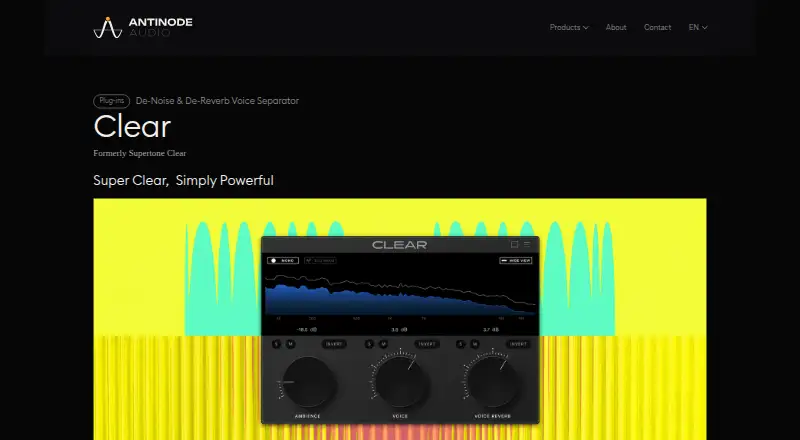
- Offers voice, ambience, and voice-reverb controls in real time
Where it doesn't
- Focuses on voice cleanup rather than full mixing
- Requires a DAW or application that supports its plug-in formats
- No free plan; the product is paid
Our verdict on Supertone Clear
Antinode Clear, formerly Supertone Clear, is a desktop audio plug-in for reducing noise and reverb in voice recordings. It is aimed at post-production engineers, video editors, streamers, and musicians who need to prepare dialogue before mixing. The focus is voice cleanup rather than a complete mixing environment, making it relevant when recorded speech needs treatment inside an existing audio workflow.
Its processing includes noise and reverb reduction, voice separation from noise and reverb, and dialogue removal that retains background ambience. Controls for voice, ambience, and voice reverb let editors work on those elements separately. Real-time processing is described for uses such as streaming as well as post-production. The plug-in supports AU, VST3, VST, and AAX formats, with 44.1, 48, and 96 kHz sample rates, and is available for Windows and macOS, including native Apple Silicon support. That range can suit varied DAW setups, provided the host application supports a compatible format.
Clear is a paid product with no free plan. Its narrower emphasis is also the main buying consideration: it can prepare voice material and help preserve ambience when dialogue is removed, but its stated features do not make it a general-purpose mixing tool. Editors looking for a focused way to clean speech before balancing a mix may find the feature set aligned with that task. Buyers who need broader mixing capabilities should look for a product centered on mixing instead. Support is offered by email.
Your product? Our editors can test Supertone Clear in depth and publish a review, labelled as paid · from $149/mo →
Supertone Clear pricing
Supertone Clear fact sheet
| Free plan | No |
|---|---|
| Paid from | Not verified |
| DAW plugin | Not verified |
| Stem separation | Not verified |
| Automatic EQ | Not verified |
| Automatic dynamics | Not verified |
| Spatial processing | Not verified |
| Maximum track count | Not verified |
| Plugin formats | Not verified |
| Deployment | Desktop |
| Platforms | Windows, macOS |
| Support | |
| Built for | Solo, Small business, Mid-market (editorial estimate) |
| Pricing | Paid (source) |
| Website | supertone.ai |
| Facts checked | 24 Sep 2026 |
Alternatives to Supertone Clear
- iZotope Neutron 5A deep AI-assisted mixing suite for producers who want detailed control inside a DAW.9.2
- iZotope Nectar 4A focused vocal suite with AI assistance, harmonies, effects, and unmasking.7.9
- EZmix 3A flexible preset-led mixing tool, but not a complete automatic full-mix solution.7.9



See all Supertone Clear alternatives →
Also Ranked In
Supertone Clear is ranked in 4 of our directories.
Used Supertone Clear? Be the first to review it
The editor score above is our own research. What this page doesn't have yet is a reader's view — what you used Supertone Clear for, what worked and what didn't. No stars are seeded and no review is paid for; an editor reads every one before it appears.
Write a reviewTwo minutes · verified accounts only · read by an editor before it appears
Featured on iTechGuides

Supertone Clear is listed in our AI Audio Mixing Software directory. Add the badge to your site — it links back to this page.
<a href="https://www.itechguides.com/products/supertone-clear/"><img src="https://www.itechguides.com/best/badge/supertone-clear.svg" alt="Featured on iTechGuides" width="230" height="46"></a>
Reviewed by iTechGuides Editors · Editorial team · Updated Oct 2026
Advertiser disclosure: iTechGuides is reader-supported. Vendors can pay for top positions in our rankings and for a place on other products' pages, and we may earn a commission when you click some links. Bought places stand at the number bought; this page and our disclosure say so. Paying vendors may get a fuller, more detailed review from our editors, and that review can change their score. How we rank.
Last updated · How we research and update