
Summarize Video to Text
Summarize Video to Text: A flexible video summarizer with broad inputs, useful exports, and a clear Pro tier. Ranked #7 of 25 in AI Video Summarizers by our editors (7.7/10); pricing: Free plan; best for cross-platform YouTube and social-video summaries.
At a glance
- Editor score7.7 / 10
- PricingFree plan
- Best forCross-platform YouTube and social-video summaries
- Free planYes
- Paid from$108/yr
- YouTube supportYes
- Facts checked21 Sep 2026
Where it wins
- Summarizes YouTube, TikTok, Instagram, X, and uploaded video files
- Combines transcripts, chapters, mind maps, and grounded Q&A
- Exports to Notion, Obsidian, and Markdown across web and mobile
Where it doesn't
- The free plan limits daily summaries
- Pro's unlimited summaries are subject to fair use
- Videos are limited to six hours on Pro
Our verdict on Summarize Video to Text
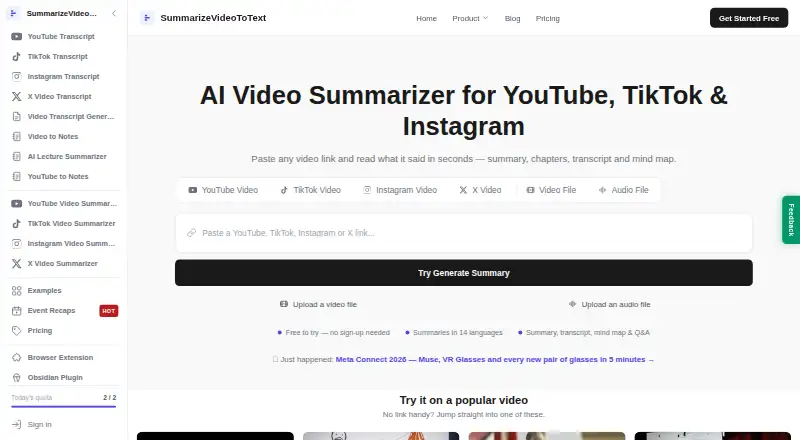
Summarize Video to Text is a browser-based AI video summarizer for students, professionals, creators, and researchers. It accepts links from YouTube, TikTok, Instagram, and X, along with uploaded video files. The service generates AI summaries, full transcripts, timestamped chapters, mind maps, and transcript-grounded Q&A. Results can be produced in 14 output languages, and the product is available through web, iOS, Android, and a Chrome extension. Its broad input coverage makes it a practical fit for people who move between long-form video, short social clips, and saved files.
The free plan provides two summaries a day without an account or three summaries a day when signed in, along with saved watch history, TikTok and Instagram Reels summaries, video Q&A, and 14 output languages. According to the published plans, Pro costs $12 per month or $108 per year. Both Pro options include everything in Free, unlimited summaries subject to fair use, and videos up to six hours. That gives occasional viewers a useful starting point, while frequent researchers and professionals have a direct paid upgrade for higher-volume work and longer videos.
Its strongest distinction is the combination of comprehension tools and knowledge-work exports. Timestamped chapters help organize a video, mind maps provide a visual structure, and transcript-grounded Q&A enables focused questions about the source. Notion, Obsidian, and Markdown exports make the results easier to carry into existing note-taking workflows, with an Obsidian plugin also listed. Choose it if you need one service for YouTube and social-video summaries across several platforms. It is less suitable for users whose needs exceed the six-hour Pro limit or who require more than the free plan's daily summary allowance.
Your product? Our editors can test Summarize Video to Text in depth and publish a review, labelled as paid · from $149/mo →
Summarize Video to Text pricing
All 2 Summarize Video to Text plans and prices →
Summarize Video to Text fact sheet
| Free plan | Yes |
|---|---|
| Paid from | $108/yr |
| YouTube support | Yes |
| Video uploads | Yes |
| Transcript output | Yes |
| Chapter generation | Yes |
| Maximum video length | 360 min |
| Input sources | YouTube, TikTok, Instagram, X, uploaded video files |
| Deployment | Cloud, Mobile, Browser extension |
| Platforms | Web, iOS, Android, Chrome extension |
| Support | Email, Docs |
| Built for | Solo, Small business (editorial estimate) |
| Integrations | 3 integrations: Notion, Obsidian, Markdown |
| Pricing | Free plan (source) |
| Website | summarizevideototext.com |
| Facts checked | 21 Sep 2026 |
Summarize Video to Text integrations
Summarize Video to Text lists 3 integrations on its own site.
- Notion
- Obsidian
- Markdown
Alternatives to Summarize Video to Text
- GlaspA flexible summarizer for YouTube, audio files, PDFs, transcripts, and saved research.8.9
- NoteGPTA flexible video summarizer for heavy YouTube use, batch work, and varied input sources.8.6
- MindgraspA broad AI study workspace that turns videos, lectures, and documents into study aids.8.0


See all Summarize Video to Text alternatives →
Summarize Video to Text vs the competition
- Summarize Video to Text vs Glasp
- Summarize Video to Text vs NoteGPT
- Summarize Video to Text vs Mindgrasp
- Summarize Video to Text vs Video Highlight
- Summarize Video to Text vs SonicScribe
- Summarize Video to Text vs Synop


Compare Summarize Video to Text with any tool side by side →
Used Summarize Video to Text? Be the first to review it
The editor score above is our own research. What this page doesn't have yet is a reader's view — what you used Summarize Video to Text for, what worked and what didn't. No stars are seeded and no review is paid for; an editor reads every one before it appears.
Write a reviewTwo minutes · verified accounts only · read by an editor before it appears
Featured on iTechGuides

Summarize Video to Text is listed in our AI Video Summarizers directory. Add the badge to your site — it links back to this page.
<a href="https://www.itechguides.com/products/summarize-video-to-text/"><img src="https://www.itechguides.com/best/badge/summarize-video-to-text.svg" alt="Featured on iTechGuides" width="230" height="46"></a>
Reviewed by iTechGuides Editors · Editorial team · Updated Sep 2026
Advertiser disclosure: iTechGuides is reader-supported. Vendors can pay for top positions in our rankings and for a place on other products' pages, and we may earn a commission when you click some links. Bought places stand at the number bought; this page and our disclosure say so. Paying vendors may get a fuller, more detailed review from our editors, and that review can change their score. How we rank.
Last updated · How we research and update