
Subtitles.app
Subtitles.app: Transcribe, translate, and export subtitles with free use or pay-as-you-go Pro processing. Ranked #43 of 99 in AI Video Caption Generators by our editors (3.2/10); pricing: Free plan; best for pay-as-you-go users needing multilingual caption exports.
At a glance
- Editor score3.2 / 10
- PricingFree plan
- Best forPay-as-you-go users needing multilingual caption exports
- Free planYes
- Paid from$0.99/unit usage-based
- Caption stylingYes
- Facts checked22 Sep 2026
Where it wins
- Translates content into up to 120 languages
- Exports timed SRT, VTT, and TXT, plus paid ASS files
- Pro includes speaker identification, batch processing, and API access
Where it doesn't
- Free Use limits daily usage and file length to 30 minutes
- The free plan allows only one watermarked clip up to 5 minutes
- Pro processing is charged by the hour rather than as a monthly plan
Our verdict on Subtitles.app
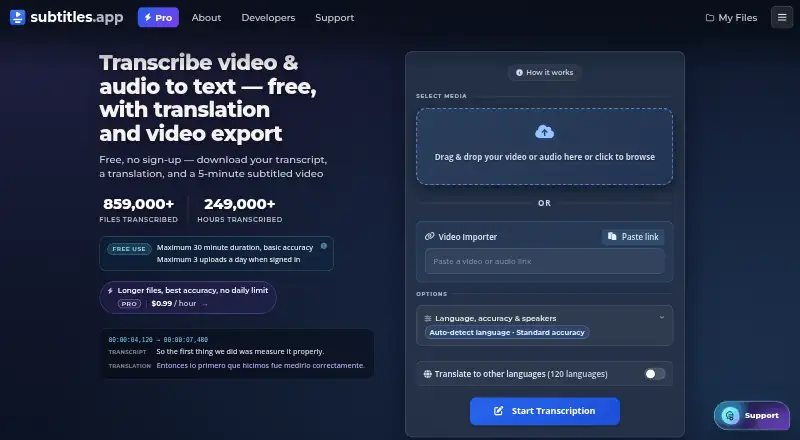
Subtitles.app is a web-based transcription and subtitle tool for creators, students, journalists, businesses, and casual users. It accepts audio and video uploads, creates timed transcripts and subtitle files, translates content into up to 120 languages, and can export a subtitled video. Its combination of free access and hourly Pro processing suits occasional workloads, while batch transcription and API access also serve teams handling repeated captioning tasks. The service runs in the cloud and is available through the web and API.
The free and paid options make the cost structure straightforward. Free Use supports files up to 30 minutes with standard accuracy and limited daily usage; it also permits one watermarked video clip of up to 5 minutes. Pro costs $0.99 per hour and adds highest accuracy, no duration limit, support for files up to 10 GB, speaker identification, a subtitle editor, and API access. Because Pro is usage-based rather than a monthly subscription, it can fit sporadic longer jobs without a recurring plan. Frequent processing may make hourly billing less suitable than a fixed subscription would be.
Exports and transcript tools are a notable part of the offering: users can download timed SRT, VTT, and TXT files, with ASS downloads available on paid processing, or burn subtitles into video. Subtitle appearance is visually adjustable. Speaker identification includes suggested names, and searchable transcripts can be filtered by speaker; DeepL is also listed as an integration. Email, chat, community, and documentation are support channels. Subtitles.app is a fit for people who need multilingual exports or occasional caption work, especially when hourly pricing matches their workload. Those needing regular high-volume processing on a predictable monthly bill, or unwatermarked clips under the free plan, should look elsewhere.
Your product? Our editors can test Subtitles.app in depth and publish a review, labelled as paid · from $149/mo →
Subtitles.app pricing
All 2 Subtitles.app plans and prices →
Subtitles.app fact sheet
| Free plan | Yes |
|---|---|
| Paid from | $0.99/unit usage-based |
| Max video length | Not verified |
| Caption languages | 100 languages |
| Caption styling | Yes |
| Subtitle export | Other formats |
| Burn-in captions | Yes |
| Speaker identification | Yes |
| Brand caption presets | Not verified |
| Deployment | Cloud |
| Platforms | Web |
| Support | Email, Live chat, Community, Docs |
| Built for | Solo, Small business, Mid-market (editorial estimate) |
| Integrations | 1 integrations: DeepL |
| Pricing | Free plan (source) |
| Website | subtitles.app |
| Facts checked | 22 Sep 2026 |
Subtitles.app integrations
Subtitles.app lists 1 integrations on its own site.
- DeepL
Alternatives to Subtitles.app
- WhisperA flexible local transcription engine, but not a complete caption-editing product.9.2
- CaptionHubA workflow-rich caption and localization platform for enterprise video teams.8.8
- SubmagicAn all-in-one caption editor with styling, text editing, B-roll, and publishing tools.8.7


See all Subtitles.app alternatives →
Used Subtitles.app? Be the first to review it
The editor score above is our own research. What this page doesn't have yet is a reader's view — what you used Subtitles.app for, what worked and what didn't. No stars are seeded and no review is paid for; an editor reads every one before it appears.
Write a reviewTwo minutes · verified accounts only · read by an editor before it appears
Featured on iTechGuides

Subtitles.app is listed in our AI Video Caption Generators directory. Add the badge to your site — it links back to this page.
<a href="https://www.itechguides.com/products/subtitles-app/"><img src="https://www.itechguides.com/best/badge/subtitles-app.svg" alt="Featured on iTechGuides" width="230" height="46"></a>
Reviewed by iTechGuides Editors · Editorial team · Updated Oct 2026
Advertiser disclosure: iTechGuides is reader-supported. Vendors can pay for top positions in our rankings and for a place on other products' pages, and we may earn a commission when you click some links. Bought places stand at the number bought; this page and our disclosure say so. Paying vendors may get a fuller, more detailed review from our editors, and that review can change their score. How we rank.
Last updated · How we research and update