
SubtitleFlow
SubtitleFlow: A subtitle-file workflow with translation, bilingual exports, and a one-time credit option. Ranked #81 of 99 in AI Video Caption Generators by our editors (3.0/10); pricing: Paid; best for creators and translators needing multilingual subtitle files.
At a glance
- Editor score3.0 / 10
- PricingPaid
- Best forCreators and translators needing multilingual subtitle files
- Free planNo
- Paid from$14.99/mo
- Facts checked22 Sep 2026
Where it wins
- Transcribes video and audio into timed captions
- Translates subtitles into 100+ languages with timestamps preserved
- Exports SRT, VTT, and bilingual subtitle files
Where it doesn't
- No free plan; the free preview is limited
- Standard's batch uploads are limited to 5 files
- Burn-in captions and caption styling are not verified
Our verdict on SubtitleFlow
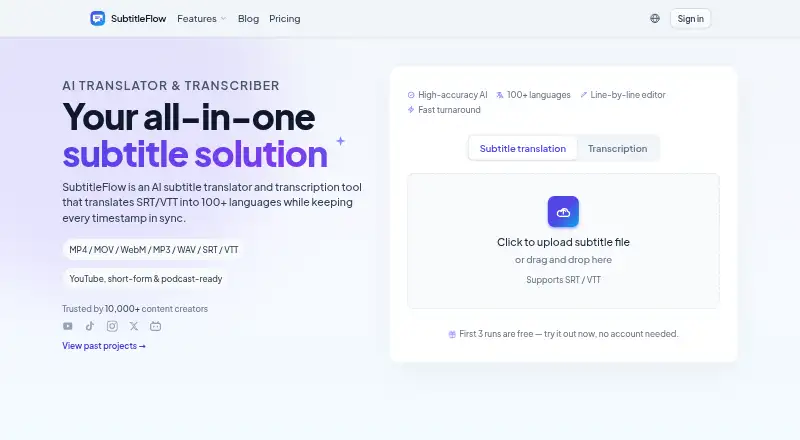
SubtitleFlow is a browser-based tool for transcribing video and audio into timed captions, translating subtitles, and editing them line by line. It is aimed at creators, podcasters, course producers, YouTubers, small video teams, and translators who need subtitle files rather than an all-purpose video editor. Its exports include SRT and VTT, and translated captions retain their timing. The workflow also accepts subtitle files, alongside video and audio, making it relevant to people adapting existing subtitle tracks as well as creating new ones.
Translation is the standout capability: SubtitleFlow supports 100+ languages, bilingual subtitle export, and context-aware translation with preserved timestamps. A custom glossary is included on Standard, alongside AI transcription and translation, watermark-free smart SRT formatting, and batch upload for up to five files. Browser-side audio extraction and processing support a browser-based workflow. The product is available on the web, with cloud and browser-extension deployment listed, and email is its stated support channel. This combination suits subtitle-focused work across multiple languages, especially where timing and terminology matter; buyers seeking caption burn-in or detailed visual styling should compare tools that explicitly offer those capabilities.
Pricing offers both recurring plans and a one-time purchase. Pay as you go costs $5 once for credits that never expire, usable for transcription or translation. Standard is $14.99 per month and adds the listed glossary, batch uploads, and watermark-free smart SRT formatting. Plus is $19.99 per month, though its included features are not specified here. There is no free plan, although a limited free preview is described. The one-time option can suit occasional projects, while regular subtitle production may better fit a monthly plan. SubtitleFlow is a focused choice for multilingual subtitle files; it is less suitable if the priority is burned-in captions or visual caption design.
Your product? Our editors can test SubtitleFlow in depth and publish a review, labelled as paid · from $149/mo →
SubtitleFlow pricing
All 3 SubtitleFlow plans and prices →
SubtitleFlow fact sheet
| Free plan | No |
|---|---|
| Paid from | $14.99/mo |
| Max video length | Not verified |
| Caption languages | 100 languages |
| Caption styling | Not verified |
| Subtitle export | Other formats |
| Burn-in captions | No |
| Speaker identification | Not verified |
| Brand caption presets | Not verified |
| Deployment | Cloud, Browser extension |
| Platforms | Web |
| Support | |
| Built for | Solo, Small business, Mid-market (editorial estimate) |
| Pricing | Paid (source) |
| Website | subtitleflow.com |
| Facts checked | 22 Sep 2026 |
Alternatives to SubtitleFlow
- WhisperA flexible local transcription engine, but not a complete caption-editing product.9.2
- CaptionHubA workflow-rich caption and localization platform for enterprise video teams.8.8
- SubmagicAn all-in-one caption editor with styling, text editing, B-roll, and publishing tools.8.7


See all SubtitleFlow alternatives →
Used SubtitleFlow? Be the first to review it
The editor score above is our own research. What this page doesn't have yet is a reader's view — what you used SubtitleFlow for, what worked and what didn't. No stars are seeded and no review is paid for; an editor reads every one before it appears.
Write a reviewTwo minutes · verified accounts only · read by an editor before it appears
Featured on iTechGuides

SubtitleFlow is listed in our AI Video Caption Generators directory. Add the badge to your site — it links back to this page.
<a href="https://www.itechguides.com/products/subtitleflow/"><img src="https://www.itechguides.com/best/badge/subtitleflow.svg" alt="Featured on iTechGuides" width="230" height="46"></a>
Reviewed by iTechGuides Editors · Editorial team · Updated Oct 2026
Advertiser disclosure: iTechGuides is reader-supported. Vendors can pay for top positions in our rankings and for a place on other products' pages, and we may earn a commission when you click some links. Bought places stand at the number bought; this page and our disclosure say so. Paying vendors may get a fuller, more detailed review from our editors, and that review can change their score. How we rank.
Last updated · How we research and update