
Subtitle Composer
Subtitle Composer: A capable free subtitle editor for Linux with transcription, translation, and timing tools. Ranked #18 of 30 in Subtitle Software by our editors (7.5/10); pricing: Free plan; best for linux users wanting a capable subtitle editor.
At a glance
- Editor score7.5 / 10
- PricingFree plan
- Best forLinux users wanting a capable subtitle editor
- Free planYes
- Paid fromFree
- Facts checked20 Sep 2026
Where it wins
- Broad support for text and graphics subtitle formats
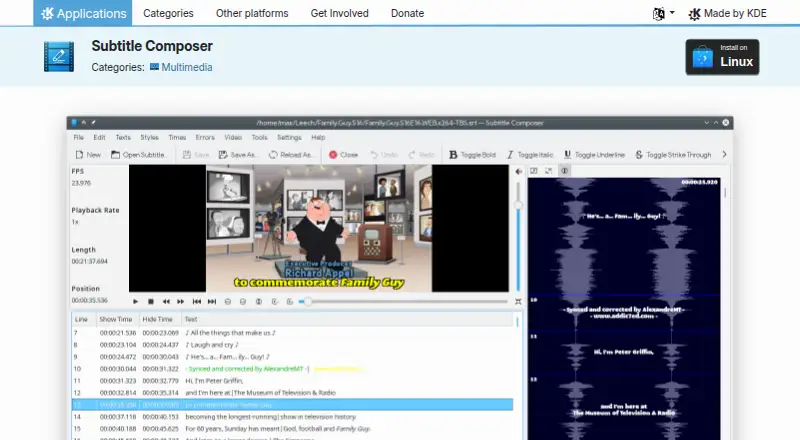
- Waveform editing, video preview, and synchronization tools
- Includes speech recognition, translation, OCR, and scripting
Where it doesn't
- Linux-only distribution narrows platform coverage
- Desktop focus is less suited to cross-platform teams
- Its feature set centers on subtitles rather than broader media workflows
Our verdict on Subtitle Composer
Subtitle Composer is an open-source, text-based subtitle editor developed by KDE for Linux users creating, editing, synchronizing, translating, and styling subtitles. It combines timeline and waveform editing with an integrated video-player preview, audio-stream selection, spell checking, timing-error detection, OCR, and demuxing support. The application is suited to editors who want detailed control over subtitle timing and presentation in a desktop workflow.
Its strongest case is feature depth. Subtitle Composer can open and save SRT, WebVTT, SSA/ASS, MicroDVD, MPlayer, TMPlayer, and YouTube subtitle formats. Speech recognition from audio or video uses PocketSphinx, while side-by-side editing supports translation workflows. Styling includes positioning, alignment, CSS classes, and WebVTT voice tags. Synchronization tools cover timeline stretching, time shifting, scaling, and frame-rate conversion, and JavaScript scripting adds room for repeatable tasks.
The pricing model is straightforward: Subtitle Composer is free and open source, distributed for Linux through package managers, AppImage, and Flathub, under the GPL-2.0+ license. That makes it a practical choice for Linux users who value format coverage and editing control without a paid software tier. Its main trade-off is platform scope: a Linux-only desktop application is a weaker fit for Windows or macOS users and for teams that need a shared, cross-platform workspace. Choose Subtitle Composer for focused subtitle production on Linux; choose an alternative if broader platform coverage or a wider media-production environment matters more.
Your product? Our editors can test Subtitle Composer in depth and publish a review, labelled as paid · from $149/mo →
Subtitle Composer pricing
Subtitle Composer fact sheet
| Free plan | Yes |
|---|---|
| Paid from | Free |
| Max video length | Not verified |
| Auto-captioning | Yes |
| Subtitle translation | Yes |
| Speaker labels | Yes |
| SRT export | Yes |
| VTT export | Yes |
| Deployment | Desktop |
| Platforms | Linux |
| Support | Community, Docs |
| Built for | Solo, Small business (editorial estimate) |
| Pricing | Free plan |
| Website | apps.kde.org |
| Facts checked | 20 Sep 2026 |
Alternatives to Subtitle Composer
- Subtitle EditA broad, free subtitle toolkit for local editing, transcription, translation, and video processing.9.4
- SRTGenA broad subtitle toolkit for creators who need transcription, localization, and exports.9.2
- EditsubEditsub combines broad subtitle tools, collaboration, and a low-cost annual Pro plan.9.0


See all Subtitle Composer alternatives →
Used Subtitle Composer? Be the first to review it
The editor score above is our own research. What this page doesn't have yet is a reader's view — what you used Subtitle Composer for, what worked and what didn't. No stars are seeded and no review is paid for; an editor reads every one before it appears.
Write a reviewTwo minutes · verified accounts only · read by an editor before it appears
Featured on iTechGuides

Subtitle Composer is listed in our Subtitle Software directory. Add the badge to your site — it links back to this page.
<a href="https://www.itechguides.com/products/subtitle-composer/"><img src="https://www.itechguides.com/best/badge/subtitle-composer.svg" alt="Featured on iTechGuides" width="230" height="46"></a>
Reviewed by iTechGuides Editors · Editorial team · Updated Oct 2026
Advertiser disclosure: iTechGuides is reader-supported. Vendors can pay for top positions in our rankings and for a place on other products' pages, and we may earn a commission when you click some links. Bought places stand at the number bought; this page and our disclosure say so. Paying vendors may get a fuller, more detailed review from our editors, and that review can change their score. How we rank.
Last updated · How we research and update