
Editsub
Editsub: Editsub combines broad subtitle tools, collaboration, and a low-cost annual Pro plan. Ranked #3 of 30 in Subtitle Software by our editors (9.0/10); pricing: Free plan; best for affordable collaborative subtitle editing.
At a glance
- Editor score9.0 / 10
- PricingFree plan
- Best forAffordable collaborative subtitle editing
- Free planYes
- Paid from$4/mo
- Facts checked20 Sep 2026
Where it wins
- Free plan includes editing, translation, conversion, and transcription
- Supports web, iOS, Android, Windows, macOS, and Linux
- Pro adds realtime collaboration, AI enhancement, and unlimited storage
Where it doesn't
- Free plan allows up to 10 subtitle files
- Pro pricing is billed annually at $4 per user per month
- Realtime editing and collaboration are Pro-only features
Our verdict on Editsub
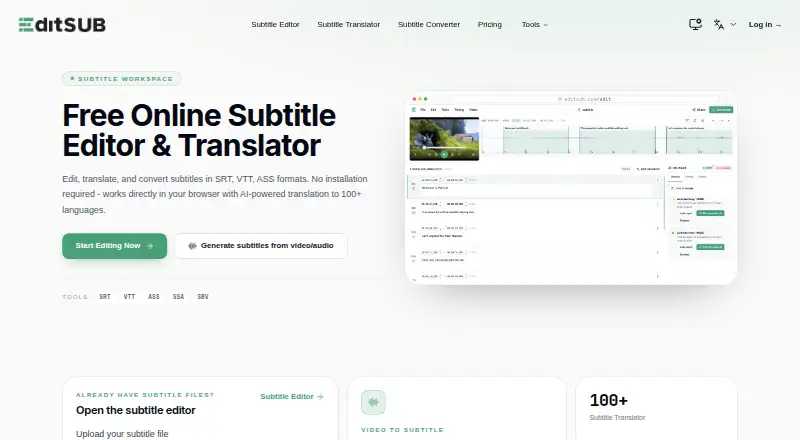
Editsub is a subtitle workspace for content creators, video editors, educators, and language learners. It combines subtitle text and timing edits with video preview, transcription from local video or audio, translation to more than 100 languages, format conversion, and subtitle cleaning. Projects can be saved in cloud storage, and the service is available across web, iOS, Android, Windows, macOS, and Linux.
The free plan covers core subtitle workflows, including free video-to-subtitle minutes each month, editing, conversion, translation, cleaning, AI translations, and exports in SRT, VTT, TXT, and other formats. It supports up to 10 subtitle files. Pro costs $4 per user per month when billed annually and adds 1,500 credits each month, realtime subtitle editing, realtime collaboration chat, AI subtitle enhancement, a priority transcription queue, and unlimited subtitle file storage. One-time credit packs are also available: the Starter pack provides 1,000 credits for $5, while the Standard pack provides 5,000 credits for $20; both never expire.
Editsub’s strongest fit is for teams or individuals who need several subtitle tasks in one workspace rather than a narrowly focused editor. Its AI co-pilot addresses timing, reading-speed, and transcription issues, while support for SRT, VTT, ASS, SSA, and SBV helps with common subtitle-file workflows. Buyers should choose it when cross-platform access, translation, transcription, and collaboration matter together. Users who need more than 10 files on the free plan will need Pro or another paid option, and teams that require realtime editing or collaboration must select Pro.
Your product? Our editors can test Editsub in depth and publish a review, labelled as paid · from $149/mo →
Editsub pricing
All 4 Editsub plans and prices →
Editsub fact sheet
| Free plan | Yes |
|---|---|
| Paid from | $4/mo |
| Max video length | Not verified |
| Auto-captioning | Yes |
| Subtitle translation | Yes |
| Speaker labels | Not verified |
| SRT export | Yes |
| VTT export | Yes |
| Deployment | Cloud, Browser extension |
| Platforms | Web, iOS, Android, Windows, macOS, Linux |
| Support | |
| Built for | Solo, Small business (editorial estimate) |
| Pricing | Free plan (source) |
| Website | editsub.com |
| Facts checked | 20 Sep 2026 |
Alternatives to Editsub
- Subtitle EditA broad, free subtitle toolkit for local editing, transcription, translation, and video processing.9.4
- SRTGenA broad subtitle toolkit for creators who need transcription, localization, and exports.9.2
- JublerA broad free subtitle editor for multi-format production, timing, translation, and validation.8.9


See all Editsub alternatives →
Editsub vs the competition
- Editsub vs Subtitle Edit
- Editsub vs SRTGen
- Editsub vs Jubler
- Editsub vs EZTitles
- Editsub vs SubtitleNEXT
- Editsub vs FAB Subtitler



Compare Editsub with any tool side by side →
Used Editsub? Be the first to review it
The editor score above is our own research. What this page doesn't have yet is a reader's view — what you used Editsub for, what worked and what didn't. No stars are seeded and no review is paid for; an editor reads every one before it appears.
Write a reviewTwo minutes · verified accounts only · read by an editor before it appears
Featured on iTechGuides

Editsub is listed in our Subtitle Software directory. Add the badge to your site — it links back to this page.
<a href="https://www.itechguides.com/products/editsub/"><img src="https://www.itechguides.com/best/badge/editsub.svg" alt="Featured on iTechGuides" width="230" height="46"></a>
Reviewed by iTechGuides Editors · Editorial team · Updated Oct 2026
Advertiser disclosure: iTechGuides is reader-supported. Vendors can pay for top positions in our rankings and for a place on other products' pages, and we may earn a commission when you click some links. Bought places stand at the number bought; this page and our disclosure say so. Paying vendors may get a fuller, more detailed review from our editors, and that review can change their score. How we rank.
Last updated · How we research and update