Subnautica 2 Mod Manager
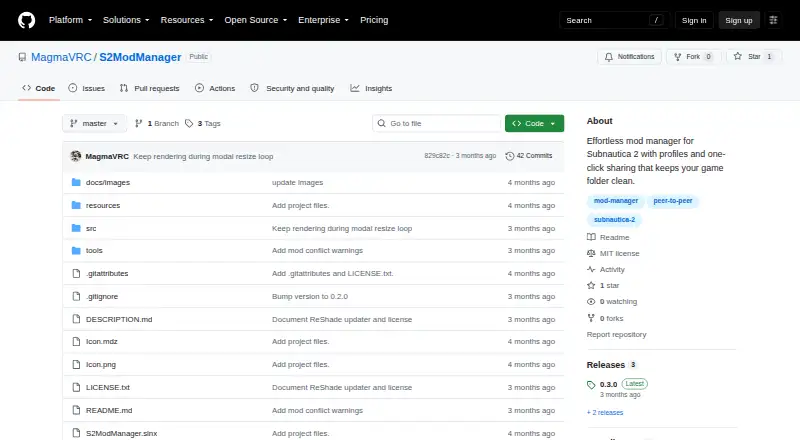
Subnautica 2 Mod Manager: A focused Windows tool for profiles, load order, conflicts, and Steam launching. Ranked #64 of 79 in Game Mod Managers by our editors (3.0/10); pricing: Open source; best for subnautica 2 early mod workflows.
At a glance
- Editor score3.0 / 10
- PricingOpen source
- Best forSubnautica 2 early mod workflows
- Paid fromFree
- Mod profilesYes
- Facts checked20 Sep 2026
Where it wins
- Named profiles keep enabled mod sets isolated.
- Conflict warnings cover duplicate PAK names and UE4SS targets.
- UE4SS, ReShade, profile sharing, and Steam launching are built in.
Where it doesn't
- Windows-only support limits platform choice.
- Mods must be imported manually rather than sourced in the manager.
- Mod updates remain a manual workflow.
Our verdict on Subnautica 2 Mod Manager
Subnautica 2 Mod Manager is a native Windows application for installing, organizing, enabling, disabling, and launching Subnautica 2 mods. It is aimed at players managing PAK files, UE4SS script and blueprint mods, and ReShade setups across different configurations. Mods can be added by drag and drop or through an Add mods button, then stored in a managed library. Only enabled profile content is kept in the game folder, while named profiles preserve separate mod arrangements.
Its strongest area is profile and load-order management. Users can enable or disable mods with one click, rearrange load order by dragging, and receive warnings for duplicate PAK names and UE4SS targets. The manager also supports ZIP, RAR, and 7Z archives by extracting and classifying their contents. One-click UE4SS installation and ReShade management with per-profile presets extend the workflow beyond simple file copying. Steam launching uses the active profile, connecting configuration directly to starting the game.
The product is a focused choice for Windows players building early Subnautica 2 mod workflows, particularly those who want isolated profiles, conflict warnings, and local control. It supports peer-to-peer and offline profile sharing, including export and import, and connects with Steam and GitHub. The tradeoff is a narrow platform and source workflow: it is Windows-only, uses manual mod import, and does not provide a verified automatic process for detecting and applying mod updates. Players who want local profile control and a copy-based deployment method should consider it; those seeking broader platform support or an integrated mod-source and update workflow should choose an alternative.
Your product? Our editors can test Subnautica 2 Mod Manager in depth and publish a review, labelled as paid · from $149/mo →
Subnautica 2 Mod Manager pricing
Subnautica 2 Mod Manager fact sheet
| Free plan | Not verified |
|---|---|
| Paid from | Free |
| Mod profiles | Yes |
| Conflict detection | Yes |
| Automatic updates | Not verified |
| Mod source access | Manual import |
| Supported platforms | Windows |
| Deployment method | Copy |
| Deployment | Desktop |
| Platforms | Windows |
| Integrations | 2 integrations: Steam, GitHub |
| Pricing | Open source |
| Website | github.com |
| Facts checked | 20 Sep 2026 |
Subnautica 2 Mod Manager integrations
Subnautica 2 Mod Manager lists 2 integrations on its own site.
- Steam
- GitHub
Alternatives to Subnautica 2 Mod Manager
- CurseForgeA broad Minecraft mod marketplace with profiles, version filters, dependencies, and updates.9.3
- VortexA capable Windows manager for Nexus Mods users who need profiles, sorting, and conflict control.9.1
- ModrinthA free Minecraft: Java Edition catalog and app for finding, managing, and sharing content.8.8


See all Subnautica 2 Mod Manager alternatives →
Used Subnautica 2 Mod Manager? Be the first to review it
The editor score above is our own research. What this page doesn't have yet is a reader's view — what you used Subnautica 2 Mod Manager for, what worked and what didn't. No stars are seeded and no review is paid for; an editor reads every one before it appears.
Write a reviewTwo minutes · verified accounts only · read by an editor before it appears
Featured on iTechGuides

Subnautica 2 Mod Manager is listed in our Game Mod Managers directory. Add the badge to your site — it links back to this page.
<a href="https://www.itechguides.com/products/subnautica-2-mod-manager/"><img src="https://www.itechguides.com/best/badge/subnautica-2-mod-manager.svg" alt="Featured on iTechGuides" width="230" height="46"></a>
Reviewed by iTechGuides Editors · Editorial team · Updated Oct 2026
Advertiser disclosure: iTechGuides is reader-supported. Vendors can pay for top positions in our rankings and for a place on other products' pages, and we may earn a commission when you click some links. Bought places stand at the number bought; this page and our disclosure say so. Paying vendors may get a fuller, more detailed review from our editors, and that review can change their score. How we rank.
Last updated · How we research and update