SubLime Captions
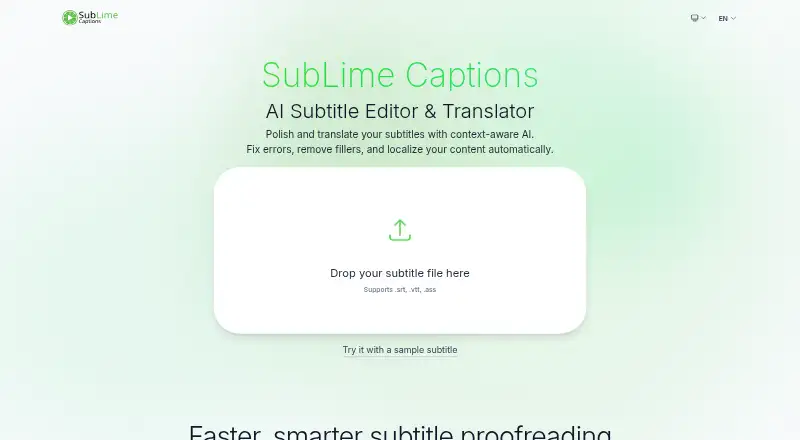
SubLime Captions: A free web tool for cleaning up and translating existing subtitle files. Ranked #25 of 30 in Subtitle Software by our editors (6.6/10); pricing: Free plan; best for free subtitle cleanup and translation.
At a glance
- Editor score6.6 / 10
- PricingFree plan
- Best forFree subtitle cleanup and translation
- Free planYes
- Paid fromFree
- Facts checked20 Sep 2026
Where it wins
- AI proofreading covers spelling, punctuation, and grammar.
- Context-aware translation supports multiple languages.
- Works with SRT, VTT, and ASS subtitle files.
Where it doesn't
- It refines existing subtitles rather than generating captions from video.
- The web-based workflow does not cover subtitle timing.
- A daily AI allowance applies per public IP.
Our verdict on SubLime Captions
SubLime Captions is a browser-based tool for proofreading, editing, and translating existing subtitle files. It is aimed at creators, editors, and localization teams who already have subtitles in SRT, VTT, or ASS format and need cleaner text or versions in other languages. Its workflow focuses on text refinement: users upload a subtitle file, then apply AI-assisted corrections, cleanup filters, translation, and custom instructions for tone, terminology, or localization.
The strongest part of the product is its focused editing toolkit. AI proofreading addresses spelling, punctuation, and grammar, while filters can remove filler words, stutters, profanity, and punctuation issues. Context-aware translation and multiple-language support extend the tool beyond basic correction, and natural-language instructions provide additional control over how the subtitle text is refined. This makes SubLime Captions a practical fit for preparing existing subtitle files for publication or localization without adding a paid plan to the workflow.
The trade-off is scope. SubLime Captions is designed to refine and translate subtitle files, not to generate captions directly from video, manage subtitle timing, or provide a video-export workflow. It is available on the web, and the service applies a daily AI allowance per public IP, which may shape how teams share access. Choose it when your starting point is an existing subtitle file and your priority is language quality or translation. Choose a broader captioning or video-editing tool when transcription, timing controls, or video output are central requirements.
Your product? Our editors can test SubLime Captions in depth and publish a review, labelled as paid · from $149/mo →
SubLime Captions pricing
SubLime Captions fact sheet
| Free plan | Yes |
|---|---|
| Paid from | Free |
| Max video length | Not verified |
| Auto-captioning | Not verified |
| Subtitle translation | Yes |
| Speaker labels | Not verified |
| SRT export | Not verified |
| VTT export | Not verified |
| Deployment | Cloud |
| Platforms | Web |
| Pricing | Free plan |
| Website | sublimecaptions.com |
| Facts checked | 20 Sep 2026 |
Alternatives to SubLime Captions
- Subtitle EditA broad, free subtitle toolkit for local editing, transcription, translation, and video processing.9.4
- SRTGenA broad subtitle toolkit for creators who need transcription, localization, and exports.9.2
- EditsubEditsub combines broad subtitle tools, collaboration, and a low-cost annual Pro plan.9.0


See all SubLime Captions alternatives →
Used SubLime Captions? Be the first to review it
The editor score above is our own research. What this page doesn't have yet is a reader's view — what you used SubLime Captions for, what worked and what didn't. No stars are seeded and no review is paid for; an editor reads every one before it appears.
Write a reviewTwo minutes · verified accounts only · read by an editor before it appears
Featured on iTechGuides

SubLime Captions is listed in our Subtitle Software directory. Add the badge to your site — it links back to this page.
<a href="https://www.itechguides.com/products/sublime-captions/"><img src="https://www.itechguides.com/best/badge/sublime-captions.svg" alt="Featured on iTechGuides" width="230" height="46"></a>
Reviewed by iTechGuides Editors · Editorial team · Updated Oct 2026
Advertiser disclosure: iTechGuides is reader-supported. Vendors can pay for top positions in our rankings and for a place on other products' pages, and we may earn a commission when you click some links. Bought places stand at the number bought; this page and our disclosure say so. Paying vendors may get a fuller, more detailed review from our editors, and that review can change their score. How we rank.
Last updated · How we research and update