Studybo
Studybo: Studybo pairs flexible focus timers with study planning and distraction blocking. Ranked #4 of 42 in Study Timer Apps by our editors (7.8/10); pricing: Free plan; best for free web and Android study planning with blocking.
At a glance
- Editor score7.8 / 10
- PricingFree plan
- Best forFree web and Android study planning with blocking
- Free planYes
- Paid fromFree
- Study goalsYes
- Facts checked24 Sep 2026
Where it wins
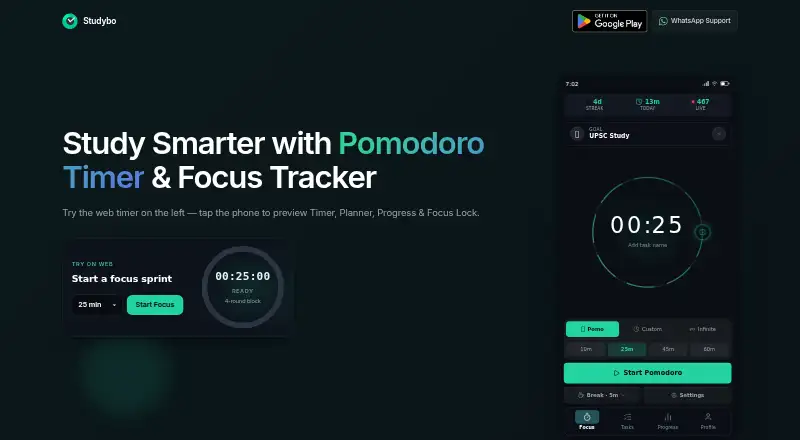
- Pomodoro, custom and infinite timers with adjustable focus and breaks
- Daily and weekly planning boards, goals and task organization
- Focus Lock blocks distracting apps during timer sessions
Where it doesn't
- Full planner and focus tools are presented as an Android app
- Focus Lock is limited to blocking apps during timer sessions
- Email is the listed support channel
Our verdict on Studybo
Studybo combines study timers, planning and progress tracking for students and exam candidates. Its Pomodoro, custom and infinite focus modes support different ways to structure a session, while a simple web timer offers a lighter option. The full planner and focus tools are presented as a mobile app for Android, so it is best suited to people who want a free study routine centered on web and Android rather than a broader study platform.
Planning tools connect study goals to daily and weekly boards, task organization, a timetable and reminders. For reviewing progress, Studybo provides charts, focus-time history, daily breakdowns, weekly trends and a monthly streak calendar. Users can adjust focus and break sessions, and also switch to countdown or stopwatch modes. This combination makes Studybo more than a basic Pomodoro clock, though its planning features are most relevant to students who want their schedule and session timer in one place.
Focus Lock blocks distracting apps during timer sessions, giving the Android app a practical focus aid alongside its timers and planning tools. The published Free plan includes the Pomodoro timer, study planner and timetable, progress analytics and goal tracking, with no ads; the product is described as free for Android. Email is the listed support channel, and GDPR is the stated compliance posture. Choose Studybo if a free timer plus planning, goals and app blocking fits your study routine. It is a weaker fit if you need a full planner on web or want a platform beyond web and Android.
Questions about Studybo
Does Studybo have a free plan? Yes, there is a free plan.
What does Studybo run on? Web and Android. It runs in the cloud and as a mobile app.
Who is Studybo built for? Solo users and small businesses (our editorial estimate).
Your product? Our editors can test Studybo in depth and publish a review, labelled as paid · from $149/mo →
Studybo pricing
All 1 Studybo plans and prices →
Studybo fact sheet
| Free plan | Yes |
|---|---|
| Paid from | Free |
| Custom break settings | Yes |
| Study goals | Yes |
| Progress statistics | Yes |
| Distraction blocking | Yes |
| Supported platforms | web, android |
| Subject or task labels | Yes |
| Calendar integration | Not verified |
| Deployment | Cloud, Mobile |
| Platforms | Web, Android |
| Compliance & security | GDPR |
| Support | |
| Built for | Solo, Small business (editorial estimate) |
| Pricing | Free plan (source) |
| Website | studybo.com |
| Facts checked | 24 Sep 2026 |
Alternatives to Studybo
- ForestA motivating focus timer with distraction blocking, analytics, and cross-platform sync.8.9
- PomofocusA free, task-focused Pomodoro timer with reports, templates, and integrations.8.6
- Focus KeeperA flexible Pomodoro timer for users who want tasks, history, and cross-device access.7.9


See all Studybo alternatives →
Studybo vs the competition
- Studybo vs Forest
- Studybo vs Pomofocus
- Studybo vs Focus Keeper
- Studybo vs Engross
- Studybo vs Be Focused
- Studybo vs EstudyLog


Compare Studybo with any tool side by side →
Used Studybo? Be the first to review it
The editor score above is our own research. What this page doesn't have yet is a reader's view — what you used Studybo for, what worked and what didn't. No stars are seeded and no review is paid for; an editor reads every one before it appears.
Write a reviewTwo minutes · verified accounts only · read by an editor before it appears
Featured on iTechGuides

Studybo is listed in our Study Timer Apps directory. Add the badge to your site — it links back to this page.
<a href="https://www.itechguides.com/products/studybo/"><img src="https://www.itechguides.com/best/badge/studybo.svg" alt="Featured on iTechGuides" width="230" height="46"></a>
Reviewed by iTechGuides Editors · Editorial team · Updated Nov 2026
Advertiser disclosure: iTechGuides is reader-supported. Vendors can pay for top positions in our rankings and for a place on other products' pages, and we may earn a commission when you click some links. Bought places stand at the number bought; this page and our disclosure say so. Paying vendors may get a fuller, more detailed review from our editors, and that review can change their score. How we rank.
Last updated · How we research and update