
StudioBinder
StudioBinder: A focused production workspace for taking projects from script to call sheet. Ranked #29 of 36 in Creative Project Management Software by our editors (6.1/10); pricing: Free plan; best for film crews needing script-to-call-sheet workflows.
At a glance
- Editor score6.1 / 10
- PricingFree plan
- Best forFilm crews needing script-to-call-sheet workflows
- Free planYes
- Paid from$99/mo
- Proofing and approvalsYes
- Founded2016
- Facts checked20 Sep 2026
Where it wins
- Connects script breakdowns, schedules, shot lists, and call sheets
- Includes approvals, permissions, comments, and delivery tracking
- Free plan supports one project and core production planning
Where it doesn't
- Free plan caps projects, contacts, shots, boards, and tasks
- Professional costs $99 per month when billed monthly
- Available as a web platform rather than a native desktop app
Our verdict on StudioBinder
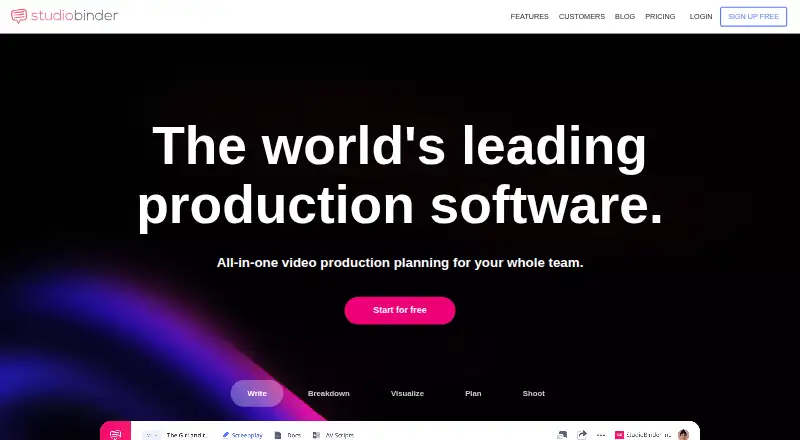
StudioBinder is a web-based production management platform for filmmakers, production companies, studios, brands, marketing agencies, and content creators. Its workflow covers screenwriting, script breakdowns, shooting schedules, shot lists, storyboards, mood boards, task boards, calendars, media storage, contacts, and call sheets. That makes it particularly suited to film crews and production teams that need to coordinate pre-production and production-day work in one workspace.
Pricing follows a freemium structure. The Free plan supports 1 project, 10 contacts, 10 shots, 10 storyboards, 10 mood boards, and 10 tasks. The Professional plan costs $99 per month when billed monthly and adds 4 complimentary users, unlimited projects, 100GB of file storage, advanced scheduling, call sheet tracking and analytics, and unlimited task boards. The paid tier is therefore aimed at teams that have outgrown the Free plan’s project and content limits, while smaller productions can begin with a constrained planning workspace.
StudioBinder’s standout strength is its production-specific flow: industry-formatted screenwriting with revision tracking can lead into script breakdowns, production reports, stripboard schedules with auto-sorting, shot planning, and call-sheet creation, distribution, and delivery tracking. Collaboration features include page sharing, comments, permissions, and approvals, while integrations and formats include Fountain, Google Maps, Final Draft, PDF, CSV, and Slack. Choose it if your work centers on script-to-schedule coordination and call-sheet operations. Teams seeking broader workload planning, versioned asset management, or time tracking should consider a tool focused on those needs instead.
Your product? Our editors can test StudioBinder in depth and publish a review, labelled as paid · from $149/mo →
StudioBinder pricing
All 2 StudioBinder plans and prices →
StudioBinder fact sheet
| Free plan | Yes |
|---|---|
| Paid from | $99/mo |
| Proofing and approvals | Yes |
| Creative briefs | Not verified |
| Workload planning | Not verified |
| Asset versioning | Not verified |
| Client portal | Yes |
| Time tracking | Not verified |
| Deployment | Cloud |
| Platforms | Web |
| Compliance & security | ISO 27001, GDPR, PCI DSS |
| Support | Live chat, Docs |
| Built for | Solo, Small business, Mid-market, Enterprise (editorial estimate) |
| Integrations | 6 integrations: Fountain, Google Maps, Final Draft, PDF, CSV, Slack |
| Pricing | Free plan (source) |
| Website | studiobinder.com |
| Facts checked | 20 Sep 2026 |
StudioBinder integrations
StudioBinder lists 6 integrations on its own site.
- Fountain
- Google Maps
- Final Draft
- CSV
- Slack
Alternatives to StudioBinder
- RunnitDeep creative workflow control with briefs, approvals, planning, and client workspaces.9.4
- WrikeA broad work management suite with strong views, automation, AI, and resource planning.9.2
- Adobe WorkfrontA comprehensive choice for enterprise creative teams managing complex, cross-functional work.9.0



See all StudioBinder alternatives →
Also Ranked In
StudioBinder is ranked in 4 of our directories.
Used StudioBinder? Be the first to review it
The editor score above is our own research. What this page doesn't have yet is a reader's view — what you used StudioBinder for, what worked and what didn't. No stars are seeded and no review is paid for; an editor reads every one before it appears.
Write a reviewTwo minutes · verified accounts only · read by an editor before it appears
Featured on iTechGuides

StudioBinder is listed in our Creative Project Management Software directory. Add the badge to your site — it links back to this page.
<a href="https://www.itechguides.com/products/studiobinder/"><img src="https://www.itechguides.com/best/badge/studiobinder.svg" alt="Featured on iTechGuides" width="230" height="46"></a>
Reviewed by iTechGuides Editors · Editorial team · Updated Oct 2026
Advertiser disclosure: iTechGuides is reader-supported. Vendors can pay for top positions in our rankings and for a place on other products' pages, and we may earn a commission when you click some links. Bought places stand at the number bought; this page and our disclosure say so. Paying vendors may get a fuller, more detailed review from our editors, and that review can change their score. How we rank.
Last updated · How we research and update