Structurize
Structurize: A free, open-source in-game toolkit for MineColonies structure workflows. Ranked #8 of 42 in Minecraft Schematic Tools by our editors (7.6/10); pricing: Free plan; best for mineColonies structure workflows.
At a glance
- Editor score7.6 / 10
- PricingFree plan
- Best forMineColonies structure workflows
- Free planYes
- Paid fromFree
- 3D previewYes
- Facts checked22 Sep 2026
Where it wins
- In-game tools cover scanning, creation, previews, and placement
- Supports server controls, schematic caching, and multiplayer sharing
- Works with MineColonies, Minecraft Forge, and NeoForge
Where it doesn't
- Requires Minecraft with Forge or NeoForge to run
- It is not a standalone schematic editor
- Does not provide format conversion beyond .blueprint workflows
Our verdict on Structurize
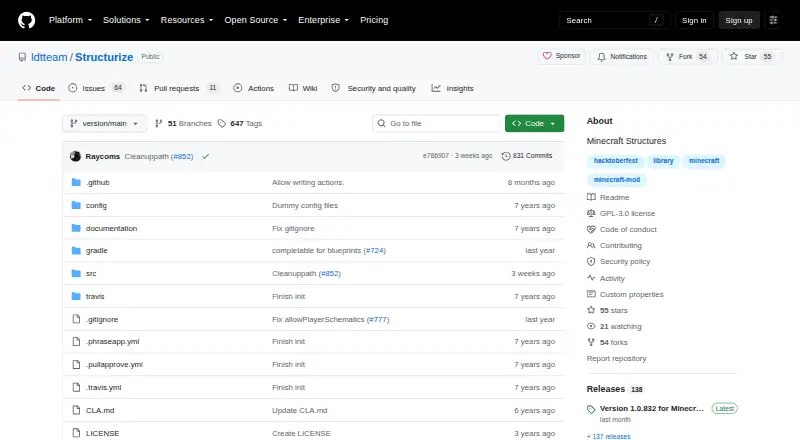
Structurize is a free, open-source Minecraft mod for designing, scanning, previewing, and placing structures. It is aimed at players and small teams working with MineColonies, whether they build in single-player worlds or multiplayer environments. The in-game Build Tool places schematic structures, while the Scan Tool captures buildings and structures. Tag and Shape Tools support schematic creation, and in-world previews show a structure before placement. Structurize uses .blueprint files and supports custom schematics and style packs.
Its strongest fit is an in-game workflow rather than a separate desktop editor. The published feature set keeps scanning, editing, previewing, and placement inside Minecraft, with builder-based placement workflows for structure projects. Server controls cover player schematics and schematic caching, while linksessions allow multiplayer preview sharing. MineColonies integration makes it particularly relevant when structure planning is part of a broader colony-building workflow. The desktop platforms listed are Windows, macOS, and Linux, but the runtime depends on Minecraft with Forge or NeoForge.
Structurize is open-source software with a free plan, so there are no paid tiers to compare. Community support and documentation are the listed support channels. It is a suitable choice for MineColonies players who want an in-game toolkit with previews, custom blueprint support, server controls, and multiplayer sharing. It is less suitable for someone seeking a standalone schematic editor or a workflow centered on converting between file formats, since format conversion is not provided. Choose it when Minecraft integration and in-game placement matter more than independent editing tools.
Your product? Our editors can test Structurize in depth and publish a review, labelled as paid · from $149/mo →
Structurize pricing
Structurize fact sheet
| Free plan | Yes |
|---|---|
| Paid from | Free |
| Supported file formats | .blueprint |
| Available platforms | Desktop |
| 3D preview | Yes |
| Placement workflow | In-game |
| World import | Not verified |
| Format conversion | No |
| Batch processing | Not verified |
| Deployment | Desktop |
| Platforms | Windows, macOS, Linux |
| Support | Community, Docs |
| Built for | Solo, Small business (editorial estimate) |
| Integrations | 3 integrations: MineColonies, Minecraft Forge, NeoForge |
| Pricing | Free plan |
| Website | github.com |
| Facts checked | 22 Sep 2026 |
Structurize integrations
Structurize lists 3 integrations on its own site.
- MineColonies
- Minecraft Forge
- NeoForge
Alternatives to Structurize
- Schematic UtilityA focused free plugin for command-based WorldEdit schematic placement.9.1
- ServerSideBuildsA self-hosted plugin for projecting and managing schematics without client-side mods.8.5
- Easy Block EditorA free in-game editor with collaboration, projections and broad schematic-format support.8.4


See all Structurize alternatives →
Structurize vs the competition
- Structurize vs Schematic Utility
- Structurize vs ServerSideBuilds
- Structurize vs Easy Block Editor
- Structurize vs Create Build Gun
- Structurize vs Litematica
- Structurize vs MagicalChalk

Compare Structurize with any tool side by side →
Used Structurize? Be the first to review it
The editor score above is our own research. What this page doesn't have yet is a reader's view — what you used Structurize for, what worked and what didn't. No stars are seeded and no review is paid for; an editor reads every one before it appears.
Write a reviewTwo minutes · verified accounts only · read by an editor before it appears
Featured on iTechGuides

Structurize is listed in our Minecraft Schematic Tools directory. Add the badge to your site — it links back to this page.
<a href="https://www.itechguides.com/products/structurize/"><img src="https://www.itechguides.com/best/badge/structurize.svg" alt="Featured on iTechGuides" width="230" height="46"></a>
Reviewed by iTechGuides Editors · Editorial team · Updated Oct 2026
Advertiser disclosure: iTechGuides is reader-supported. Vendors can pay for top positions in our rankings and for a place on other products' pages, and we may earn a commission when you click some links. Bought places stand at the number bought; this page and our disclosure say so. Paying vendors may get a fuller, more detailed review from our editors, and that review can change their score. How we rank.
Last updated · How we research and update