
Step
Step: A capable free Linux tool for 2D mechanics, learning, and editable experiments. Ranked #11 of 89 in Physics Simulation Software by our editors (7.9/10); pricing: Free plan; best for open-source technical mechanics simulation on Linux.
At a glance
- Editor score7.9 / 10
- PricingFree plan
- Best forOpen-source technical mechanics simulation on Linux
- Free planYes
- Paid fromFree
- Delivery modeDesktop
- Facts checked20 Sep 2026
Where it wins
- Covers rigid bodies, soft bodies, collisions, and molecular dynamics
- Includes adaptive solvers, controllers, graphs, meters, and tracers
- Provides integrated tutorials plus example and downloadable experiments
Where it doesn't
- Runs on Linux rather than across multiple desktop platforms
- Focuses on two-dimensional simulation instead of 3D visuals
- Its scope is technical mechanics rather than broad general-purpose simulation
Our verdict on Step
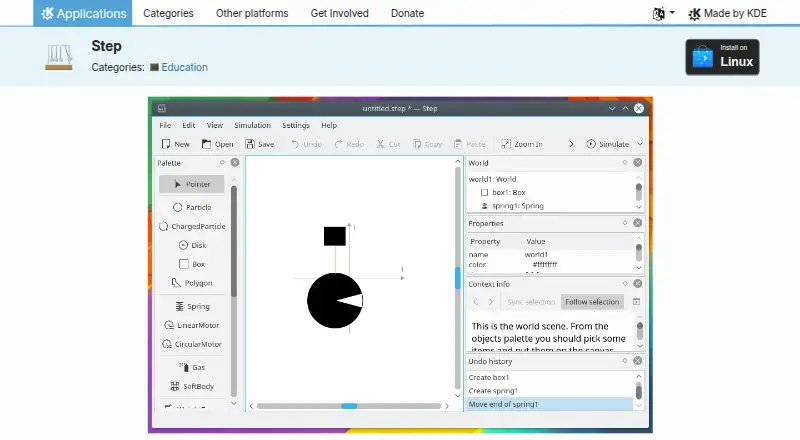
Step is KDE’s open-source desktop software for interactive physics simulation on Linux. It is designed for learners, educators, and technically minded users who want to construct physical systems, apply forces, run simulations, and inspect how those systems evolve. Its focus is two-dimensional classical mechanics, with support for particles, damped springs, gravitational and Coulomb forces, rigid bodies, collisions, and deformable particle-spring systems. Step is distributed under the GPL-2.0-or-later license and is available as free open-source software.
Its strongest area is the depth of the simulation workspace. Users can work with molecular dynamics for gases and liquids, choose among explicit and implicit solvers, and use adaptive timesteps for simulation control. Controllers can change simulation properties during a run, while graphs, meters, and tracers help visualize results. The editable soft-body systems add authoring flexibility beyond a fixed collection of demonstrations. Integrated tutorials, example experiments, and downloadable experiments also make Step useful for structured exploration and classroom-oriented learning. These features suit users who value inspectable mechanics models and visual analysis over a simplified animation tool.
Step is a focused choice rather than a broad physics platform. Linux support limits its desktop reach, and the two-dimensional scope means it is not aimed at workflows that require 3D visuals. Users looking for mechanics fundamentals, editable experiments, solver options, and molecular-dynamics concepts should find its feature set aligned with those needs. Users who require cross-platform availability or three-dimensional simulation should choose a different product. Overall, Step fits Linux-based technical learning and experimentation especially well, while its narrow visual and platform scope defines where it should not be the first choice.
Your product? Our editors can test Step in depth and publish a review, labelled as paid · from $149/mo →
Step pricing
Step fact sheet
| Free plan | Yes |
|---|---|
| Paid from | Free |
| Delivery mode | Desktop |
| Lesson library | Yes |
| Authoring tools | Yes |
| Assessment tools | Not verified |
| 3D visuals | No |
| Offline access | Not verified |
| Data export | Not verified |
| Deployment | Desktop |
| Platforms | Linux |
| Support | Email, Community, Docs |
| Built for | Solo, Small business (editorial estimate) |
| Pricing | Free plan |
| Website | apps.kde.org |
| Facts checked | 20 Sep 2026 |
Alternatives to Step
- COMSOL MultiphysicsA broad desktop environment for coupled physics, engineering models, and custom simulation apps.9.4
- Ansys FluentA deep CFD and HPC environment for demanding industrial simulation work.9.3
- SimScaleA broad browser-based multiphysics platform with flexible cloud workflows and tiered access.9.1


Used Step? Be the first to review it
The editor score above is our own research. What this page doesn't have yet is a reader's view — what you used Step for, what worked and what didn't. No stars are seeded and no review is paid for; an editor reads every one before it appears.
Write a reviewTwo minutes · verified accounts only · read by an editor before it appears
Featured on iTechGuides

Step is listed in our Physics Simulation Software directory. Add the badge to your site — it links back to this page.
<a href="https://www.itechguides.com/products/step/"><img src="https://www.itechguides.com/best/badge/step.svg" alt="Featured on iTechGuides" width="230" height="46"></a>
Reviewed by iTechGuides Editors · Editorial team · Updated Oct 2026
Advertiser disclosure: iTechGuides is reader-supported. Vendors can pay for top positions in our rankings and for a place on other products' pages, and we may earn a commission when you click some links. Bought places stand at the number bought; this page and our disclosure say so. Paying vendors may get a fuller, more detailed review from our editors, and that review can change their score. How we rank.
Last updated · How we research and update