
Steins;Tracker
Steins;Tracker: A detailed free tracker for Windows users who want local playtime statistics. Ranked #5 of 20 in Game Playtime Trackers by our editors (8.3/10); pricing: Free plan; best for windows users wanting rich local statistics.
At a glance
- Editor score8.3 / 10
- PricingFree plan
- Best forWindows users wanting rich local statistics
- Free planYes
- Tracking modeAutomatic
- Facts checked20 Sep 2026
Where it wins
- Automatic detection with sessions, goals, averages, heatmaps, and charts
- CSV export plus per-game statistics and custom icons
- Hardware monitoring and local-network dashboard access from a phone
Where it doesn't
- Windows PC only, with no mobile app
- No verified integrations with other platforms or services
- Pro features and downloadable content are separate from the free mode
Our verdict on Steins;Tracker
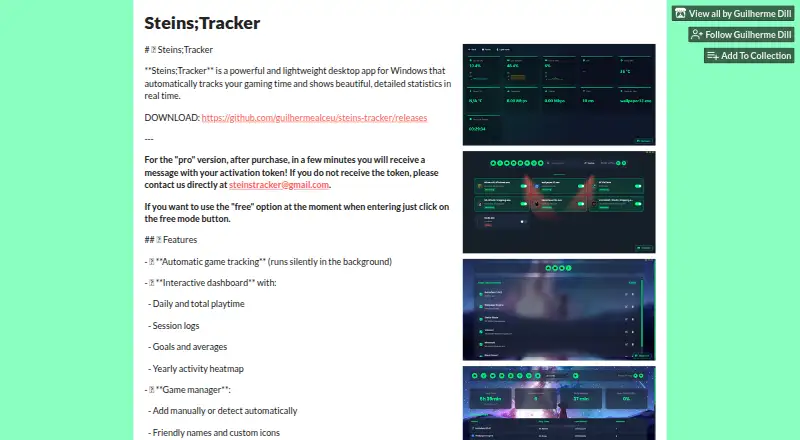
Steins;Tracker is a Windows desktop application for automatically recording game time locally. It suits PC players who want more than a simple total, with daily and overall playtime statistics, session logs, goals, averages, yearly heatmaps, charts, and per-game views. Games can be detected automatically in the background, while manual and folder-based management provide alternatives when detection needs adjustment. Custom icons, themes, wallpapers, blur, and opacity controls add presentation options without changing the app’s focus on local tracking.
Its strongest area is the depth of its statistics and monitoring in a desktop setting. Users can export logs as CSV and view CPU, GPU, RAM, temperature, network, and ping information alongside their gaming activity. The dashboard can also be opened from a phone over the local network through a QR code, which adds remote viewing without turning the product into a mobile app. This combination makes Steins;Tracker a strong fit for Windows users who want detailed personal records and system context in one place.
The free mode provides the core tracking experience, while Pro features and downloadable content are offered separately. The product remains focused on Windows PC use, with no native mobile app and no verified integrations. That makes it less suitable for people who play across multiple operating systems, want cloud-based account synchronization, or need a broader platform ecosystem. Choose Steins;Tracker for automatic local statistics, flexible game management, exports, and hardware monitoring; consider an alternative if cross-platform coverage or integrated services matter more than desktop detail.
Your product? Our editors can test Steins;Tracker in depth and publish a review, labelled as paid · from $149/mo →
Steins;Tracker pricing
Steins;Tracker fact sheet
| Free plan | Yes |
|---|---|
| Paid from | Not verified |
| Tracking mode | Automatic |
| Supported platforms | Windows PC |
| Mobile app | No |
| Desktop app | Yes |
| History retention | Not verified |
| Data export | Basic |
| Deployment | Desktop, Mobile |
| Platforms | Windows |
| Support | Email, Community |
| Built for | Solo, Small business (editorial estimate) |
| Pricing | Free plan |
| Website | guilhermealceu.itch.io |
| Facts checked | 20 Sep 2026 |
Alternatives to Steins;Tracker
- PlayCounterA free, open-source Windows tracker with broad launcher coverage and local history.9.4
- PlayTrackerA broad tracker for gamers who want one view across supported gaming accounts.9.0
- PyroblastA free web tracker that unifies playtime, achievements, and profiles across major platforms.8.8



See all Steins;Tracker alternatives →
Steins;Tracker vs the competition
- Steins;Tracker vs PlayCounter
- Steins;Tracker vs PlayTracker
- Steins;Tracker vs Pyroblast
- Steins;Tracker vs GamingGaiden
- Steins;Tracker vs Thusfar
- Steins;Tracker vs Steam Wrapped
Compare Steins;Tracker with any tool side by side →
Used Steins;Tracker? Be the first to review it
The editor score above is our own research. What this page doesn't have yet is a reader's view — what you used Steins;Tracker for, what worked and what didn't. No stars are seeded and no review is paid for; an editor reads every one before it appears.
Write a reviewTwo minutes · verified accounts only · read by an editor before it appears
Featured on iTechGuides

Steins;Tracker is listed in our Game Playtime Trackers directory. Add the badge to your site — it links back to this page.
<a href="https://www.itechguides.com/products/steins-tracker/"><img src="https://www.itechguides.com/best/badge/steins-tracker.svg" alt="Featured on iTechGuides" width="230" height="46"></a>
Reviewed by iTechGuides Editors · Editorial team · Updated Oct 2026
Advertiser disclosure: iTechGuides is reader-supported. Vendors can pay for top positions in our rankings and for a place on other products' pages, and we may earn a commission when you click some links. Bought places stand at the number bought; this page and our disclosure say so. Paying vendors may get a fuller, more detailed review from our editors, and that review can change their score. How we rank.
Last updated · How we research and update