StaxRip
StaxRip: A free, scriptable Windows encoder for detailed batch workflows. Ranked #20 of 74 in Video Converter Software by our editors (7.1/10); pricing: Free plan; best for scriptable Windows encoding workflows.
At a glance
- Editor score7.1 / 10
- PricingFree plan
- Best forScriptable Windows encoding workflows
- Free planYes
- Paid fromFree
- Supported platformsWindows
- Facts checked20 Sep 2026
Where it wins
- Queued batch jobs with configurable encoder profiles
- AMD, Intel, and NVIDIA hardware encoding support
- PowerShell scripting and portable, installer-free deployment
Where it doesn't
- Windows-only platform support
- Detailed controls may suit experts more than casual users
- No built-in AI features
Our verdict on StaxRip
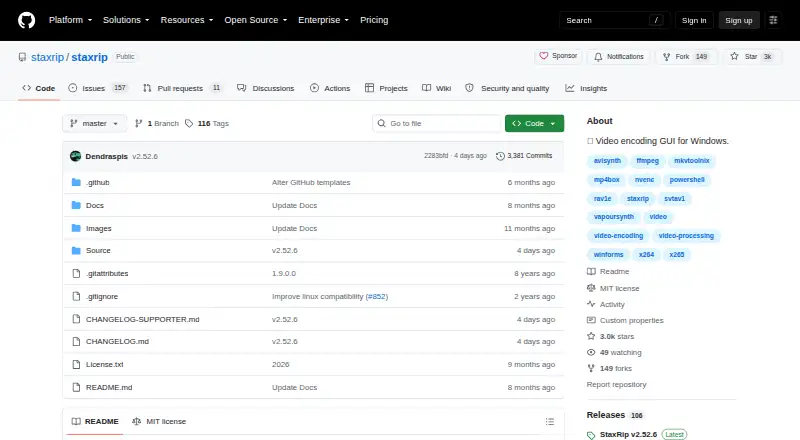
StaxRip is a free, open-source Windows application for video and audio encoding. Its graphical interface brings together tools including FFmpeg, x265, MKVToolNix, MP4Box, AviSynth+, and VapourSynth. The software is aimed at users who need control over encoder profiles, filtering, containers, subtitles, audio, and processing steps rather than a one-click conversion workflow. Its portable distribution also suits users who prefer an application that runs without an installer.
The main strength is workflow depth. StaxRip supports batch processing and queued jobs, hardware encoding through AMD, Intel, and NVIDIA technologies, and encoder options including x264, x265, XviD, Rav1e, SVT-AV1, NVEnc, QSVEnc, VCEEnc, and FFmpeg. AviSynth+ and VapourSynth provide video filtering, while MKV and MP4 muxing and other FFmpeg-supported containers cover common packaging needs. Audio and subtitle demuxing, remuxing, and cutting or trimming without re-encoding in MKV copy mode extend the workflow beyond basic conversion.
PowerShell scripting and customizable command-line workflows make StaxRip a strong fit for repeatable Windows encoding pipelines. The trade-off is scope: it supports Windows only and is designed around detailed configuration, so users seeking a simple, cross-platform converter should choose an alternative. StaxRip is better suited to technically confident users who value queued jobs, scriptable filtering, hardware encoders, and portable deployment. The free and open-source model keeps access straightforward, with the published plan covering video and audio encoding under an MIT license.
Questions about StaxRip
Does StaxRip have a free plan? Yes: the Free and open-source plan is free.
What does StaxRip run on? Windows. It runs as a desktop app.
Who is StaxRip built for? Solo users and small businesses (our editorial estimate).
Your product? Our editors can test StaxRip in depth and publish a review, labelled as paid · from $149/mo →
StaxRip pricing
All 1 StaxRip plans and prices →
StaxRip fact sheet
| Free plan | Yes |
|---|---|
| Paid from | Free |
| Supported platforms | Windows |
| Output formats | MKV, MP4, and other FFmpeg-supported containers; x264, x265, XviD, Rav1e, SVT-AV1, NVEnc, QSVEnc, VCEEnc, and FFmpeg encoders |
| Batch conversion | Yes |
| Hardware acceleration | Yes |
| Maximum output resolution | Not verified |
| Audio extraction | Yes |
| Deployment | Desktop |
| Platforms | Windows |
| Support | Community, Docs |
| Built for | Solo, Small business (editorial estimate) |
| Pricing | Free plan (source) |
| Website | github.com |
| Facts checked | 20 Sep 2026 |
Alternatives to StaxRip
- FFmpegA powerful open-source toolkit for technical media workflows across major desktop platforms.9.4
- HandBrakeA capable free converter for everyday desktop encoding, presets, queues, and disc sources.9.3
- Adobe Media EncoderA deep Adobe-centered encoder for teams managing complex media pipelines.9.2



See all StaxRip alternatives →
Also Ranked In
StaxRip is ranked in 2 of our directories.
Used StaxRip? Be the first to review it
The editor score above is our own research. What this page doesn't have yet is a reader's view — what you used StaxRip for, what worked and what didn't. No stars are seeded and no review is paid for; an editor reads every one before it appears.
Write a reviewTwo minutes · verified accounts only · read by an editor before it appears
Featured on iTechGuides

StaxRip is listed in our Video Converter Software directory. Add the badge to your site — it links back to this page.
<a href="https://www.itechguides.com/products/staxrip/"><img src="https://www.itechguides.com/best/badge/staxrip.svg" alt="Featured on iTechGuides" width="230" height="46"></a>
Reviewed by iTechGuides Editors · Editorial team · Updated Nov 2026
Advertiser disclosure: iTechGuides is reader-supported. Vendors can pay for top positions in our rankings and for a place on other products' pages, and we may earn a commission when you click some links. Bought places stand at the number bought; this page and our disclosure say so. Paying vendors may get a fuller, more detailed review from our editors, and that review can change their score. How we rank.
Last updated · How we research and update