Stage AI
Stage AI: An affordable iOS app for quick staging, decluttering, and exterior photo edits. Ranked #23 of 28 in Virtual Staging Software by our editors (6.9/10); pricing: 3-day trial; best for iPhone users wanting inexpensive exterior edits.
At a glance
- Editor score6.9 / 10
- Pricing3-day trial
- Best foriPhone users wanting inexpensive exterior edits
- Free planNo
- Paid from$39.99/mo
- Service modeAi
- Facts checked21 Sep 2026
Where it wins
- Combines staging, decluttering, lighting, sky, and landscape edits
- Offers custom instructions, multiple styles, and HD downloads
- Includes a 3-day trial and $9.99 weekly unlimited staging
Where it doesn't
- Available on iOS rather than across broader platforms
- Does not provide integrations or wider workflow features
- Access is paid beyond the trial and free staging credits
Our verdict on Stage AI
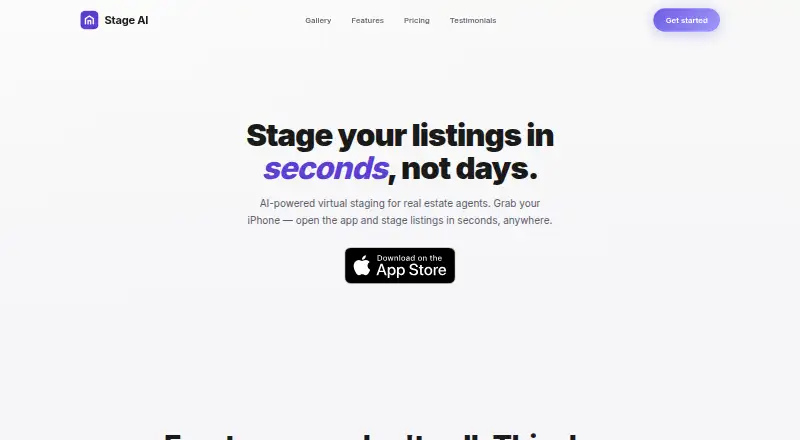
Stage AI is an AI virtual staging app for iPhone and iPad. It is designed for real estate agents, photographers, investors, home stagers, and brokerages that need to furnish empty rooms or improve listing images. Its scope extends beyond interior staging: the app can declutter photos, enhance lighting and atmosphere, replace skies, improve landscapes, and edit exterior photos. Users can choose a design style or provide custom text instructions, then download HD results for MLS, print, and social use. Before-and-after comparison is also included.
Pricing is structured around a free trial and recurring access. The Free Trial includes 7 free staging credits, all styles, and HD downloads. The Weekly plan costs $9.99 per week and adds unlimited staging, all styles, and cancellation at any time. The Monthly plan costs $39.99 per month, includes a 3-day free trial, unlimited staging, all styles, custom instructions, and cancellation at any time. A Yearly subscription and a One-Time Credit Purchase option are also available. The plan lineup suits users who want either short-term weekly access or recurring use without committing to a permanent purchase.
Stage AI’s strongest fit is for iOS users who want a focused image-editing tool with both interior and exterior capabilities. Its advertised workflow is straightforward: upload a photo, select a style or write instructions, and download the result. The product also advertises generation in under 60 seconds. However, its platform coverage is limited to iOS, and it does not extend into integrations or broader workflow features. Choose Stage AI for quick listing-photo improvements and flexible staging styles; choose another option if cross-platform access, connected workflows, or wider real estate operations are priorities.
Questions about Stage AI
Does Stage AI have a free plan? Yes: the Free Trial plan is free; paid plans start at $39.99/mo (Monthly).
How much does Stage AI cost? Stage AI lists 2 paid plans; the lowest is Monthly at $39.99/mo.
Is there a free trial of Stage AI? Yes: a 3-day free trial; no card is needed.
What does Stage AI run on? iOS. It runs in the cloud and as a mobile app.
Who is Stage AI built for? Solo users, small businesses and mid-market companies (our editorial estimate).
Your product? Our editors can test Stage AI in depth and publish a review, labelled as paid · from $149/mo →
Stage AI pricing
All 5 Stage AI plans and prices →
Stage AI fact sheet
| Free plan | No |
|---|---|
| Paid from | $39.99/mo |
| Service mode | Ai |
| Exterior staging | Yes |
| Floor-plan staging | Not verified |
| Turnaround time | Not verified |
| Included revisions | Not verified |
| Output resolution | Hd |
| Free trial | 3 days · no card needed |
| Deployment | Cloud, Mobile |
| Platforms | iOS |
| Built for | Solo, Small business, Mid-market (editorial estimate) |
| Pricing | 3-day trial (source) |
| Website | getstageai.com |
| Facts checked | 21 Sep 2026 |
Alternatives to Stage AI
- Apply DesignA broad web-based staging suite with coin-based pricing and 360° support.9.4
- PadStyler AIBroad property-visualization coverage with AI subscriptions and designer-led staging.9.2
- PristageA broad AI toolkit that pairs virtual staging with listing and promotional assets.9.0


See all Stage AI alternatives →
Used Stage AI? Be the first to review it
The editor score above is our own research. What this page doesn't have yet is a reader's view — what you used Stage AI for, what worked and what didn't. No stars are seeded and no review is paid for; an editor reads every one before it appears.
Write a reviewTwo minutes · verified accounts only · read by an editor before it appears
Featured on iTechGuides

Stage AI is listed in our Virtual Staging Software directory. Add the badge to your site — it links back to this page.
<a href="https://www.itechguides.com/products/stage-ai/"><img src="https://www.itechguides.com/best/badge/stage-ai.svg" alt="Featured on iTechGuides" width="230" height="46"></a>
Reviewed by iTechGuides Editors · Editorial team · Updated Nov 2026
Advertiser disclosure: iTechGuides is reader-supported. Vendors can pay for top positions in our rankings and for a place on other products' pages, and we may earn a commission when you click some links. Bought places stand at the number bought; this page and our disclosure say so. Paying vendors may get a fuller, more detailed review from our editors, and that review can change their score. How we rank.
Last updated · How we research and update