
SRS
SRS: A self-hosted media server for protocol conversion, WebRTC, and streaming infrastructure. Ranked #54 of 136 in Live Streaming Software by our editors (4.2/10); pricing: Free plan; best for open-source protocol conversion and server control.
At a glance
- Editor score4.2 / 10
- PricingFree plan
- Best forOpen-source protocol conversion and server control
- Free planYes
- Paid fromFree
- Founded2013 · North York, Ontario, Canada
- Facts checked20 Sep 2026
Where it wins
- Supports RTMP, WebRTC, HLS, SRT, MPEG-DASH, and GB28181
- Converts streams between RTMP, SRT, HLS, HTTP-FLV, and WebRTC
- Includes APIs, callbacks, metrics, DVR recording, and Docker deployment
Where it doesn't
- Requires self-hosted deployment rather than a hosted browser studio
- Does not provide verified studio production features
- Does not provide verified multistreaming or prerecorded-production features
Our verdict on SRS
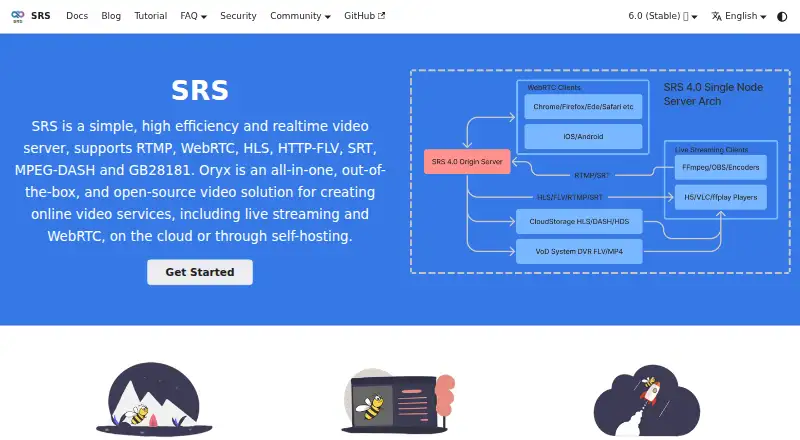
SRS is an open-source, self-hosted real-time media server for developers, small organizations, and media infrastructure teams building live streaming or WebRTC services. It receives, distributes, and converts streams across RTMP, WebRTC, HLS, HTTP-FLV, SRT, MPEG-DASH, and GB28181. Deployment options include Docker and source installation, with support for Linux, Windows, and macOS. SRS is infrastructure software, not a hosted browser studio, so it fits teams that want server control and are prepared to manage their own streaming environment.
Protocol breadth is the central strength. SRS supports WebRTC publishing and playback, RTMP/WebRTC conversion, and conversion between RTMP, SRT, HLS, HTTP-FLV, and WebRTC. DVR recording can save streams to FLV and MP4 files. The HTTP API queries system and stream status, while HTTP callbacks support authentication and business integrations. Prometheus export and traceable session logs add visibility for teams operating streaming services. Integrations with FFmpeg, OBS, VLC, and WebRTC support common production and playback workflows.
SRS is free and open source, making it a fit for organizations that prefer self-hosted infrastructure over a paid hosted service. The trade-off is focus: its documented capabilities center on media serving, protocol conversion, APIs, deployment, and operational visibility. It does not provide verified studio, multistreaming, or prerecorded-production features. Choose SRS when protocol control, WebRTC support, and integration flexibility matter most; choose another product when the priority is a browser-based production workspace or built-in distribution and prerecorded workflows.
Your product? Our editors can test SRS in depth and publish a review, labelled as paid · from $149/mo →
SRS pricing
SRS fact sheet
| Free plan | Yes |
|---|---|
| Paid from | Free |
| Multistreaming | Not verified |
| Pre-recorded streams | Not verified |
| 24/7 looping | Not verified |
| Browser-based studio | Not verified |
| Custom RTMP destinations | Not verified |
| Cloud recording | Not verified |
| Unified chat | Not verified |
| Deployment | Self-hosted, Cloud |
| Platforms | Windows, macOS, Linux |
| Support | Community, Docs |
| Built for | Solo, Small business (editorial estimate) |
| Integrations | 4 integrations: FFmpeg, OBS, VLC, WebRTC |
| Pricing | Free plan |
| Website | ossrs.io |
| Facts checked | 20 Sep 2026 |
SRS integrations
SRS lists 4 integrations on its own site.
- FFmpeg
- OBS
- VLC
- WebRTC
Alternatives to SRS
- OBS StudioA highly customizable free desktop production tool for creators, educators, and broadcasters.9.4
- Streamlabs DesktopA capable desktop streamer with strong alerts, automation, and creator tools.9.2
- vMixA Windows production suite for multicamera switching, replay, graphics, guests, and multistreaming.9.1



Also Ranked In
SRS is ranked in 2 of our directories.
Used SRS? Be the first to review it
The editor score above is our own research. What this page doesn't have yet is a reader's view — what you used SRS for, what worked and what didn't. No stars are seeded and no review is paid for; an editor reads every one before it appears.
Write a reviewTwo minutes · verified accounts only · read by an editor before it appears
Featured on iTechGuides

SRS is listed in our Live Streaming Software directory. Add the badge to your site — it links back to this page.
<a href="https://www.itechguides.com/products/srs/"><img src="https://www.itechguides.com/best/badge/srs.svg" alt="Featured on iTechGuides" width="230" height="46"></a>
Reviewed by iTechGuides Editors · Editorial team · Updated Oct 2026
Advertiser disclosure: iTechGuides is reader-supported. Vendors can pay for top positions in our rankings and for a place on other products' pages, and we may earn a commission when you click some links. Bought places stand at the number bought; this page and our disclosure say so. Paying vendors may get a fuller, more detailed review from our editors, and that review can change their score. How we rank.
Last updated · How we research and update