SpriteForge
SpriteForge: An open-source skeletal animation editor for local web workflows and Spine-compatible exports. Ranked #16 of 25 in 2D Game Animation Software by our editors (6.8/10); pricing: Open source; best for open-source Spine-compatible web workflows.
At a glance
- Editor score6.8 / 10
- PricingOpen source
- Best forOpen-source Spine-compatible web workflows
- Paid fromFree
- Animation methodSkeletal
- Facts checked20 Sep 2026
Where it wins
- Bone rigging, IK, automatic weights, and GPU-skinned mesh attachments
- Exports Spine-compatible JSON, atlas, and PNG bundles
- Local autosave with editable .sfproj project files
Where it doesn't
- Partial Spine 4.x bundle import limits project portability
- Advanced features are documented as partial or still in progress
- Runtime coverage centers on web and the included standalone player
Our verdict on SpriteForge
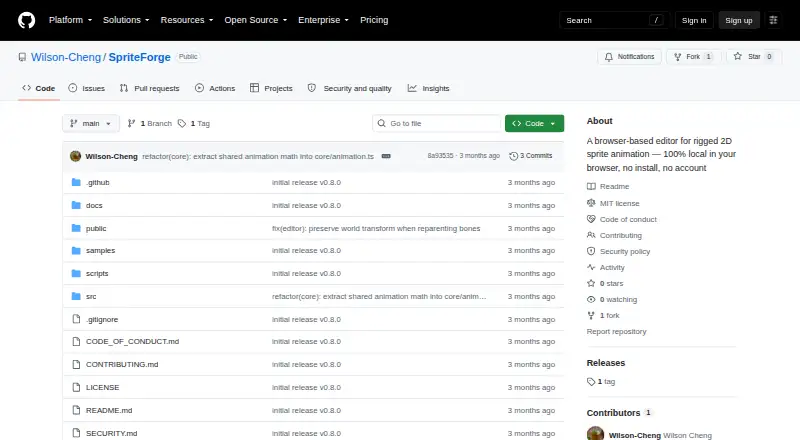
SpriteForge is an open-source, browser-based editor for skeletal 2D sprite animation. It suits small teams, game-jam projects, and lightweight local workflows that need to turn PNG or JPG artwork into rigged, poseable characters. Users can create bone hierarchies, bind images to bones, set timeline keyframes, preview animations, and save editable .sfproj project files. Processing takes place locally in the browser, while the project supports web and self-hosted use.
Its strongest technical fit is a Spine-compatible workflow. SpriteForge exports JSON, atlas, and PNG bundles, supports mesh attachments with GPU skinning and automatic weights, and includes two-bone inverse kinematics for character posing. Timeline easing and curve previews provide control over motion, while the standalone HTML runtime player offers a way to preview exported animation in a web context. Partial Spine 4.x bundle import is available, but teams moving existing Spine projects should account for that narrower import coverage.
The tool keeps the workflow focused on local project files and browser-based editing rather than a broad set of runtime targets. MP4 preview export is included through ffmpeg.wasm, and local autosave supports iterative work without requiring a hosted project service. At the same time, SpriteForge is an early open-source release, with several advanced features documented as partial or still in progress. Choose it when open-source access, local browser processing, editable project files, and Spine-compatible exports matter most. Teams needing broader platform coverage, mature advanced tooling, or complete Spine 4.x import support should consider another option.
Your product? Our editors can test SpriteForge in depth and publish a review, labelled as paid · from $149/mo →
SpriteForge pricing
SpriteForge fact sheet
| Free plan | Not verified |
|---|---|
| Paid from | Free |
| Animation method | Skeletal |
| Runtime export | Yes |
| Mesh deformation | Yes |
| Frame-by-frame tools | Not verified |
| Particle effects | Not verified |
| Runtime targets | Spine-compatible runtimes and the included standalone web runtime player |
| Deployment | Self-hosted, Browser extension |
| Platforms | Web |
| Support | Docs |
| Built for | Solo, Small business (editorial estimate) |
| Pricing | Open source |
| Website | github.com |
| Facts checked | 20 Sep 2026 |
Alternatives to SpriteForge
- SpineA deep 2D rigging tool for game teams that can manage a paid workflow.9.4
- CreatureA capable Windows tool for advanced 2D game animation and deformation workflows.9.1
- RiveA broad cross-platform animation workspace with game-ready runtimes and collaboration.8.8


See all SpriteForge alternatives →
Also Ranked In
SpriteForge is ranked in 2 of our directories.
Used SpriteForge? Be the first to review it
The editor score above is our own research. What this page doesn't have yet is a reader's view — what you used SpriteForge for, what worked and what didn't. No stars are seeded and no review is paid for; an editor reads every one before it appears.
Write a reviewTwo minutes · verified accounts only · read by an editor before it appears
Featured on iTechGuides

SpriteForge is listed in our 2D Game Animation Software directory. Add the badge to your site — it links back to this page.
<a href="https://www.itechguides.com/products/spriteforge/"><img src="https://www.itechguides.com/best/badge/spriteforge.svg" alt="Featured on iTechGuides" width="230" height="46"></a>
Reviewed by iTechGuides Editors · Editorial team · Updated Oct 2026
Advertiser disclosure: iTechGuides is reader-supported. Vendors can pay for top positions in our rankings and for a place on other products' pages, and we may earn a commission when you click some links. Bought places stand at the number bought; this page and our disclosure say so. Paying vendors may get a fuller, more detailed review from our editors, and that review can change their score. How we rank.
Last updated · How we research and update