
SpectraView II
SpectraView II: A focused NEC display calibration suite with hardware-assisted measurement and ICC profile tools. Ranked #19 of 23 in Color Management Software by our editors (7.2/10); pricing: Pricing on request; best for NEC professional-display owners.
At a glance
- Editor score7.2 / 10
- PricingPricing on request
- Best forNEC professional-display owners
- Display calibrationYes
- Facts checked23 Sep 2026
Where it wins
- Hardware-assisted calibration with supported color sensors
- Creates and installs ICC monitor profiles
- Calibration targets support repeatable display color
Where it doesn't
- Compatibility depends on specific NEC display models
- No printer or camera profiling tools
- Desktop software only for Windows and macOS
Our verdict on SpectraView II
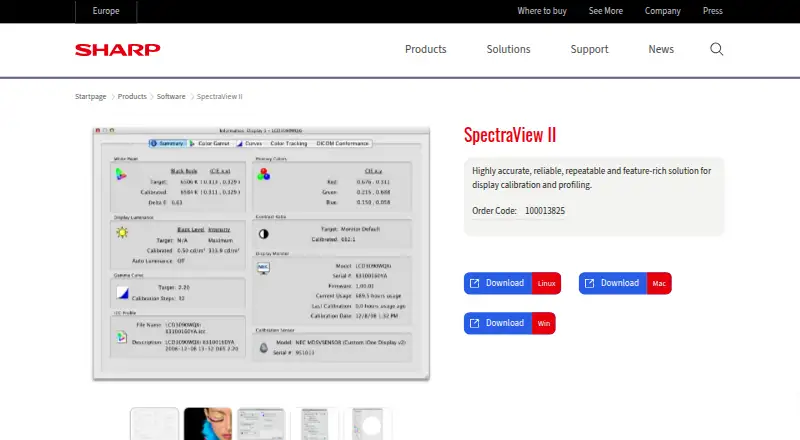
SpectraView II is desktop color-management software for calibrating compatible NEC professional displays. It is intended for photographers, designers, video professionals and other users who need repeatable display color. Supported color sensors measure the display, while the software creates a calibrated target state and generates or installs ICC monitor profiles for color-managed applications. Compatibility depends on the NEC display model and supported measurement device.
Its main strength is the calibration workflow built around NEC professional displays. Users can configure calibration targets, run sensor-based measurements and create an ICC monitor profile for installation. Hardware-assisted calibration can help establish a defined target state rather than relying only on visual adjustments. This makes SpectraView II a focused fit for color-critical display work where the monitor and measurement device are both supported. The software runs on Windows and macOS and is deployed on desktop systems.
SpectraView II has a narrow ecosystem by design. It supports compatible NEC professional displays, so users with other monitor brands should verify compatibility before choosing it. The published feature set covers display calibration and ICC monitor profile management, but not printer or camera profiling. Pricing is handled through contact sales, and documentation is listed as the support channel. Choose SpectraView II when NEC display compatibility and a sensor-driven monitor workflow are the priority; choose a broader color-management product when you need multi-brand hardware support or profiling across displays, printers and cameras.
Your product? Our editors can test SpectraView II in depth and publish a review, labelled as paid · from $149/mo →
SpectraView II pricing
SpectraView II fact sheet
| Free plan | Not verified |
|---|---|
| Paid from | Not verified |
| Display calibration | Yes |
| Printer profiling | No |
| Camera profiling | No |
| HDR calibration | Not verified |
| ICC profile management | Yes |
| Supported platforms | Windows_macos |
| License model | Not verified |
| Deployment | Desktop |
| Platforms | Windows, macOS |
| Support | Docs |
| Built for | Small business, Mid-market, Enterprise (editorial estimate) |
| Pricing | Pricing on request |
| Website | sharpdisplays.eu |
| Facts checked | 23 Sep 2026 |
Alternatives to SpectraView II
- X-Rite i1ProfilerA focused choice for display calibration, ICC profiling, multi-monitor matching, and QA.9.1
- ASUS ProArt CalibrationA capable free option for ProArt owners who need SDR and HDR calibration.9.0
- EIZO ColorNavigator 7A capable free choice for hardware-calibrating supported EIZO monitors.8.8

See all SpectraView II alternatives →
Used SpectraView II? Be the first to review it
The editor score above is our own research. What this page doesn't have yet is a reader's view — what you used SpectraView II for, what worked and what didn't. No stars are seeded and no review is paid for; an editor reads every one before it appears.
Write a reviewTwo minutes · verified accounts only · read by an editor before it appears
Featured on iTechGuides

SpectraView II is listed in our Color Management Software directory. Add the badge to your site — it links back to this page.
<a href="https://www.itechguides.com/products/spectraview-ii/"><img src="https://www.itechguides.com/best/badge/spectraview-ii.svg" alt="Featured on iTechGuides" width="230" height="46"></a>
Reviewed by iTechGuides Editors · Editorial team · Updated Oct 2026
Advertiser disclosure: iTechGuides is reader-supported. Vendors can pay for top positions in our rankings and for a place on other products' pages, and we may earn a commission when you click some links. Bought places stand at the number bought; this page and our disclosure say so. Paying vendors may get a fuller, more detailed review from our editors, and that review can change their score. How we rank.
Last updated · How we research and update