
Spectora
Spectora: A broad inspection workflow with offline mobile reporting, portals, payments, and integrations. Ranked #1 of 25 in Home Inspection Software by our editors (9.4/10); pricing: Paid; best for established teams needing broad integrations.
At a glance
- Editor score9.4 / 10
- PricingPaid
- Best forEstablished teams needing broad integrations
- Free planNo
- Paid from$699/yr
- Mobile platformsBoth
- Facts checked21 Sep 2026
Where it wins
- Offline iOS and Android reporting synchronizes automatically
- Client portal combines reports, payments, and scheduling
- Integrates with Google Calendar, QuickBooks Online, Zapier, and more
Where it doesn't
- Core subscription starts at $109 per month
- Advanced automation costs an additional $4 per inspection
- Website products are separate add-ons
Our verdict on Spectora
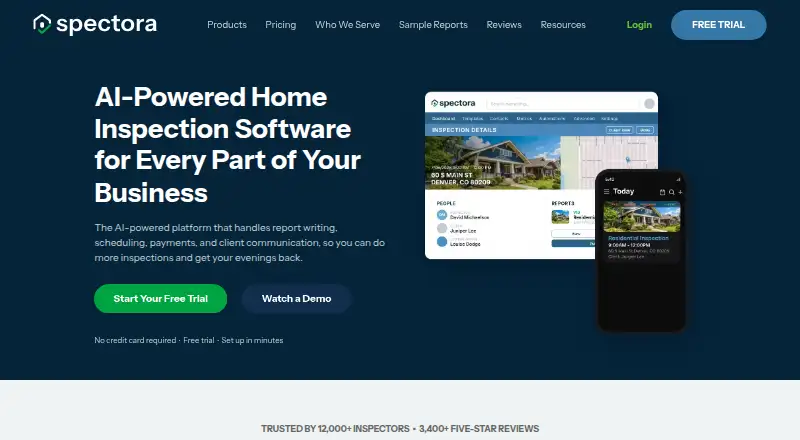
Spectora is cloud-based software for home inspectors and inspection companies that need reporting, scheduling, client communication, payments, and business management in one platform. Inspectors can write reports on iOS, Android, or the web, use customizable templates, and continue working offline on mobile before synchronization. The client portal supports reports, payments, and service scheduling, while photo tools cover annotation, cropping, brightness, and magnification. AI-assisted comment and report writing is also included among the platform’s capabilities.
The published plans show a $109 monthly Monthly Subscription or a $1,090 annual Annual Subscription. Both include report writing, scheduling, a client portal, integrated payments, and mobile and web reporting. An Additional Inspector costs $99 per month or $999 per year for additional team member access. Advanced adds automation, CRM tools, business insights, and team management for $4 per inspection. Website add-ons start with Base Website at $69 per month or $699 per year; Pro Website costs $159 per month and adds SEO and AI search optimization, reviews integration, and services and fees integration.
Spectora’s platform fit is a major consideration for established teams. It supports web, iOS, Android, and API access, with integrations including Google Calendar, Google Maps, QuickBooks Online, Mailchimp, ISN, Zapier, Repair Pricer, HomeBinder, and several call-center services. Online appointment scheduling can be embedded into a website, and payment processing includes Apple Pay and Google Pay. Teams seeking offline mobile reporting, customizable templates, client-facing workflows, and connected business tools should find the feature mix relevant. Smaller practices seeking a permanent free plan or a lower starting subscription should look elsewhere.
Your product? Our editors can test Spectora in depth and publish a review, labelled as paid · from $149/mo →
Spectora pricing
All 6 Spectora plans and prices →
Spectora fact sheet
| Free plan | No |
|---|---|
| Paid from | $699/yr |
| Mobile platforms | Both |
| Custom report templates | Yes |
| Appointment scheduling | Yes |
| Photo annotations | Yes |
| Defect library | Yes |
| Client portal | Yes |
| Payment collection | Yes |
| Deployment | Cloud, Mobile |
| Platforms | Web, iOS, Android |
| Compliance & security | 2FA |
| Support | Email, Live chat, Docs · 24/7 |
| Built for | Solo, Small business, Mid-market, Enterprise (editorial estimate) |
| Integrations | 14 integrations: Google Calendar, Google Maps, QuickBooks Online, Mailchimp, ISN, Zapier … See all → |
| Pricing | Paid (source) |
| Website | spectora.com |
| Facts checked | 21 Sep 2026 |
Spectora integrations
Spectora lists 14 integrations on its own site.
- Google Calendar
- Google Maps
- QuickBooks Online
- Mailchimp
- ISN
- Zapier
- Blipp Reviews
- Repair Pricer
- HomeBinder
- InterNACHI BuyBack
- RecallChek
- Inspector Call Center
- America's Call Center
- Small Hive Solutions Call Center
See all Spectora integrations →
Alternatives to Spectora
- SpecuLinkA broad inspection platform combining offline reports, AI, scheduling, portals, and payments.9.3
- ScribeWareA collaborative inspection suite with broad reporting and client workflow tools.9.2
- Inspector ToolbeltA free-entry inspection platform covering reports, scheduling, payments, and client work.9.1


See all Spectora alternatives →
Spectora vs the competition
- Spectora vs SpecuLink
- Spectora vs ScribeWare
- Spectora vs Inspector Toolbelt
- Spectora vs SpecMind
- Spectora vs Home Inspector Pro
- Spectora vs HomeGauge



Compare Spectora with any tool side by side →
Used Spectora? Be the first to review it
The editor score above is our own research. What this page doesn't have yet is a reader's view — what you used Spectora for, what worked and what didn't. No stars are seeded and no review is paid for; an editor reads every one before it appears.
Write a reviewTwo minutes · verified accounts only · read by an editor before it appears
Featured on iTechGuides

Spectora is listed in our Home Inspection Software directory. Add the badge to your site — it links back to this page.
<a href="https://www.itechguides.com/products/spectora/"><img src="https://www.itechguides.com/best/badge/spectora.svg" alt="Featured on iTechGuides" width="230" height="46"></a>
Reviewed by iTechGuides Editors · Editorial team · Updated Oct 2026
Advertiser disclosure: iTechGuides is reader-supported. Vendors can pay for top positions in our rankings and for a place on other products' pages, and we may earn a commission when you click some links. Bought places stand at the number bought; this page and our disclosure say so. Paying vendors may get a fuller, more detailed review from our editors, and that review can change their score. How we rank.
Last updated · How we research and update