
Smodin AI Paraphraser
Smodin AI Paraphraser: A paid paraphraser with uploads, strength controls, API access, and browser workflows. Ranked #18 of 24 in AI Paraphrasing Tools by our editors (7.2/10); pricing: Paid; best for paid users needing uploads, API, and extensions.
At a glance
- Editor score7.2 / 10
- PricingPaid
- Best forPaid users needing uploads, API, and extensions
- Free planNo
- Paid from$10/mo
- Tone controlsYes
- Facts checked20 Sep 2026
Where it wins
- Preserves meaning with four adjustable paraphrasing strength levels
- Supports DOC, DOCX, and PDF uploads
- Includes a rewriter API and Chrome extension for Google Docs workflows
Where it doesn't
- No permanent free plan
- Length controls are not included
- Advanced features require the Premium plan
Our verdict on Smodin AI Paraphraser
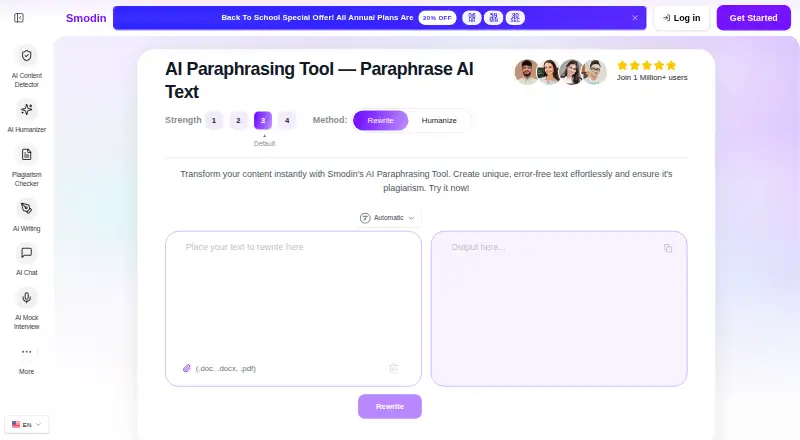
Smodin AI Paraphraser rewrites existing text while preserving its meaning. It offers standard rewriting and humanization modes, four paraphrasing strength levels, document uploads, and a Recreate workflow that accepts writing-style input. The product is positioned for students, academics, bloggers, content creators, business professionals, writers, and researchers who need more than basic text rewording.
Pricing is split between two paid plans, with annual billing shown at monthly-equivalent rates. Starter costs $10 per month and includes all AI tools, a standard text rewriter, limited writing output, and email support. Premium costs $16 per month and adds premium AI models, an advanced text rewriter, unlimited writing output, a Chrome extension, extended API access, and 24/7 priority support. Smodin supports web, API, and Chrome extension workflows, with integrations for RapidAPI and WordPress. Choose Premium when browser-based work, higher output limits, or application integration matters; Starter suits lighter rewriting needs.
Its strongest fit is for users who want paraphrasing controls alongside document handling and workflow options. The Rewrite and Humanize modes, adjustable strength settings, DOC, DOCX, and PDF support, and Rewriter API cover several content-processing scenarios. The Chrome extension also supports browser and Google Docs workflows. However, the product does not include length controls, and its paraphrasing controls are narrower than those of higher-ranked alternatives. Users who need a permanent free plan or more control over rewritten length should consider another tool. Smodin is a practical choice for paid users who value uploads, API access, and extensions more than broad editing controls.
Your product? Our editors can test Smodin AI Paraphraser in depth and publish a review, labelled as paid · from $149/mo →
Smodin AI Paraphraser pricing
All 2 Smodin AI Paraphraser plans and prices →
Smodin AI Paraphraser fact sheet
| Free plan | No |
|---|---|
| Paid from | $10/mo |
| Word limit | Not verified |
| Supported languages | Not verified |
| Tone controls | Yes |
| Length controls | No |
| Document upload | Yes |
| API access | Yes |
| Deployment | Cloud, Browser extension |
| Platforms | Web, Chrome extension |
| Compliance & security | GDPR |
| Support | Email, Phone, Docs · 24/7 |
| Built for | Solo, Small business, Mid-market (editorial estimate) |
| Integrations | 2 integrations: RapidAPI, WordPress |
| Pricing | Paid (source) |
| Website | smodin.io |
| Facts checked | 20 Sep 2026 |
Smodin AI Paraphraser integrations
Smodin AI Paraphraser lists 2 integrations on its own site.
- RapidAPI
- WordPress
Alternatives to Smodin AI Paraphraser
- QuillBotA broad AI writing suite with a useful free tier and wider paid capabilities.9.4
- WordtuneA flexible browser-based writing assistant with useful tone, length, and summarization controls.9.1
- Paraphraser.ioA broad paraphrasing toolkit with tone, length, file, audio, language, and API options.8.9

See all Smodin AI Paraphraser alternatives →
Also Ranked In
Smodin AI Paraphraser is ranked in 2 of our directories.
Used Smodin AI Paraphraser? Be the first to review it
The editor score above is our own research. What this page doesn't have yet is a reader's view — what you used Smodin AI Paraphraser for, what worked and what didn't. No stars are seeded and no review is paid for; an editor reads every one before it appears.
Write a reviewTwo minutes · verified accounts only · read by an editor before it appears
Featured on iTechGuides

Smodin AI Paraphraser is listed in our AI Paraphrasing Tools directory. Add the badge to your site — it links back to this page.
<a href="https://www.itechguides.com/products/smodin-ai-paraphraser/"><img src="https://www.itechguides.com/best/badge/smodin-ai-paraphraser.svg" alt="Featured on iTechGuides" width="230" height="46"></a>
Reviewed by iTechGuides Editors · Editorial team · Updated Oct 2026
Advertiser disclosure: iTechGuides is reader-supported. Vendors can pay for top positions in our rankings and for a place on other products' pages, and we may earn a commission when you click some links. Bought places stand at the number bought; this page and our disclosure say so. Paying vendors may get a fuller, more detailed review from our editors, and that review can change their score. How we rank.
Last updated · How we research and update