
Smilebox
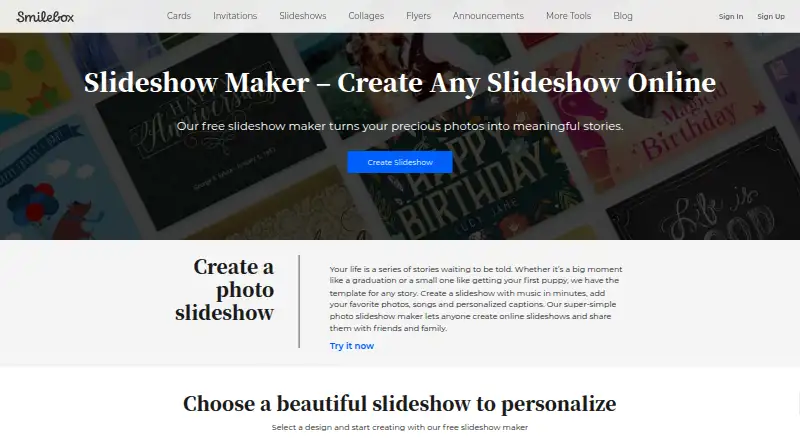
Smilebox: A straightforward web slideshow maker for personal stories, events, and simple sharing. Ranked #5 of 23 in Photo Slideshow Makers by our editors (8.0/10); pricing: Free plan · 7-day trial; best for simple template-based web slideshows.
At a glance
- Editor score8.0 / 10
- PricingFree plan · 7-day trial
- Best forSimple template-based web slideshows
- Free planYes
- Founded2005
- Facts checked20 Sep 2026
Where it wins
- Imports photos from computers, phones, Facebook, and Instagram
- Autofill arranges photos automatically, with manual customization available
- Adds music, captions, animations, sharing, and MP4 downloads
Where it doesn't
- Available on the web rather than across multiple platforms
- Export is provided as MP4, with no other format listed
- Focuses on templates rather than a more advanced feature set
Our verdict on Smilebox
Smilebox is a web-based slideshow maker for individuals, families, and small organizations creating photo stories for events and personal milestones. Its workflow combines templates with photo uploads from a computer, phone, Facebook, or Instagram. Users can arrange images automatically with Autofill or adjust them manually, then add text, fonts, colors, animations, and music. The product also supports storage for photos and slideshows, along with related creative formats such as eCards, invitations, and collages.
The free web plan covers the main needs of a simple slideshow project: templates, Autofill, music, user-uploaded music, captions, customization controls, MP4 downloads, and sharing by email or social media. Facebook and Instagram imports give it a practical fit for personal photo collections. The published product details identify a seven-day free trial configuration, while the overall pricing model is freemium. This makes Smilebox a reasonable choice for users who want to create and share a slideshow without moving into a more specialized editing workflow.
Its main trade-off is focus. Smilebox emphasizes template-based creation and straightforward photo storytelling, so it suits event memories, family milestones, invitations, and small-organization projects better than users seeking an advanced slideshow tool. The web-only platform may also be limiting for people who require dedicated desktop or mobile applications. MP4 is the listed download format, while email and social media provide the main playback and sharing paths. Choose Smilebox for accessible browser-based creation, familiar social imports, and simple music-led presentations; choose an alternative if deeper editing or broader platform support is a priority.
Your product? Our editors can test Smilebox in depth and publish a review, labelled as paid · from $149/mo →
Smilebox pricing
Smilebox fact sheet
| Free plan | Yes |
|---|---|
| Paid from | Not verified |
| Maximum photos | Not verified |
| Caption tools | Yes |
| Audio upload | Yes |
| Export formats | MP4 |
| Playback options | download, email, social media |
| Supported platforms | web |
| Free trial | 7 days |
| Deployment | Cloud |
| Platforms | Web |
| Support | Tickets |
| Built for | Solo, Small business (editorial estimate) |
| Integrations | 2 integrations: Facebook, Instagram |
| Pricing | Free plan · 7-day trial |
| Website | smilebox.com |
| Facts checked | 20 Sep 2026 |
Smilebox integrations
Smilebox lists 2 integrations on its own site.
Alternatives to Smilebox
- MAGIX Photostory deluxeA feature-rich Windows slideshow editor for personal photo and video projects.8.9
- PhotoStageA versatile slideshow maker with broad export options and a non-commercial free version.8.7
- Icecream Slideshow MakerA capable free Windows slideshow maker with paid 4K, DVD, and cloud-upload features.8.4



See all Smilebox alternatives →
Smilebox vs the competition
- Smilebox vs MAGIX Photostory deluxe
- Smilebox vs PhotoStage
- Smilebox vs Icecream Slideshow Maker
- Smilebox vs Ashampoo Slideshow Studio HD 4
- Smilebox vs 4K Slideshow Maker
- Smilebox vs Photopia



Compare Smilebox with any tool side by side →
Also Ranked In
Smilebox is ranked in 4 of our directories.
Used Smilebox? Be the first to review it
The editor score above is our own research. What this page doesn't have yet is a reader's view — what you used Smilebox for, what worked and what didn't. No stars are seeded and no review is paid for; an editor reads every one before it appears.
Write a reviewTwo minutes · verified accounts only · read by an editor before it appears
Featured on iTechGuides

Smilebox is listed in our Photo Slideshow Makers directory. Add the badge to your site — it links back to this page.
<a href="https://www.itechguides.com/products/smilebox/"><img src="https://www.itechguides.com/best/badge/smilebox.svg" alt="Featured on iTechGuides" width="230" height="46"></a>
Reviewed by iTechGuides Editors · Editorial team · Updated Oct 2026
Advertiser disclosure: iTechGuides is reader-supported. Vendors can pay for top positions in our rankings and for a place on other products' pages, and we may earn a commission when you click some links. Bought places stand at the number bought; this page and our disclosure say so. Paying vendors may get a fuller, more detailed review from our editors, and that review can change their score. How we rank.
Last updated · How we research and update