
Slides
Slides: An accessible AI deck builder for animated presentations, with limited export breadth. Ranked #12 of 25 in Animated Presentation Software by our editors (7.5/10); pricing: Free plan; best for affordable AI motion-design presentations.
At a glance
- Editor score7.5 / 10
- PricingFree plan
- Best forAffordable AI motion-design presentations
- Free planYes
- Paid from$9/mo
- Facts checked20 Sep 2026
Where it wins
- Generates presentation structure and layouts from natural-language prompts
- Adds animated motion design, transitions, and interactive elements
- Offers responsive layouts, shareable URLs, and view tracking
Where it doesn't
- Free presentations include a Slides watermark
- Free plan limits image generation and asset storage
- Web-only access and HTML export is limited to Premium
Our verdict on Slides
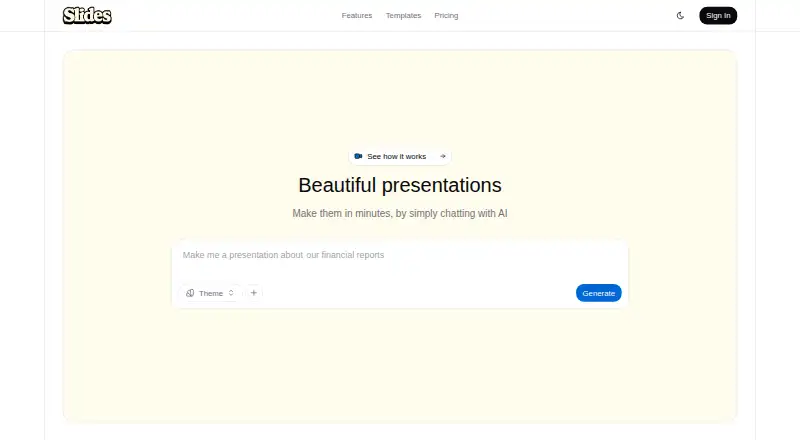
Slides is a web-based presentation platform for creating animated decks with AI. Users can describe a presentation in natural language, receive generated structure, layouts, visual styles, and motion design, then refine the result through conversational editing. Its responsive presentations are designed for phones, tablets, and projectors, while shareable URLs support distribution. The product fits project proposals, sales decks, financial reports, and training materials, especially when motion and interactivity matter alongside standard slide content.
The plan structure makes Slides accessible for lighter use. The Free plan includes AI presentation generation, five image generations per month, 10 total asset storage slots, standard generation speed, and a Slides watermark. Premium costs $9 per month when billed monthly and adds 20 presentations per month, 100 image generations per month, unlimited asset storage, priority AI generation, no watermark, and HTML export. Enterprise adds team collaboration, SSO integration, custom branding, and dedicated support. For individuals, the main decision is whether the Free plan's limits and watermark are acceptable or whether Premium's higher allowances and export option justify the monthly cost.
Its strongest fit is for people who want AI-assisted motion design without building every layout manually. Animated entrance effects and transitions, interactive charts and presentation elements, custom uploads for images, SVGs, and documents, password protection, and view tracking give the platform more presentation control than a simple static deck generator. However, its platform access is limited to the web, and HTML is the specified Premium export format. Choose Slides when responsive, shareable, animated presentations are the priority; choose another tool when your workflow depends on broader presentation-format exports or a native desktop application.
Your product? Our editors can test Slides in depth and publish a review, labelled as paid · from $149/mo →
Slides pricing
All 3 Slides plans and prices →
Slides fact sheet
| Free plan | Yes |
|---|---|
| Paid from | $9/mo |
| Character animation | Not verified |
| Motion graphics | Yes |
| Custom asset upload | Yes |
| Video export | Not verified |
| Presentation export | Not verified |
| Team collaboration | Yes |
| Maximum video length | Not verified |
| Money-back guarantee | 14 days |
| Deployment | Cloud |
| Platforms | Web |
| Support | |
| Built for | Solo, Small business, Mid-market, Enterprise (editorial estimate) |
| Pricing | Free plan (source) |
| Website | useslides.com |
| Facts checked | 20 Sep 2026 |
Alternatives to Slides
- PowtoonA broad web-based toolkit for animated presentations, videos, branding, and AI creation.9.4
- AnimakerA broad animation toolkit with AI creation, collaboration, and flexible export options.9.1
- PreziA flexible visual storytelling platform built around interactive, zoomable presentations.8.9


Also Ranked In
Slides is ranked in 2 of our directories.
Used Slides? Be the first to review it
The editor score above is our own research. What this page doesn't have yet is a reader's view — what you used Slides for, what worked and what didn't. No stars are seeded and no review is paid for; an editor reads every one before it appears.
Write a reviewTwo minutes · verified accounts only · read by an editor before it appears
Featured on iTechGuides

Slides is listed in our Animated Presentation Software directory. Add the badge to your site — it links back to this page.
<a href="https://www.itechguides.com/products/slides-animated-presentation-software/"><img src="https://www.itechguides.com/best/badge/slides-animated-presentation-software.svg" alt="Featured on iTechGuides" width="230" height="46"></a>
Reviewed by iTechGuides Editors · Editorial team · Updated Oct 2026
Advertiser disclosure: iTechGuides is reader-supported. Vendors can pay for top positions in our rankings and for a place on other products' pages, and we may earn a commission when you click some links. Bought places stand at the number bought; this page and our disclosure say so. Paying vendors may get a fuller, more detailed review from our editors, and that review can change their score. How we rank.
Last updated · How we research and update