
SlideDog
SlideDog: A Windows-centered playback tool for live shows using mixed presentation media. Ranked #52 of 93 in Presentation Software by our editors (4.1/10); pricing: Free plan; best for combining mixed media during live shows.
At a glance
- Editor score4.1 / 10
- PricingFree plan
- Best forCombining mixed media during live shows
- Free planYes
- Paid from$99/seat/yr
- Facts checked20 Sep 2026
Where it wins
- Combines PowerPoint, PDF, video, web, image, Word, and Excel files
- Adds polls, feedback, chat, live sharing, and remote control
- Supports Presenter View, dual screens, looping, and playlist automation
Where it doesn't
- Primarily a Windows-centered playback tool, not a full presentation editor
- Real-time collaborative deck editing is not included
- Online media and audience interaction require an internet connection
Our verdict on SlideDog
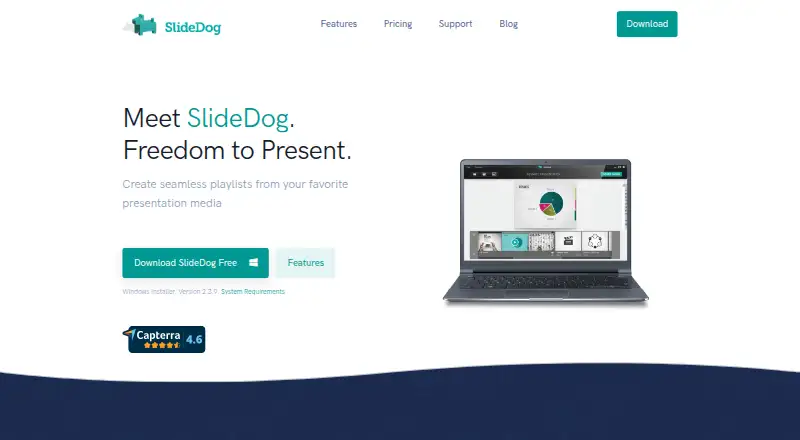
SlideDog is a presentation application for presenters who need to combine different media types during meetings, events, conferences, lectures, sales presentations, and educational sessions. Its playlist approach brings PowerPoint, PDF, Prezi, video, web pages, images, Word files, and Excel files into one show. Presenters can switch between items, use cross-fade playback, run content offline when it is stored locally, and control playback from a web-enabled device. The product is a fit for live presenters managing varied source files rather than teams building presentation decks together.
The published plans use a freemium model. The free plan provides an entry point, while Pro Monthly costs $19 per 2 seats and includes all SlideDog Pro features, two license activations, and priority email support. Pro Annual costs $99 per 2 seats with the same included features and support. Pro Lifetime costs $299 per 2 seats and adds free upgrades for the next two major versions. Enterprise offers custom pricing for larger organizations. This structure suits presenters who value multi-seat access or longer-term licensing, while the free option supports initial evaluation.
SlideDog’s standout capability is playback orchestration: playlists can combine office files, PDFs, video, web content, and images, with automatic advancement and looping for event-style programs. Audience sharing, polls, feedback, chat, Presenter View, and dual-screen support extend it beyond basic file playback. Microsoft PowerPoint, Adobe Acrobat Reader, VLC, Microsoft Word, Microsoft Excel, Prezi, and YouTube are listed integrations. Windows is central to the application, with web, iOS, and Android supporting the broader presentation experience. Choose SlideDog for mixed-media live shows and presenter controls; choose another tool if collaborative deck editing or a platform-neutral authoring environment is the priority.
Your product? Our editors can test SlideDog in depth and publish a review, labelled as paid · from $149/mo →
SlideDog pricing
All 4 SlideDog plans and prices →
SlideDog fact sheet
| Free plan | Yes |
|---|---|
| Paid from | $99/seat/yr |
| AI assistance | Not verified |
| Real-time collaboration | No |
| PowerPoint import | Yes |
| PowerPoint export | No |
| Offline access | Yes |
| Presenter mode | Yes |
| Supported platforms | Windows, web, iOS, Android |
| Money-back guarantee | 24 days |
| Deployment | Cloud, Desktop, Mobile |
| Platforms | Web, Windows, iOS, Android |
| Support | Email, Community |
| Built for | Solo, Small business, Mid-market, Enterprise (editorial estimate) |
| Integrations | 7 integrations: Microsoft PowerPoint, Adobe Acrobat Reader, VLC, Microsoft Word, Microsoft Excel, Prezi … |
| Pricing | Free plan (source) |
| Website | slidedog.com |
| Facts checked | 20 Sep 2026 |
SlideDog integrations
SlideDog lists 7 integrations on its own site.
- Microsoft PowerPoint
- Adobe Acrobat Reader
- VLC
- Microsoft Word
- Microsoft Excel
- Prezi
- YouTube
Alternatives to SlideDog
- Microsoft PowerPointA broad presentation workspace spanning web, desktop, mobile, collaboration, AI, and rehearsal tools.9.4
- Apple KeynoteA polished free presentation tool for Apple ecosystem users, with optional AI features.9.1
- Zoho ShowA capable free option for teams that need collaboration, offline work, and PPTX support.9.0



See all SlideDog alternatives →
Used SlideDog? Be the first to review it
The editor score above is our own research. What this page doesn't have yet is a reader's view — what you used SlideDog for, what worked and what didn't. No stars are seeded and no review is paid for; an editor reads every one before it appears.
Write a reviewTwo minutes · verified accounts only · read by an editor before it appears
Featured on iTechGuides

SlideDog is listed in our Presentation Software directory. Add the badge to your site — it links back to this page.
<a href="https://www.itechguides.com/products/slidedog/"><img src="https://www.itechguides.com/best/badge/slidedog.svg" alt="Featured on iTechGuides" width="230" height="46"></a>
Guides on presentation software
- 5 Best AI Presentation and PowerPoint Design Tools in 2026Aug 2026
- Best AI Tools for Effortless Presentation Design Compared 2025: 2026 Buyer’s UpdateAug 2026
- Best Presentation Apps for iPad and iPhone: Keynote, PowerPoint, Google Slides, Canva, and PreziAug 2026
Reviewed by iTechGuides Editors · Editorial team · Updated Oct 2026
Advertiser disclosure: iTechGuides is reader-supported. Vendors can pay for top positions in our rankings and for a place on other products' pages, and we may earn a commission when you click some links. Bought places stand at the number bought; this page and our disclosure say so. Paying vendors may get a fuller, more detailed review from our editors, and that review can change their score. How we rank.
Last updated · How we research and update