
SlideCamp
SlideCamp: Centralizes, updates, governs, and measures presentation content inside PowerPoint. Ranked #16 of 24 in Presentation Management Software by our editors (7.7/10); pricing: Pricing on request; best for powerPoint teams needing simple content control.
At a glance
- Editor score7.7 / 10
- PricingPricing on request
- Best forPowerPoint teams needing simple content control
- Central deck libraryYes
- Facts checked20 Sep 2026
Where it wins
- Centralized slide library with full-text and image search
- Synchronizes updated master slides across linked decks
- Adds permissions, approvals, duplicate detection, and engagement tracking
Where it doesn't
- Pricing requires contact with sales
- Workflow centers on PowerPoint and Office 365
- Teams outside presentation-content workflows may find it too specialized
Our verdict on SlideCamp
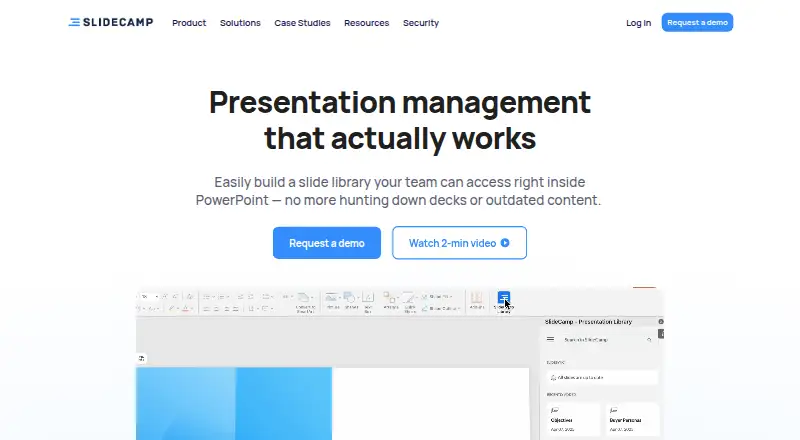
SlideCamp is presentation management software built into PowerPoint for teams that maintain large collections of shared presentation content. It centralizes approved slides, indexes slide content for full-text and image search, detects duplicate slides, and lets users insert content directly into presentations. Sales, marketing, training, and other teams can use it to keep decks current, apply access rules, and track how shared presentations perform. Its focus is practical: controlling slide content and keeping distributed presentations aligned with approved material.
The standout capability is synchronization across linked decks. When a master slide changes, SlideCamp is designed to synchronize that update across connected presentations, helping teams manage content that appears in multiple decks. Duplicate slide detection adds another layer of library control, while role-based permissions and content review and approval workflows support governance before material is shared. Slide view and engagement tracking extend the product beyond storage, giving teams a way to monitor interaction with shared presentations. These features make SlideCamp a fit for organizations where consistency and review matter as much as finding a slide quickly.
SlideCamp connects with Microsoft PowerPoint and Microsoft Office 365, so it is most suitable for teams already working in that environment. The published pricing model is contact sales, and a free trial is mentioned. That approach may suit organizations that want to discuss their presentation-management needs before choosing the product, but it gives buyers less immediate pricing clarity. SlideCamp is a strong candidate for PowerPoint-centered teams that need centralized content control, synchronization, permissions, approvals, and engagement tracking. Teams looking for a presentation tool independent of PowerPoint or a broader collaboration environment should consider whether this focused workflow matches how they create and distribute decks.
Your product? Our editors can test SlideCamp in depth and publish a review, labelled as paid · from $149/mo →
SlideCamp pricing
SlideCamp fact sheet
| Free plan | Not verified |
|---|---|
| Paid from | Not verified |
| Central deck library | Yes |
| Version history | Not verified |
| Approval workflows | Yes |
| Brand controls | Yes |
| Viewer analytics | Yes |
| Sharing controls | Access_rules |
| API access | Not verified |
| Deployment | Cloud, Desktop |
| Compliance & security | GDPR, HIPAA, ISO 27001, SSO/SAML, 2FA |
| Support | Email, Docs |
| Built for | Mid-market, Enterprise (editorial estimate) |
| Integrations | 2 integrations: Microsoft PowerPoint, Microsoft Office 365 |
| Pricing | Pricing on request |
| Website | slidecamp.io |
| Facts checked | 20 Sep 2026 |
SlideCamp integrations
SlideCamp lists 2 integrations on its own site.
- Microsoft PowerPoint
- Microsoft Office 365
Alternatives to SlideCamp
- DeckForgeA broad open-source deck governance platform with AI, approvals, and controlled sharing.9.4
- DeckyAffordable deck management with AI generation, brand controls, and native presentation exports.9.2
- TeamSlideA strong fit for enterprise PowerPoint teams managing shared slides, templates, and approvals.9.0


See all SlideCamp alternatives →
Used SlideCamp? Be the first to review it
The editor score above is our own research. What this page doesn't have yet is a reader's view — what you used SlideCamp for, what worked and what didn't. No stars are seeded and no review is paid for; an editor reads every one before it appears.
Write a reviewTwo minutes · verified accounts only · read by an editor before it appears
Featured on iTechGuides

SlideCamp is listed in our Presentation Management Software directory. Add the badge to your site — it links back to this page.
<a href="https://www.itechguides.com/products/slidecamp/"><img src="https://www.itechguides.com/best/badge/slidecamp.svg" alt="Featured on iTechGuides" width="230" height="46"></a>
Reviewed by iTechGuides Editors · Editorial team · Updated Oct 2026
Advertiser disclosure: iTechGuides is reader-supported. Vendors can pay for top positions in our rankings and for a place on other products' pages, and we may earn a commission when you click some links. Bought places stand at the number bought; this page and our disclosure say so. Paying vendors may get a fuller, more detailed review from our editors, and that review can change their score. How we rank.
Last updated · How we research and update