
TeamSlide
TeamSlide: A strong fit for enterprise PowerPoint teams managing shared slides, templates, and approvals. Ranked #3 of 24 in Presentation Management Software by our editors (9.0/10); pricing: 30-day trial; best for powerPoint-centric enterprise slide teams.
At a glance
- Editor score9.0 / 10
- Pricing30-day trial
- Best forPowerPoint-centric enterprise slide teams
- Free planNo
- Paid from$29/user/mo
- Central deck libraryYes
- Facts checked20 Sep 2026
Where it wins
- Centralized PowerPoint library with secure search and metadata filtering
- Version alerts, approvals, permissions, and brand-compliance checks
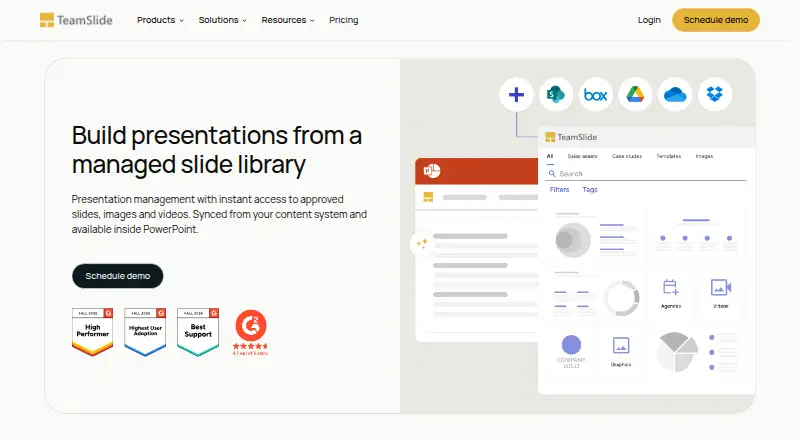
- Integrations with SharePoint, OneDrive, Box, Google Drive, and Dropbox
Where it doesn't
- Annual billing starts at $29 per user per month
- Plans require a minimum of 3 users
- The workflow is centered on PowerPoint rather than broader presentation tools
Our verdict on TeamSlide
TeamSlide is presentation-management software for organizations that create and reuse PowerPoint content across marketing, sales, consulting, finance, and other teams. Its centralized library stores slides, templates, images, and videos, while users can search slide text, notes, tags, and metadata, preview content, and insert slides directly into presentations. PowerPoint-native management is the core proposition, supported by permissions, template controls, version alerts, approval submissions, and brand-compliance checks.
Pricing is organized around management-first and generation-first options. Slide Management costs $29 per user per month with annual billing and includes the centralized library, secure search, version control, template management, brand checks, and user controls. Slide Management + Generation costs $49 per user per month and adds AI-assisted slide generation, text rewriting, interchangeable layouts, prompt-based editing, and editable PowerPoint slides. Slide Generation costs $29 per month with annual billing, while Slide Generation + Management costs $49 per month with annual billing. Enterprise adds custom layouts and brand voice, APIs and MCP, enterprise SSO, role-based access controls, and optional on-premise deployment. A 30-day free trial is available, and subscriptions require at least 3 users.
TeamSlide fits teams already working in PowerPoint and needing consistent content governance across repositories. It connects with SharePoint, OneDrive, Box, Google Drive, Dropbox, and Widen, and is available through web, Windows, macOS, API, and self-hosted options. The management features are especially relevant where outdated slides, inconsistent branding, and uncontrolled reuse create operational friction. Teams seeking AI generation can choose a generation-first plan or add generation to management. Organizations that do not depend on PowerPoint, need a broader presentation-authoring environment, or prefer a lower-commitment subscription should consider a different category fit.
Your product? Our editors can test TeamSlide in depth and publish a review, labelled as paid · from $149/mo →
TeamSlide pricing
All 5 TeamSlide plans and prices →
TeamSlide fact sheet
| Free plan | No |
|---|---|
| Paid from | $29/user/mo |
| Central deck library | Yes |
| Version history | Yes |
| Approval workflows | Yes |
| Brand controls | Yes |
| Viewer analytics | Yes |
| Sharing controls | Access_rules |
| API access | Yes |
| Free trial | 30 days |
| Deployment | Cloud, Self-hosted |
| Platforms | Web, Windows, macOS |
| Compliance & security | GDPR, SSO/SAML |
| Support | Email, Phone, Docs |
| Built for | Small business, Mid-market, Enterprise (editorial estimate) |
| Integrations | 7 integrations: Microsoft PowerPoint, SharePoint, OneDrive, Box, Google Drive, Dropbox … See all → |
| Pricing | 30-day trial (source) |
| Website | teamslide.com |
| Facts checked | 20 Sep 2026 |
TeamSlide integrations
TeamSlide lists 7 integrations on its own site.
- Microsoft PowerPoint
- SharePoint
- OneDrive
- Box
- Google Drive
- Dropbox
- Widen
See all TeamSlide integrations →
Alternatives to TeamSlide
- DeckForgeA broad open-source deck governance platform with AI, approvals, and controlled sharing.9.4
- DeckyAffordable deck management with AI generation, brand controls, and native presentation exports.9.2
- ShufflrrA broad presentation governance platform with PowerPoint access, controls, analytics, and AI options.8.9


See all TeamSlide alternatives →
TeamSlide vs the competition
- TeamSlide vs DeckForge
- TeamSlide vs Decky
- TeamSlide vs Shufflrr
- TeamSlide vs DIGIDECK
- TeamSlide vs empower
- TeamSlide vs SlideSource Library



Compare TeamSlide with any tool side by side →
Used TeamSlide? Be the first to review it
The editor score above is our own research. What this page doesn't have yet is a reader's view — what you used TeamSlide for, what worked and what didn't. No stars are seeded and no review is paid for; an editor reads every one before it appears.
Write a reviewTwo minutes · verified accounts only · read by an editor before it appears
Featured on iTechGuides

TeamSlide is listed in our Presentation Management Software directory. Add the badge to your site — it links back to this page.
<a href="https://www.itechguides.com/products/teamslide/"><img src="https://www.itechguides.com/best/badge/teamslide.svg" alt="Featured on iTechGuides" width="230" height="46"></a>
Reviewed by iTechGuides Editors · Editorial team · Updated Oct 2026
Advertiser disclosure: iTechGuides is reader-supported. Vendors can pay for top positions in our rankings and for a place on other products' pages, and we may earn a commission when you click some links. Bought places stand at the number bought; this page and our disclosure say so. Paying vendors may get a fuller, more detailed review from our editors, and that review can change their score. How we rank.
Last updated · How we research and update