
Sketch a Day
Sketch a Day: A motivating mobile sketching community for regular practice, not comprehensive art instruction. Ranked #24 of 27 in Art Learning Apps by our editors (6.8/10); pricing: Free plan; best for daily drawing motivation and community sharing.
At a glance
- Editor score6.8 / 10
- PricingFree plan
- Best forDaily drawing motivation and community sharing
- Free planYes
- Facts checked21 Sep 2026
Where it wins
- Free daily prompts encourage consistent drawing practice
- Streaks, milestones, badges, and recaps make progress visible
- Community sharing includes comments, likes, follows, and artist profiles
Where it doesn't
- No verified instructor feedback
- No live classes
- Learning is less structured than a broader art course
Our verdict on Sketch a Day
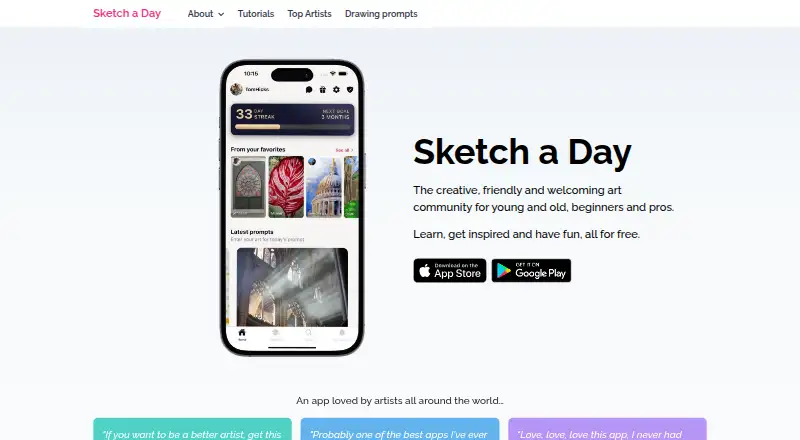
Sketch a Day is a mobile drawing-practice and art community app for beginners, hobbyists, and experienced artists. Its central feature is a new drawing prompt each day, supported by step-by-step video tutorials and artist guides. Users can upload sketches, share them with the community, follow creators, comment on artwork, and collect famous artworks in a personal gallery. With iOS and Android apps, it suits learners who want a regular creative routine supported by social sharing.
The app’s strongest area is daily practice. Drawing streaks, milestones, achievement badges, monthly recap graphics, and personal galleries give users several ways to track and reflect on participation. The community layer adds comments, likes, follows, and artist profiles, while Gold membership adds a portfolio website, a personalised in-app profile, artist private chat, and an ad-free experience. Free access keeps the core prompt-and-sharing loop available, with optional Supporter and Gold memberships through in-app purchases.
Sketch a Day is a good fit for people who need motivation, prompts, and a friendly place to share work. It is less suitable for learners seeking a complete curriculum, verified instructor feedback, or live classes. The step-by-step tutorials and artist guides provide learning support, but the product’s focus remains consistent sketching and community participation rather than broad, structured instruction. Choose it for a lightweight daily habit and social accountability; choose another art-learning app if guided teaching and formal class formats are priorities.
Your product? Our editors can test Sketch a Day in depth and publish a review, labelled as paid · from $149/mo →
Sketch a Day pricing
All 5 Sketch a Day plans and prices →
Sketch a Day fact sheet
| Free plan | Yes |
|---|---|
| Paid from | Not verified |
| Guided projects | Yes |
| Instructor feedback | Not verified |
| Live classes | Not verified |
| Progress tracking | Yes |
| Offline access | Not verified |
| Mobile platforms | ios, android |
| Art history lessons | Not verified |
| Deployment | Mobile |
| Platforms | iOS, Android |
| Support | |
| Built for | Solo, Small business (editorial estimate) |
| Pricing | Free plan (source) |
| Website | sketchaday.app |
| Facts checked | 21 Sep 2026 |
Alternatives to Sketch a Day
- Art ProfA broad art-learning platform combining adaptive study, feedback, and live mentoring.9.4
- DigitalPainting.SchoolA focused learning platform for artists who want guided practice and professional feedback.9.2
- Creature Art TeacherA broad art-learning library with mobile access, workshops, and instructor critique.9.0


See all Sketch a Day alternatives →
Used Sketch a Day? Be the first to review it
The editor score above is our own research. What this page doesn't have yet is a reader's view — what you used Sketch a Day for, what worked and what didn't. No stars are seeded and no review is paid for; an editor reads every one before it appears.
Write a reviewTwo minutes · verified accounts only · read by an editor before it appears
Featured on iTechGuides

Sketch a Day is listed in our Art Learning Apps directory. Add the badge to your site — it links back to this page.
<a href="https://www.itechguides.com/products/sketch-a-day/"><img src="https://www.itechguides.com/best/badge/sketch-a-day.svg" alt="Featured on iTechGuides" width="230" height="46"></a>
Reviewed by iTechGuides Editors · Editorial team · Updated Oct 2026
Advertiser disclosure: iTechGuides is reader-supported. Vendors can pay for top positions in our rankings and for a place on other products' pages, and we may earn a commission when you click some links. Bought places stand at the number bought; this page and our disclosure say so. Paying vendors may get a fuller, more detailed review from our editors, and that review can change their score. How we rank.
Last updated · How we research and update