
Skanlite
Skanlite: A focused open-source scanner utility for Linux image capture and export. Ranked #22 of 27 in Document Scanning Software by our editors (6.4/10); pricing: Free plan; best for basic open-source Linux image scanning.
At a glance
- Editor score6.4 / 10
- PricingFree plan
- Best forBasic open-source Linux image scanning
- Free planYes
- Paid fromFree
- Founded1996 · Berlin, Germany
- Facts checked20 Sep 2026
Where it wins
- Supports flatbed and network scanners
- Scans multiple selections from one preview
- Exports images in PNG, JPEG, JPEG 2000, and BMP
Where it doesn't
- Linux-only desktop availability
- Focused on image files rather than searchable documents
- Advanced features depend on scanner hardware support
Our verdict on Skanlite
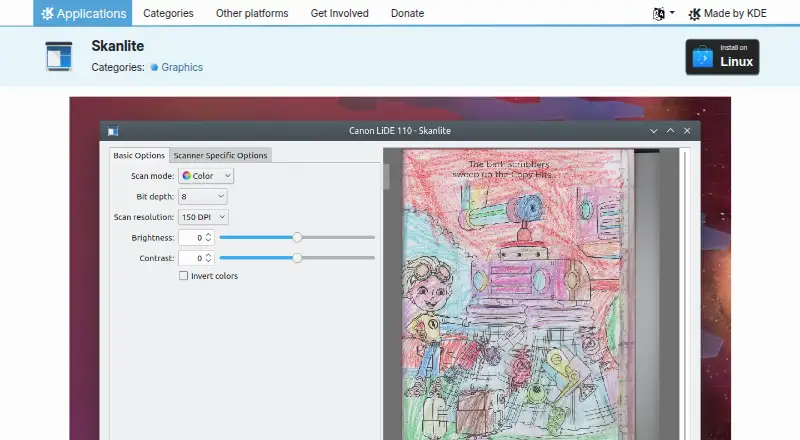
Skanlite is a free, open-source Linux desktop application for scanning and saving images. It is suited to Linux users who need a straightforward way to capture photos, documents, transparent slides, or filmstrips from supported scanners. The workflow includes a preview, selectable scan areas, adjustable preview resolution, and image export, with support for both flatbed and network scanners. Automatic file naming and saving also help keep routine scanning organized.
There is no paid tier in its pricing model, so the product is positioned as an open-source desktop utility rather than a multi-level commercial service. Its platform fit is narrow but clear: Linux users can work with supported local or network scanners and save output in PNG, JPEG, JPEG 2000, or BMP. Multiple selections from one preview add useful batch-style handling when several areas need to be captured from a single source image. Transparent slide and filmstrip scanning extends the workflow for compatible hardware.
Skanlite is strongest when the goal is image acquisition with a focused set of scanner controls. It is less suitable for teams seeking a broader document-processing system, since its documented workflow centers on scanning and saving images. Users who need OCR, searchable PDF creation, or camera capture should choose a product built around those functions instead. For basic Linux scanning, especially with flatbed or network hardware, Skanlite offers a concise feature set without a paid plan; for document archiving and text recognition, its narrow focus may be limiting.
Your product? Our editors can test Skanlite in depth and publish a review, labelled as paid · from $149/mo →
Skanlite pricing
Skanlite fact sheet
| Free plan | Yes |
|---|---|
| Paid from | Free |
| OCR languages | Not verified |
| Scanner support | Yes |
| Camera capture | Not verified |
| Batch scanning | Yes |
| Searchable PDF | Not verified |
| Supported platforms | Linux |
| Export formats | png, jpeg, jpg, jpeg 2000, bmp |
| Deployment | Desktop |
| Platforms | Linux |
| Support | Docs, Community |
| Built for | Solo, Small business (editorial estimate) |
| Pricing | Free plan |
| Website | apps.kde.org |
| Facts checked | 20 Sep 2026 |
Alternatives to Skanlite
- NAPS2A capable no-cost scanner app with broad driver support, OCR, and automation.9.4
- ScanSnap HomeA free ScanSnap companion for organized scanning, OCR, search, and cloud export.9.2
- Brother iPrint&ScanA capable free companion app for Brother owners who need everyday scanning tools.9.0


See all Skanlite alternatives →
Also Ranked In
Skanlite is ranked in 3 of our directories.
Used Skanlite? Be the first to review it
The editor score above is our own research. What this page doesn't have yet is a reader's view — what you used Skanlite for, what worked and what didn't. No stars are seeded and no review is paid for; an editor reads every one before it appears.
Write a reviewTwo minutes · verified accounts only · read by an editor before it appears
Featured on iTechGuides

Skanlite is listed in our Document Scanning Software directory. Add the badge to your site — it links back to this page.
<a href="https://www.itechguides.com/products/skanlite/"><img src="https://www.itechguides.com/best/badge/skanlite.svg" alt="Featured on iTechGuides" width="230" height="46"></a>
Reviewed by iTechGuides Editors · Editorial team · Updated Oct 2026
Advertiser disclosure: iTechGuides is reader-supported. Vendors can pay for top positions in our rankings and for a place on other products' pages, and we may earn a commission when you click some links. Bought places stand at the number bought; this page and our disclosure say so. Paying vendors may get a fuller, more detailed review from our editors, and that review can change their score. How we rank.
Last updated · How we research and update