
Sidenote
Sidenote: Cited document summaries, chat, OCR and integrations for research-heavy teams. Ranked #4 of 36 in AI Summarizers by our editors (7.9/10); pricing: Free plan · 7-day trial; best for teams needing cited summaries and integrations.
At a glance
- Editor score7.9 / 10
- PricingFree plan · 7-day trial
- Best forTeams needing cited summaries and integrations
- Free planYes
- Paid from£96/yr
- Webpage summariesYes
- Facts checked20 Sep 2026
Where it wins
- Clickable citations connect summaries to source passages.
- Supports PDFs, Office files, webpages and connected documents.
- Integrates with Confluence, Notion, SharePoint, Slack and more.
Where it doesn't
- Free plan limits monthly documents, summaries, explanations and chat turns.
- OCR and Word and PowerPoint support begin on the Pro plan.
- Shared collections and SAML SSO require a Team plan.
Our verdict on Sidenote
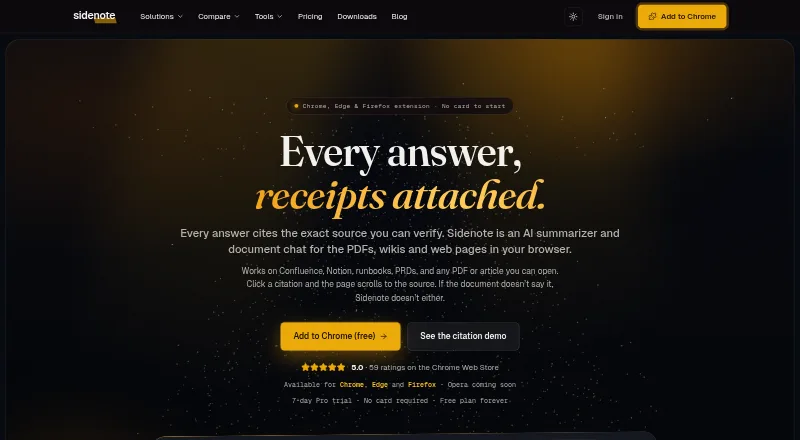
Sidenote is an AI reading assistant and document summarizer available through a Chrome extension and web dashboard. It is designed for students, researchers, analysts, legal teams, consultants and organizations working with internal documentation. The product summarizes webpages, PDFs, Word documents, PowerPoint files, research papers, wikis and connected documents, then attaches citations to source passages. Users can also chat with documents, generate glossaries, explain selected text, search semantically and create multi-document collections.
The free plan provides 3 documents, 10 standard-length summaries, 10 explanations, 3 glossary builds and 10 chat turns per month. Pro costs £10 per month or £96 per year and adds TL;DR, Standard and Detailed summaries, cited chat, collections, OCR for scanned PDFs, and Word and PowerPoint support. Pro+ costs £20 monthly and adds Claude Opus for chat, multi-document collections and Confluence space indexing. Pro Max costs £100 monthly for Opus chat at power-user volume. Team costs £18 per seat monthly or £14.40 per seat monthly when billed annually, with shared collections, centralized billing and SAML SSO with domain auto-join. A 7-day free trial is also available.
Sidenote fits teams that need source-linked answers across browser content, files and connected workspaces. Its integrations include Confluence, Notion, SharePoint, OneDrive, Google Docs, Gmail, Outlook, Google Drive and Slack canvases. Export options include Markdown, HTML, plain text and PDF, while shareable summary and chat links support distribution. Choose it if citations, document chat, OCR and cross-platform access matter; choose a lower-tier workflow if advanced collaboration, indexing or higher-volume Claude Opus access is unnecessary.
Your product? Our editors can test Sidenote in depth and publish a review, labelled as paid · from $149/mo →
Sidenote pricing
All 5 Sidenote plans and prices →
Sidenote fact sheet
| Free plan | Yes |
|---|---|
| Paid from | £96/yr |
| Document upload | Yes |
| Webpage summaries | Yes |
| Transcript summaries | Yes |
| Input limit | Not verified |
| Summary length control | Short |
| Export formats | Markdown |
| Free trial | 7 days · no card needed |
| Deployment | Cloud, Browser extension |
| Platforms | Web, Chrome extension |
| Compliance & security | GDPR, SSO/SAML |
| Support | Email, Docs |
| Built for | Solo, Small business, Mid-market, Enterprise (editorial estimate) |
| Integrations | 9 integrations: Confluence, Notion, SharePoint, OneDrive, Google Docs, Gmail … |
| Pricing | Free plan · 7-day trial (source) |
| Website | getsidenote.app |
| Facts checked | 20 Sep 2026 |
Sidenote integrations
Sidenote lists 9 integrations on its own site.
- Confluence
- Notion
- SharePoint
- OneDrive
- Google Docs
- Gmail
- Outlook
- Google Drive
- Slack canvases
Alternatives to Sidenote
- Kagi SummarizeA broad-input summarizer with flexible outputs, mobile access, integrations, and API support.9.2
- ScholarcyA research-focused summarizer that turns papers into structured, searchable flashcards.8.8
- Prepostseo Text SummarizerA flexible browser-based summarizer for shorter text and PDF inputs.7.9


See all Sidenote alternatives →
Sidenote vs the competition
- Sidenote vs Kagi Summarize
- Sidenote vs Scholarcy
- Sidenote vs Prepostseo Text Summarizer
- Sidenote vs smry
- Sidenote vs genei
- Sidenote vs SciSummary



Compare Sidenote with any tool side by side →
Used Sidenote? Be the first to review it
The editor score above is our own research. What this page doesn't have yet is a reader's view — what you used Sidenote for, what worked and what didn't. No stars are seeded and no review is paid for; an editor reads every one before it appears.
Write a reviewTwo minutes · verified accounts only · read by an editor before it appears
Featured on iTechGuides

Sidenote is listed in our AI Summarizers directory. Add the badge to your site — it links back to this page.
<a href="https://www.itechguides.com/products/sidenote/"><img src="https://www.itechguides.com/best/badge/sidenote.svg" alt="Featured on iTechGuides" width="230" height="46"></a>
Reviewed by iTechGuides Editors · Editorial team · Updated Oct 2026
Advertiser disclosure: iTechGuides is reader-supported. Vendors can pay for top positions in our rankings and for a place on other products' pages, and we may earn a commission when you click some links. Bought places stand at the number bought; this page and our disclosure say so. Paying vendors may get a fuller, more detailed review from our editors, and that review can change their score. How we rank.
Last updated · How we research and update