
Shotsnapp
Shotsnapp: A focused web tool for creating customizable device mockups and image exports. Ranked #23 of 24 in Mockup Generator Software by our editors (6.4/10); pricing: Free plan; best for simple device mockups with custom layouts.
At a glance
- Editor score6.4 / 10
- PricingFree plan
- Best forSimple device mockups with custom layouts
- Free planYes
- Scene typesmobile phones, tablets, laptops, browsers, displays, smart watches, app-store images, text and icons
- Facts checked20 Sep 2026
Where it wins
- Supports phones, tablets, laptops, browsers, displays, and watches
- Custom fonts, text objects, backgrounds, and canvas appearance
- Free plan includes templates, Unsplash photos, and PNG/JPEG export
Where it doesn't
- The workflow is web-based rather than available across listed platforms
- Basic limits each canvas to one object
- Exports are provided as PNG or JPEG images
Our verdict on Shotsnapp
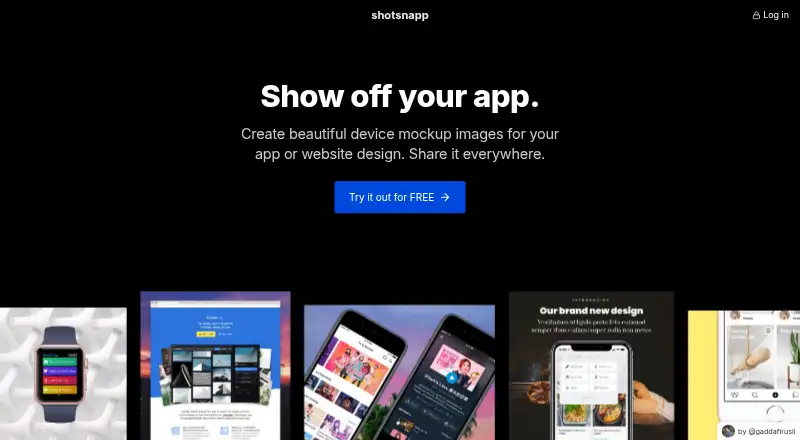
Shotsnapp is a web-based mockup generator for designers, marketers, managers, and teams presenting mobile app and website designs. It combines device templates with design-file and screenshot uploads, custom text and fonts, Unsplash backgrounds, pre-designed layouts, canvas appearance controls, and PNG or JPEG export. Its template range covers phones, tablets, laptops, browsers, displays, smart watches, app-store images, text, and icons, making it suited to portfolios, presentations, social media images, app-store screenshots, and documentation.
The free Basic plan provides one object per canvas, free templates, curated Unsplash photos, and PNG or JPEG export. The Pro plan is listed at $48 USD as a one-time payment with annual billing shown. It adds unlimited objects per canvas, including text; unlimited pre-designed templates; unlimited Unsplash photo search; more device model styles and variations; and the same PNG or JPEG export. This structure makes the free tier useful for simple single-object compositions, while Pro is aimed at users who need more layered layouts and broader template access.
Shotsnapp’s main strength is focused visual composition rather than a broad production workflow. Unsplash is the listed integration, and the browser-based format keeps the product centered on creating and exporting static mockup images. Choose it if you need straightforward device scenes with adjustable layouts and familiar image exports. Consider another tool if your process depends on formats beyond PNG or JPEG, batch generation, or a wider platform footprint. Shotsnapp is a practical fit for individual creators and small teams whose mockup needs are primarily static, design-led, and device-focused.
Your product? Our editors can test Shotsnapp in depth and publish a review, labelled as paid · from $149/mo →
Shotsnapp pricing
All 2 Shotsnapp plans and prices →
Shotsnapp fact sheet
| Free plan | Yes |
|---|---|
| Paid from | Not verified |
| Scene types | mobile phones, tablets, laptops, browsers, displays, smart watches, app-store images, text and icons |
| Max export width | Not verified |
| Template count | Not verified |
| Video mockups | Not verified |
| Transparent export | Not verified |
| Custom design uploads | Yes |
| Batch generation | Not verified |
| Deployment | Cloud |
| Platforms | Web |
| Support | |
| Built for | Solo, Small business (editorial estimate) |
| Integrations | 1 integrations: Unsplash |
| Pricing | Free plan (source) |
| Website | shotsnapp.com |
| Facts checked | 20 Sep 2026 |
Shotsnapp integrations
Shotsnapp lists 1 integrations on its own site.
- Unsplash
Alternatives to Shotsnapp
- Artboard StudioA broad browser mockup editor with AI generation, video output, and design plugins.9.4
- Mockuuups StudioA broad mockup toolkit with automation, editing, and design-tool integrations.9.2
- SudoMockFlexible mockup rendering for teams automating catalogs, storefronts, and creative workflows.9.1



See all Shotsnapp alternatives →
Used Shotsnapp? Be the first to review it
The editor score above is our own research. What this page doesn't have yet is a reader's view — what you used Shotsnapp for, what worked and what didn't. No stars are seeded and no review is paid for; an editor reads every one before it appears.
Write a reviewTwo minutes · verified accounts only · read by an editor before it appears
Featured on iTechGuides

Shotsnapp is listed in our Mockup Generator Software directory. Add the badge to your site — it links back to this page.
<a href="https://www.itechguides.com/products/shotsnapp/"><img src="https://www.itechguides.com/best/badge/shotsnapp.svg" alt="Featured on iTechGuides" width="230" height="46"></a>
Reviewed by iTechGuides Editors · Editorial team · Updated Oct 2026
Advertiser disclosure: iTechGuides is reader-supported. Vendors can pay for top positions in our rankings and for a place on other products' pages, and we may earn a commission when you click some links. Bought places stand at the number bought; this page and our disclosure say so. Paying vendors may get a fuller, more detailed review from our editors, and that review can change their score. How we rank.
Last updated · How we research and update