
Artboard Studio
Artboard Studio: A broad mockup library with AI creation, video output, plugins, and team tools. Ranked #3 of 31 in AI Mockup Generators by our editors (9.1/10); pricing: Free plan; best for teams wanting a broad mockup library.
At a glance
- Editor score9.1 / 10
- PricingFree plan
- Best forTeams wanting a broad mockup library
- Free planYes
- Paid from$9/mo
- Design uploadYes
- Facts checked20 Sep 2026
Where it wins
- 5,000+ mockups across device, apparel, packaging, print, and branding
- AI generation, scene enhancement, and image or video mockups
- Figma and Adobe Express plugins with broad export support
Where it doesn't
- Free access limits items, exports, and uploads
- Some paid plan names and benefits vary across published plan pages
- The browser-based editor may not suit teams seeking a desktop app
Our verdict on Artboard Studio
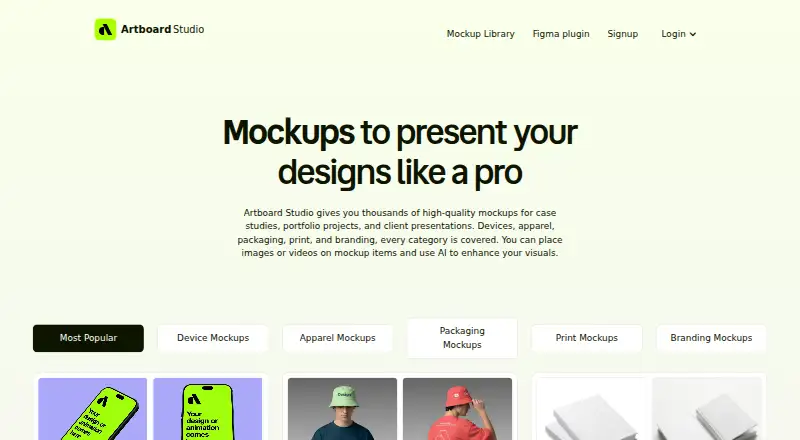
Artboard Studio is a browser-based mockup editor for designers, agencies, and creative teams. Its library covers device, apparel, packaging, print, branding, and out-of-home mockups, while the editor supports image and video uploads, scene customization, AI mockup generation from text prompts, and AI enhancement for backgrounds, lighting, and scenes. It is aimed at teams that need varied presentation visuals without restricting work to one mockup category.
The published plans range from a Free tier with limited free items, exports, and uploads to paid options billed annually. Lite is listed at $9 per month, Pro at $19 per month with unlimited image and video exports, and Premium at $9 per month with all mockup items, unlimited exports and uploads, high-resolution exports, plugins, and team management. One-time options include Lifetime Mockup at $129 and Mockup Forever at $129; Mockup Forever includes all mockups forever, unlimited exports and uploads, plugins, and high-resolution exports. The plan lineup gives teams both recurring and one-time payment paths, although the published plan names differ between listings.
Workflow fit is a clear focus. Artboard Studio runs online, supports PNG, JPEG, WEBP, MP4, and WEBM exports, and connects with Figma and Adobe Express through plugins. Team administration and seat-based billing support shared creative operations, while the AI tools add prompt-based creation and scene enhancement to the template library. Choose it if your team values breadth, browser access, video mockups, and integration with these design tools. Consider an alternative if you need a desktop application or a narrower workflow built around a different ecosystem.
Your product? Our editors can test Artboard Studio in depth and publish a review, labelled as paid · from $149/mo →
Artboard Studio pricing
All 6 Artboard Studio plans and prices →
Artboard Studio fact sheet
| Free plan | Yes |
|---|---|
| Paid from | $9/mo |
| Design upload | Yes |
| Mockup types | device, apparel, packaging, print, branding, out-of-home |
| AI creation mode | Prompt |
| Monthly AI credits | Not verified |
| Commercial use | Yes |
| Export formats | PNG, JPEG, WEBP, MP4, WEBM |
| Money-back guarantee | 14 days |
| Deployment | Cloud, Browser extension |
| Platforms | Web |
| Support | Email, Live chat |
| Built for | Solo, Small business, Mid-market (editorial estimate) |
| Integrations | 2 integrations: Figma, Adobe Express |
| Pricing | Free plan (source) |
| Website | artboard.studio |
| Facts checked | 20 Sep 2026 |
Artboard Studio integrations
Artboard Studio lists 2 integrations on its own site.
- Figma
- Adobe Express
Alternatives to Artboard Studio
- Custom Mockup GeneratorA practical choice for sellers who need repeatable AI mockup and listing-image flows.9.4
- Mockey AIA broad mockup toolkit for creators who need bulk, 3D, video, and AI visuals.9.2
- Mew Design AI Product Mockup MakerA flexible AI mockup tool with chat revisions, broad scene coverage, and credit-based plans.9.0



See all Artboard Studio alternatives →
Artboard Studio vs the competition
- Artboard Studio vs Custom Mockup Generator
- Artboard Studio vs Mockey AI
- Artboard Studio vs Mew Design AI Product Mockup Maker
- Artboard Studio vs Dynamic Mockups
- Artboard Studio vs Keter Labs
- Artboard Studio vs MockupHive


Compare Artboard Studio with any tool side by side →
Also Ranked In
Artboard Studio is ranked in 3 of our directories.
Used Artboard Studio? Be the first to review it
The editor score above is our own research. What this page doesn't have yet is a reader's view — what you used Artboard Studio for, what worked and what didn't. No stars are seeded and no review is paid for; an editor reads every one before it appears.
Write a reviewTwo minutes · verified accounts only · read by an editor before it appears
Featured on iTechGuides

Artboard Studio is listed in our AI Mockup Generators directory. Add the badge to your site — it links back to this page.
<a href="https://www.itechguides.com/products/artboard-studio/"><img src="https://www.itechguides.com/best/badge/artboard-studio.svg" alt="Featured on iTechGuides" width="230" height="46"></a>
Reviewed by iTechGuides Editors · Editorial team · Updated Oct 2026
Advertiser disclosure: iTechGuides is reader-supported. Vendors can pay for top positions in our rankings and for a place on other products' pages, and we may earn a commission when you click some links. Bought places stand at the number bought; this page and our disclosure say so. Paying vendors may get a fuller, more detailed review from our editors, and that review can change their score. How we rank.
Last updated · How we research and update