
ShotPut Pro
ShotPut Pro: A focused choice for verified card and drive offloads across Windows and macOS. Ranked #21 of 25 in Photo Backup Software by our editors (6.8/10); pricing: 30-day trial; best for established photo and video offload workflows.
At a glance
- Editor score6.8 / 10
- Pricing30-day trial
- Best forEstablished photo and video offload workflows
- Free planNo
- Paid from$59/device/yr
- Version historyNone
- Founded1991 · Indianapolis, Indiana, USA
- Facts checked20 Sep 2026
Where it wins
- Checksum verification helps validate media transfers.
- Presets, queues, pause/resume, and ejection automate offloads.
- PDF, CSV, TXT reports plus job history support documentation.
Where it doesn't
- No free plan; licensing starts at $60 for 30 days.
- Storage is bring-your-own rather than included.
- No version history is listed in the category specifications.
Our verdict on ShotPut Pro
ShotPut Pro is desktop media offload software for film, video, and photography professionals who need to copy files from cards, drives, and other sources to one or more destinations. It runs on Windows and macOS and focuses on verified transfers rather than serving as a cloud photo-library backup service. Checksum algorithms, duplicate detection, file-extension filtering, and ASC MHL sealing support a controlled workflow for media handling.
Its strongest fit is an established offload process that benefits from repeatable settings and documentation. Destination, naming, verification, and report presets can standardize recurring jobs, while queue automation, pause and resume, and automatic source ejection help organize multi-step transfers. PDF, CSV, and TXT reports, job history, aggregate reports, and email, SMS, and push notifications extend the workflow beyond copying files. These features make ShotPut Pro a practical choice for teams and individuals who need records of media movement and verification.
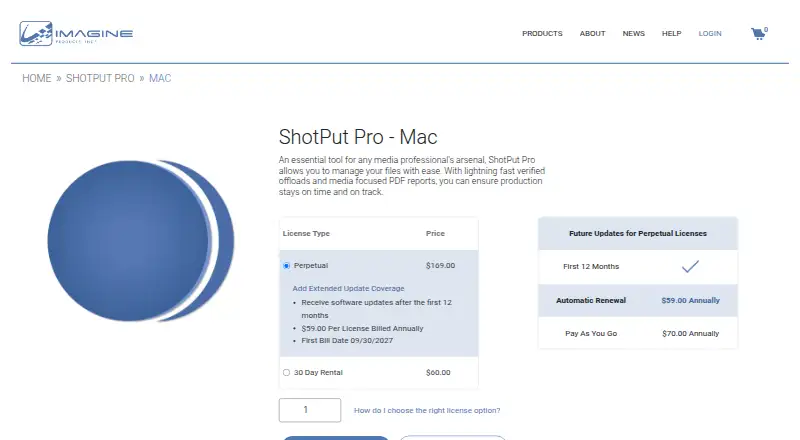
The licensing options suit different durations but require paid access. The 30 Day Rental costs $60 per 30 days, while the Perpetual plan costs $169 per license and includes a lifetime license with 12 months of included updates. Extended Update Coverage costs $59 per license per year after the first 12 months, and Pay As You Go costs $70 per license per year with annual update coverage. The software uses bring-your-own storage and has no version history. Choose ShotPut Pro when verified desktop offloads and reporting are central; choose another category of tool if you want a cloud library or included storage.
Your product? Our editors can test ShotPut Pro in depth and publish a review, labelled as paid · from $149/mo →
ShotPut Pro pricing
All 4 ShotPut Pro plans and prices →
ShotPut Pro fact sheet
| Free plan | No |
|---|---|
| Paid from | $59/device/yr |
| Mobile photo backup | Not verified |
| External drive backup | Yes |
| NAS backup | Not verified |
| RAW photo support | Yes |
| Version history | None |
| Storage model | Bring_your_own |
| Included storage | Not verified |
| Free trial | 30 days |
| Deployment | Desktop |
| Platforms | Windows, macOS |
| Support | Tickets, Docs |
| Built for | Small business, Mid-market, Enterprise (editorial estimate) |
| Pricing | 30-day trial (source) |
| Website | imagineproducts.com |
| Facts checked | 20 Sep 2026 |
Alternatives to ShotPut Pro
- PhotoSyncA flexible photo backup tool for users who want control over destinations and protocols.9.3
- SyncDropA flexible cross-platform backup tool for users who bring their own storage.9.2
- ImmichA feature-rich self-hosted library for backing up, organizing, and sharing personal media.9.0



See all ShotPut Pro alternatives →
Used ShotPut Pro? Be the first to review it
The editor score above is our own research. What this page doesn't have yet is a reader's view — what you used ShotPut Pro for, what worked and what didn't. No stars are seeded and no review is paid for; an editor reads every one before it appears.
Write a reviewTwo minutes · verified accounts only · read by an editor before it appears
Featured on iTechGuides

ShotPut Pro is listed in our Photo Backup Software directory. Add the badge to your site — it links back to this page.
<a href="https://www.itechguides.com/products/shotput-pro/"><img src="https://www.itechguides.com/best/badge/shotput-pro.svg" alt="Featured on iTechGuides" width="230" height="46"></a>
Reviewed by iTechGuides Editors · Editorial team · Updated Oct 2026
Advertiser disclosure: iTechGuides is reader-supported. Vendors can pay for top positions in our rankings and for a place on other products' pages, and we may earn a commission when you click some links. Bought places stand at the number bought; this page and our disclosure say so. Paying vendors may get a fuller, more detailed review from our editors, and that review can change their score. How we rank.
Last updated · How we research and update