
PhotoSync
PhotoSync: A flexible photo backup tool for users who want control over destinations and protocols. Ranked #1 of 25 in Photo Backup Software by our editors (9.3/10); pricing: Free plan; best for broad device and cloud-service compatibility.
At a glance
- Editor score9.3 / 10
- PricingFree plan
- Best forBroad device and cloud-service compatibility
- Free planYes
- Facts checked20 Sep 2026
Where it wins
- Supports Windows, macOS, Linux, iOS, and Android
- Backs up to NAS, personal cloud, remote servers, and wireless drives
- Handles RAW files, camera transfers, and multiple storage protocols
Where it doesn't
- Free transfers are limited to lower-quality photos and videos
- Automatic background backup is available with Premium
- Client-side encryption applies only to supported destinations
Our verdict on PhotoSync
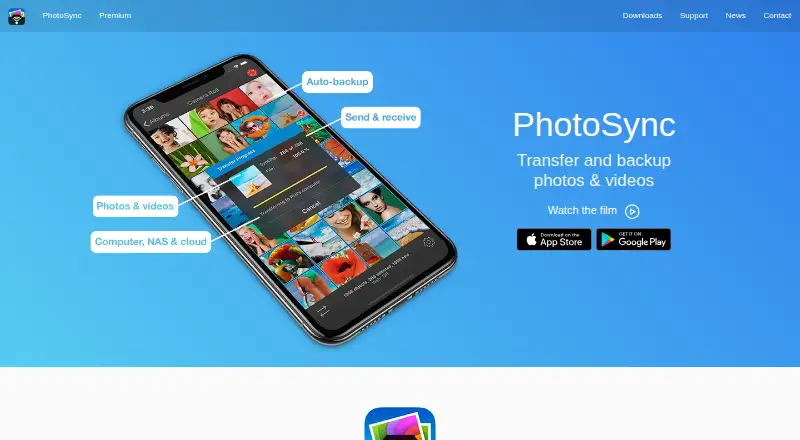
PhotoSync is a cross-platform photo transfer and backup tool for consumers and photographers who want to move photos and videos between mobile devices, computers, cameras, personal storage, and cloud services. It supports Windows, macOS, Linux, iOS, and Android, with automatic mobile backup, local Wi-Fi transfers, USB and Wi-Fi camera connections, and RAW photo transfer and viewing. Its bring-your-own-storage approach suits people who prefer NAS devices, external drives, personal cloud services, or remote servers over relying on one managed photo library.
The plan structure starts with Free, which includes no ads, limited-quality photo and video transfers, and future compatibility updates and bug fixes. PhotoSync Pro adds a lifetime purchase option, unlimited full-quality transfers, RAW and HEIC support, and family sharing. PhotoSync Premium includes unlimited full-quality transfers, RAW and HEIC support, automatic background backup, and premium features; Premium listings also include a lifetime purchase option. This makes the free tier useful for basic transfers, while Pro and Premium address full-quality archiving and more automated workflows.
PhotoSync’s main strength is destination and ecosystem breadth. It transfers to Windows, Mac, and Linux over local Wi-Fi and supports NAS, personal cloud, remote servers, wireless drives, and services including Dropbox, Google Photos, Google Drive, Amazon S3, OneDrive, Box, Backblaze, Wasabi, Flickr, SmugMug, and PhotoPrism. SMB, FTP, SFTP, and WebDAV support adds flexibility, while client-side encryption is available for supported NAS and file-based cloud services. Choose PhotoSync if you need wide device coverage and control over storage destinations. Users seeking a narrowly focused, fully managed cloud photo library may prefer a simpler approach.
Your product? Our editors can test PhotoSync in depth and publish a review, labelled as paid · from $149/mo →
PhotoSync pricing
All 4 PhotoSync plans and prices →
PhotoSync fact sheet
| Free plan | Yes |
|---|---|
| Paid from | Not verified |
| Mobile photo backup | Yes |
| External drive backup | Yes |
| NAS backup | Yes |
| RAW photo support | Yes |
| Version history | Not verified |
| Storage model | Bring_your_own |
| Included storage | Not verified |
| Deployment | Cloud, Desktop, Mobile |
| Platforms | Windows, macOS, Linux, iOS, Android |
| Compliance & security | GDPR |
| Support | Email, Docs |
| Built for | Solo, Small business (editorial estimate) |
| Integrations | 20 integrations: Dropbox, Google Photos, Google Drive, Amazon S3, Flickr, SmugMug … |
| Pricing | Free plan (source) |
| Website | photosync-app.com |
| Facts checked | 20 Sep 2026 |
PhotoSync integrations
PhotoSync lists 20 integrations on its own site.
- Dropbox
- Google Photos
- Google Drive
- Amazon S3
- Flickr
- SmugMug
- OneDrive
- Box
- Backblaze
- Wasabi
- Zenfolio
- PhotoPrism
- pCloud
- InfiniCLOUD
- SugarSync
- SMB
- FTP
- SFTP
- WebDAV
- Synology
Alternatives to PhotoSync
- SyncDropA flexible cross-platform backup tool for users who bring their own storage.9.2
- ImmichA feature-rich self-hosted library for backing up, organizing, and sharing personal media.9.0
- IDriveA low-cost, broad backup service for photo protection plus full-device recovery.8.7



See all PhotoSync alternatives →
PhotoSync vs the competition
- PhotoSync vs SyncDrop
- PhotoSync vs Immich
- PhotoSync vs IDrive
- PhotoSync vs Pho
- PhotoSync vs Recallio
- PhotoSync vs PhoneCopy


Compare PhotoSync with any tool side by side →
Used PhotoSync? Be the first to review it
The editor score above is our own research. What this page doesn't have yet is a reader's view — what you used PhotoSync for, what worked and what didn't. No stars are seeded and no review is paid for; an editor reads every one before it appears.
Write a reviewTwo minutes · verified accounts only · read by an editor before it appears
Featured on iTechGuides

PhotoSync is listed in our Photo Backup Software directory. Add the badge to your site — it links back to this page.
<a href="https://www.itechguides.com/products/photosync/"><img src="https://www.itechguides.com/best/badge/photosync.svg" alt="Featured on iTechGuides" width="230" height="46"></a>
Reviewed by iTechGuides Editors · Editorial team · Updated Oct 2026
Advertiser disclosure: iTechGuides is reader-supported. Vendors can pay for top positions in our rankings and for a place on other products' pages, and we may earn a commission when you click some links. Bought places stand at the number bought; this page and our disclosure say so. Paying vendors may get a fuller, more detailed review from our editors, and that review can change their score. How we rank.
Last updated · How we research and update